







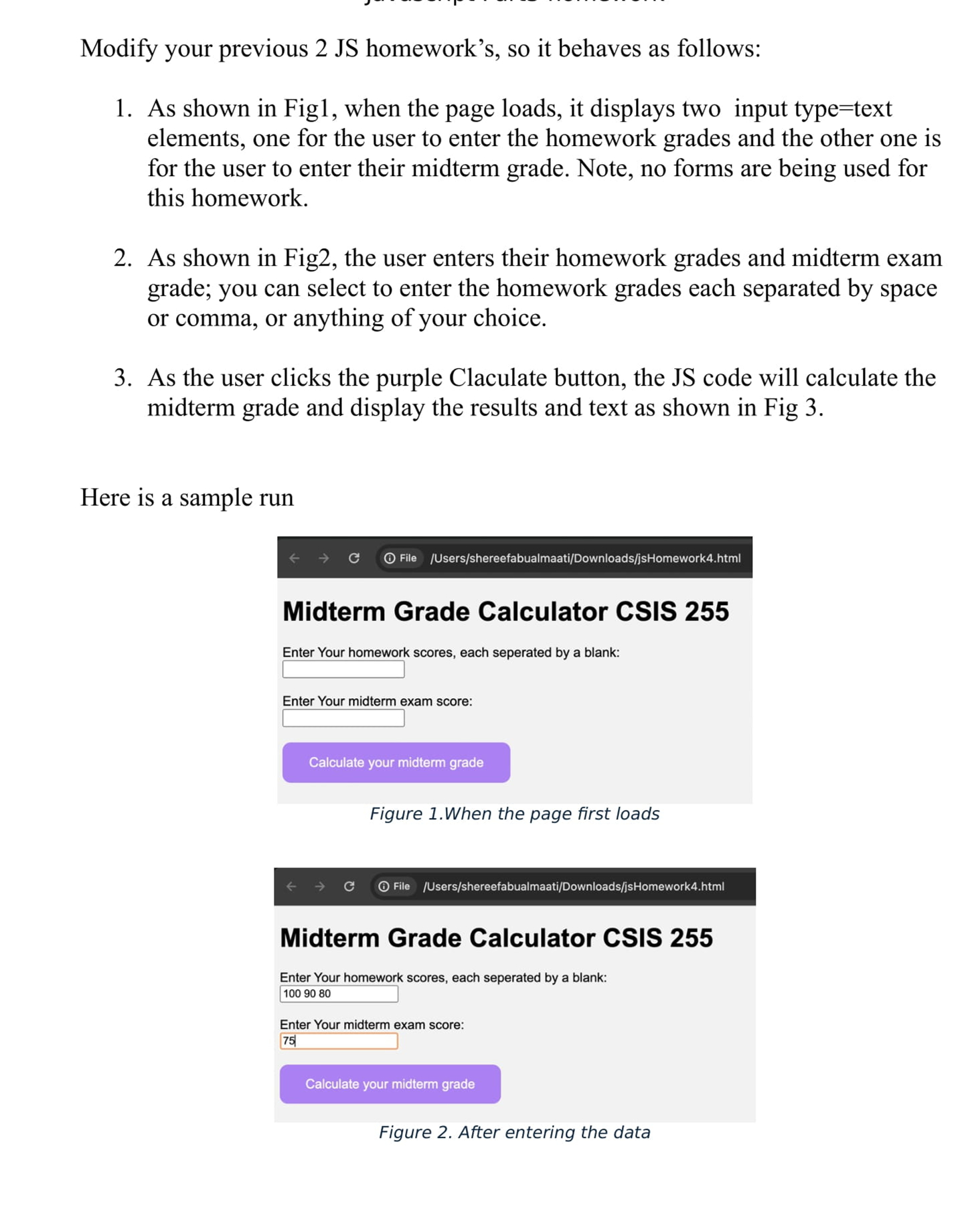
Question: Modify your previous 2 JS homework s , so it behaves as follows: 1 . As shown in Fig 1 , when the page loads,
Modify your previous JS homeworks so it behaves as follows:
As shown in Fig when the page loads, it displays two input typetext elements, one for the user to enter the homework grades and the other one is for the user to enter their midterm grade. Note, no forms are being used for this homework.
As shown in Fig the user enters their homework grades and midterm exam grade; you can select to enter the homework grades each separated by space or comma, or anything of your choice.
As the user clicks the purple Calculate button, the JS code will calculate the midterm grade and display the results and text as shown in Fig
Modify your previous JS homework's, so it behaves as follows:
As shown in Fig when the page loads, it displays two input typetext
elements, one for the user to enter the homework grades and the other one is
for the user to enter their midterm grade. Note, no forms are being used for
this homework.
As shown in Fig the user enters their homework grades and midterm exam
grade; you can select to enter the homework grades each separated by space
or comma, or anything of your choice.
As the user clicks the purple Claculate button, the JS code will calculate the
midterm grade and display the results and text as shown in Fig
Here is a sample run
Figure When the page first loads
Midterm Grade Calculator CSIS
Enter Your homework scores, each seperated by a blank:
Enter Your midterm exam score:
Figure After entering the data For this assignment you will upload zipped file consisting of files:
Your html file with just html
Your javascript file,
Step by Step Solution
There are 3 Steps involved in it
1 Expert Approved Answer
Step: 1 Unlock

Question Has Been Solved by an Expert!
Get step-by-step solutions from verified subject matter experts
Step: 2 Unlock
Step: 3 Unlock
 Study Help