







Question: Module 0 4 Course Project - Effective Permissions. Ver. 2 . 1 . 2 Backiground: ACME Kitchens Compary is a relatively small compary engaged in
Module Course Project Effective
Permissions. Ver.
Backiground:
ACME Kitchens Compary is a relatively small compary engaged in producing and selling kitchen cabinets. The
compary's main office and distribution center is logted in Miami. ACME employs approximately people:
office personnel and sales, and about warehouse workers and managers. There are computers in the
Warehouse. The compary currently has Windows server used to store all compary data, including
customers' information and credit card processing records. The compary has installed Active Directory and
added Domain Controllers. There are about Windows desktop and laptop computers used by office
personal, sales staff and manazers. Some of the sales people and other employees are also able to connect to
the compary server remotely working from home. All employees re allowed to access the Internet arytime
from ary workstation. There are network connected printers throughout the facility.
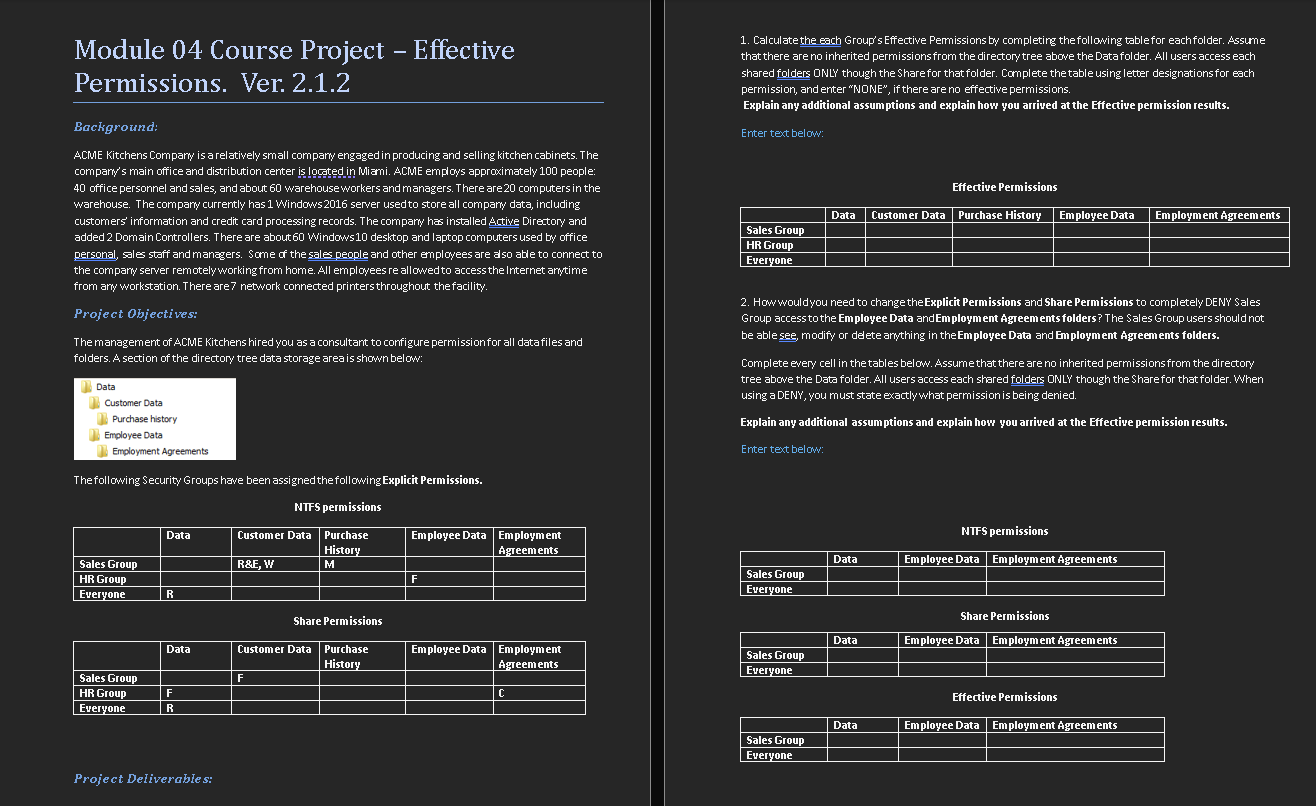
The management of ACME Kitchens hired you as a consultant to configure permission for all data files and folders. A section of the directory tree data storage area is shown below:The management of ACME Kitchens hired you as a consultant to configure permission for all data files and folders. A section of the directory tree data storage area is shown below:
NTFS permissions
Data Customer Data Purchase History Employee Data Employment Agreements
Sales Group R&E W M
HR Group F
Everyone R
Share Permissions
Data Customer Data Purchase History Employee Data Employment Agreements
Sales Group F
HR Group F C
Everyone RNTFS permissions
Data Customer Data Purchase History Employee Data Employment Agreements
Sales Group R&E W M
HR Group F
Everyone R
Project Deliverables:
Calculate each Groups Effective Permissions by completing the following table for each folder. Assume no inherited permissions exist from the directory tree above the Data folder. All users access each shared folder ONLY through the Share for that folder. Complete the table using letter designations for each permission, and enter NONE if there are no effective permissions.
Explain any additional assumptions and how you arrived at the Effective permission results.
Effective Permissions
Data Customer Data Purchase History Employee Data Employment Agreements
Sales Group R
HR Group
Everyone
How would you need to change the Explicit Permissions and Share Permissions to completely DENY Sales Group access to the Employee Data and Employment Agreements folders? The Sales Group users should not be able to see, modify, or delete anything in these folders.
Complete every cell in the tables below. Assume no inherited permissions exist from the directory tree above the Data folder. All users access each shared folder ONLY through the Share for that folder. When using a DENY, you must state strictly what permission is being denied.
Explain any additional assumptions and how you arrived at the Effective permission results.
Enter the text below:
NTFS permissions
Data Employee Data Employment Agreements
Sales Group
Everyone
Share Permissions
Data Employee Data Employment Agreements
Sales Group
Everyone
Effective Permissions
Data Employee Data Employment Agreements
Sales Group
Everyone
Step by Step Solution
There are 3 Steps involved in it
1 Expert Approved Answer
Step: 1 Unlock

Question Has Been Solved by an Expert!
Get step-by-step solutions from verified subject matter experts
Step: 2 Unlock
Step: 3 Unlock
 Study Help