







Question: Module 7: Dample: (ENG 101-03 X You Will Submit One Excel Worklx module 7 assignment 2.0.pdf X c Get Homework Help With Chego X +
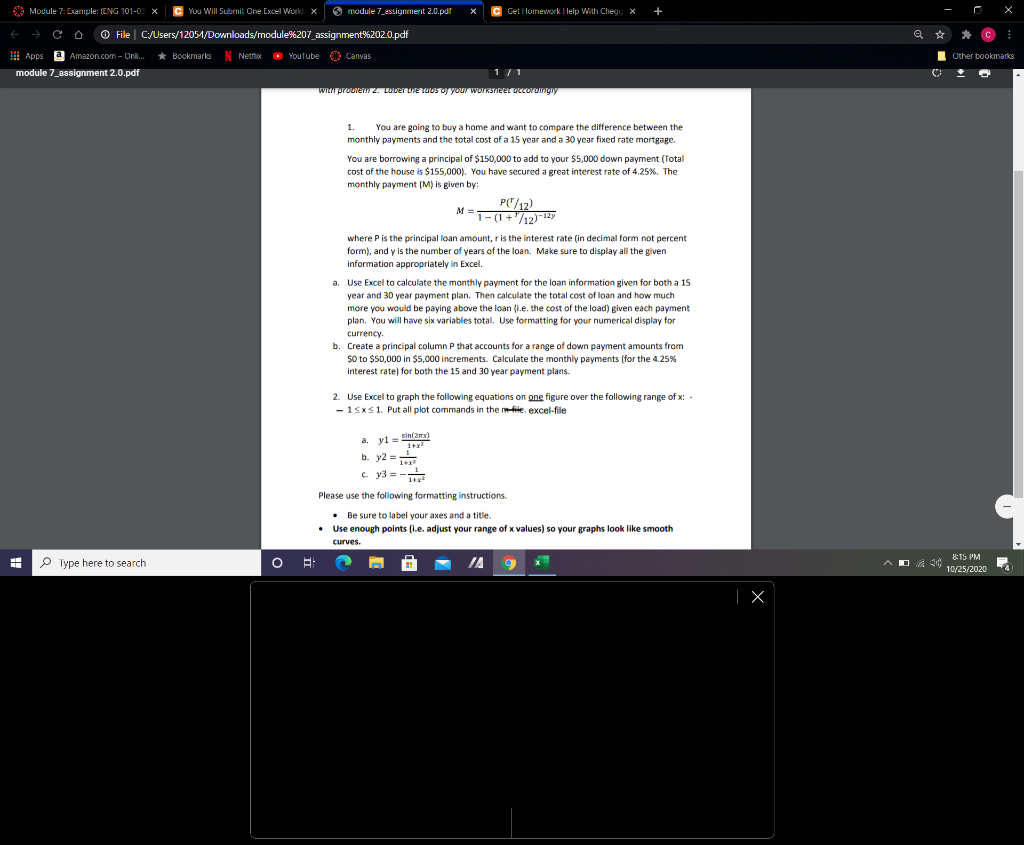
Module 7: Dample: (ENG 101-03 X You Will Submit One Excel Worklx module 7 assignment 2.0.pdf X c Get Homework Help With Chego X + @ # C O File C:/Users/12051/Downloads/module%207_assignment%2020.pdf !!! Apps a Amazon.com - Onli.... * Bookmarks | Netflix YouTube Canvas module 7_assignment 2.0.pdf 171 WIM prostem z. Lower ELUSU your WORSTULOVOM Other bookmarks 1. You are going to buy a home and want to compare the difference between the monthly payments and the total cost of a 15 year and a 30 year fixed rate mortgage. You are borrowing a principal of $150,000 to add to your $5,000 down payment (Total cost of the house is $155,000). You have secured a great interest rate of 4.25%. The monthly payment (M) is given by: P('/12) M=1-(1+" /12)-*** where P is the principal loan amount, r is the interest rate (in decimal form not percent form), and y is the number of years of the loan. Make sure to display all the given Information appropriately in Excel. a. Use Excel to calculate the monthly payment for the loan information given for both a 15 year and 30 year payment plan. Then calculate the total cost of loan and how much more you would be paying above the loan (i.e. the cost of the load) given each payment plan. You will have six variables total. Use formatting for your numerical display for currency b. Create a principal column P that accounts for a range of down payment amounts from $0 to $50,000 in $5,000 increments. Calculate the monthly payments (for the 4.25% interest rate) for both the 15 and 30 year payment plans. 2. Use Excel to graph the following equations on one figure over the following range of X: - - 15x31. Put all plot commands in the non-file, excel-file yl Sin (2x) ay1 1+x2 b. y2 = c. y3 = -1 1 Please use the following formatting instructions. Be sure to label your axes and a title Use enough points (i.e. adjust your range of x values) so your graphs look like smooth curves. OB Type here to search 8:15 PM 10/25/2020 | X Module 7: Dample: (ENG 101-03 X You Will Submit One Excel Worklx module 7 assignment 2.0.pdf X c Get Homework Help With Chego X + @ # C O File C:/Users/12051/Downloads/module%207_assignment%2020.pdf !!! Apps a Amazon.com - Onli.... * Bookmarks | Netflix YouTube Canvas module 7_assignment 2.0.pdf 171 WIM prostem z. Lower ELUSU your WORSTULOVOM Other bookmarks 1. You are going to buy a home and want to compare the difference between the monthly payments and the total cost of a 15 year and a 30 year fixed rate mortgage. You are borrowing a principal of $150,000 to add to your $5,000 down payment (Total cost of the house is $155,000). You have secured a great interest rate of 4.25%. The monthly payment (M) is given by: P('/12) M=1-(1+" /12)-*** where P is the principal loan amount, r is the interest rate (in decimal form not percent form), and y is the number of years of the loan. Make sure to display all the given Information appropriately in Excel. a. Use Excel to calculate the monthly payment for the loan information given for both a 15 year and 30 year payment plan. Then calculate the total cost of loan and how much more you would be paying above the loan (i.e. the cost of the load) given each payment plan. You will have six variables total. Use formatting for your numerical display for currency b. Create a principal column P that accounts for a range of down payment amounts from $0 to $50,000 in $5,000 increments. Calculate the monthly payments (for the 4.25% interest rate) for both the 15 and 30 year payment plans. 2. Use Excel to graph the following equations on one figure over the following range of X: - - 15x31. Put all plot commands in the non-file, excel-file yl Sin (2x) ay1 1+x2 b. y2 = c. y3 = -1 1 Please use the following formatting instructions. Be sure to label your axes and a title Use enough points (i.e. adjust your range of x values) so your graphs look like smooth curves. OB Type here to search 8:15 PM 10/25/2020 | X
Step by Step Solution
There are 3 Steps involved in it

Get step-by-step solutions from verified subject matter experts
 Study Help