







Question: Module 7 Excel Spreadsheet Instructions Below you will see three sets of inputs. After inputting all of your formulas, you should be able to use
Module Excel Spreadsheet Instructions
Below you will see three sets of inputs. After inputting all of your formulas, you should be able to use any of these sets of data and have the answers automatically update.
For this assignment, please choose one of the data sets above and input all of the necessary formulas to find the answers. Once you are done, choose a different data set, enter it into your spreadsheet, and check the updated answers to ensure that everything is flowing through the formulas appropriately. A check answer for each one has been provided.
Provide formulas please.Sales Budget
Cash Budget
Cash balance, beginning
Collections from customers:
From April sales
From May sales
From June sales
From July sales
From August sales
Total cash available
Cash disbursements:
Merchandise
Variable expenses
Fixed expenses
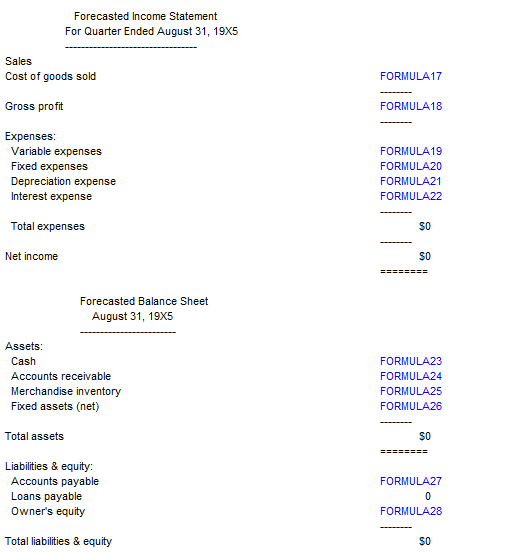
Interest paidForecasted Income Statement
For Quarter Ended August X
Sales
Cost of goods sold
FORMULA
Gross profit
FORMULA
Expenses:
Variable expenses
Fixed expenses
Depreciation expense
Interest expense
Total expenses
FORMULA
FORMULA
FORMULA
FORIMULA
Net income
$
zzzz
Forecasted Balance Sheet
August X
Assets:
Cash
FORMULA
Accounts receivable
FORMULA
Merchandise inventory
FORMULA
Fixed assets net
FORMULA
Total assets
Liabilities & equity:
Accounts payable
FORMULA
Loans payable
Owner's equity
FORMULA
Total liabilities & equity
Step by Step Solution
There are 3 Steps involved in it
1 Expert Approved Answer
Step: 1 Unlock

Question Has Been Solved by an Expert!
Get step-by-step solutions from verified subject matter experts
Step: 2 Unlock
Step: 3 Unlock
 Study Help