







Question: --------------------------------- Movie.java public class Movie { private String title; private String company; private String actor; private String rating; private int year; private double taking; /**
---------------------------------
Movie.java
public class Movie { private String title; private String company; private String actor; private String rating; private int year; private double taking; /** * @param title * @param company * @param actor * @param rating * @param year * @param taking */ public Movie(String title, String company, String actor, String rating, int year, double taking) { this.title = title; this.company = company; this.actor = actor; this.rating = rating; this.year = year; this.taking = taking; } /** * @return the title */ public String getTitle() { return title; } /** * @return the company */ public String getCompany() { return company; } /** * @return the actor */ public String getActor() { return actor; } /** * @return the rating */ public String getRating() { return rating; } /** * @return the year */ public int getYear() { return year; } /** * @return the taking */ public double getTaking() { return taking; } }
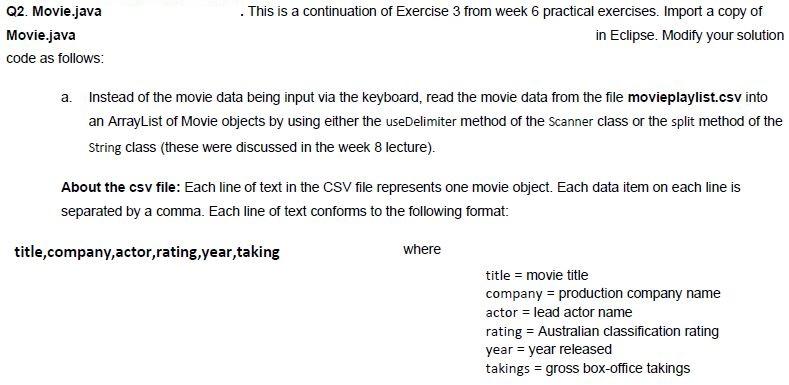
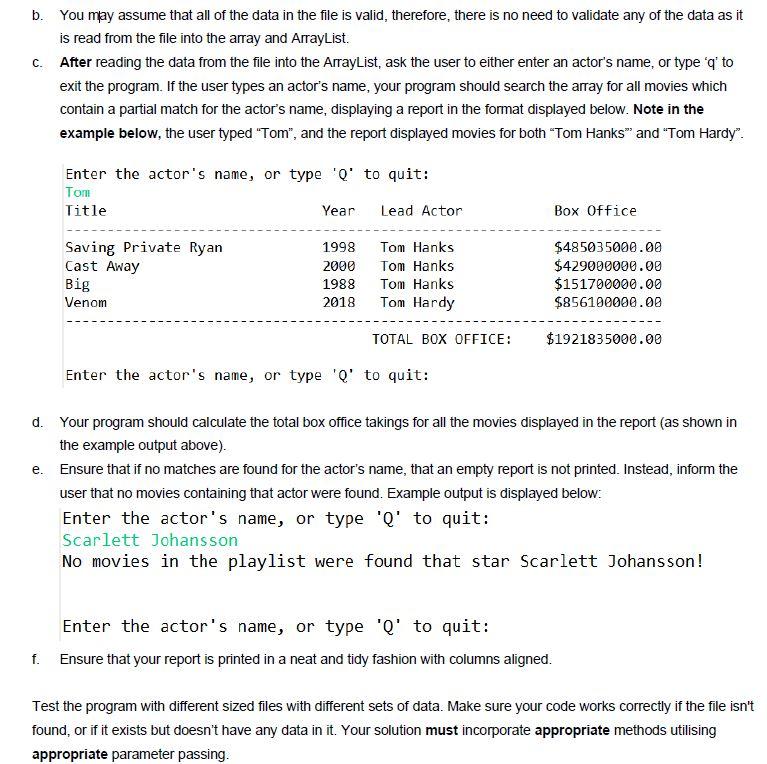
Q2. Movie.java Movie.java code as follows: . This is a continuation of Exercise 3 from week 6 practical exercises. Import a copy of in Eclipse. Modify your solution a. Instead of the movie data being input via the keyboard, read the movie data from the file movieplaylist.csv into an ArrayList of Movie objects by using either the useDelimiter method of the Scanner class or the split method of the String class (these were discussed in the week 8 lecture). About the csv file: Each line of text in the CSV file represents one movie object. Each data item on each line is separated by a comma. Each line of text conforms to the following format: title,company,actor,rating, year, taking where title = movie title company = production company name actor = lead actor name rating = Australian classification rating year = year released takings = gross box-office takings b. You may assume that all of the data in the file is valid, therefore, there is no need to validate any of the data as it is read from the file into the array and ArrayList. C. After reading the data from the file into the ArrayList, ask the user to either enter an actor's name, or type 'q' to exit the program. If the user types an actor's name, your program should search the array for all movies which contain a partial match for the actor's name, displaying a report in the format displayed below. Note in the example below, the user typed "Tom", and the report displayed movies for both "Tom Hanks" and "Tom Hardy". Enter the actor's name, or type 'Q' to quit: Tom Title Year Lead Actor Box Office Saving Private Ryan Cast Away Big Venom 1998 2000 1988 2018 Tom Hanks Tom Hanks Tom Hanks Tom Hardy $485035000.00 $429000000.00 $151700000.00 $856100000.00 TOTAL BOX OFFICE: $1921835000.00 Enter the actor's name, or type 'o' to quit: d. Your program should calculate the total box office takings for all the movies displayed in the report (as shown in the example output above). e. Ensure that if no matches are found for the actor's name, that an empty report is not printed. Instead, inform the user that no movies containing that actor were found. Example output is displayed below: Enter the actor's name, or type 'Q' to quit: Scarlett Johansson No movies in the playlist were found that star Scarlett Johansson! Enter the actor's name, or type 'Q' to quit: Ensure that your report is printed in a neat and tidy fashion with columns aligned. f. Test the program with different sized files with different sets of data. Make sure your code works correctly if the file isn't found, or if it exists but doesn't have any data in it. Your solution must incorporate appropriate methods utilising appropriate parameter passing
Step by Step Solution
There are 3 Steps involved in it

Get step-by-step solutions from verified subject matter experts
 Study Help