







Question: MS Excel Exercise : Weight In Space You will be constructing a spreadsheet that will calculate your current weight if you were standing on each
MS Excel Exercise : Weight In Space
You will be constructing a spreadsheet that will calculate your current weight if you were
standing on each of the planets including Pluto
Open a New Worksheet in Microsoft
Excel.
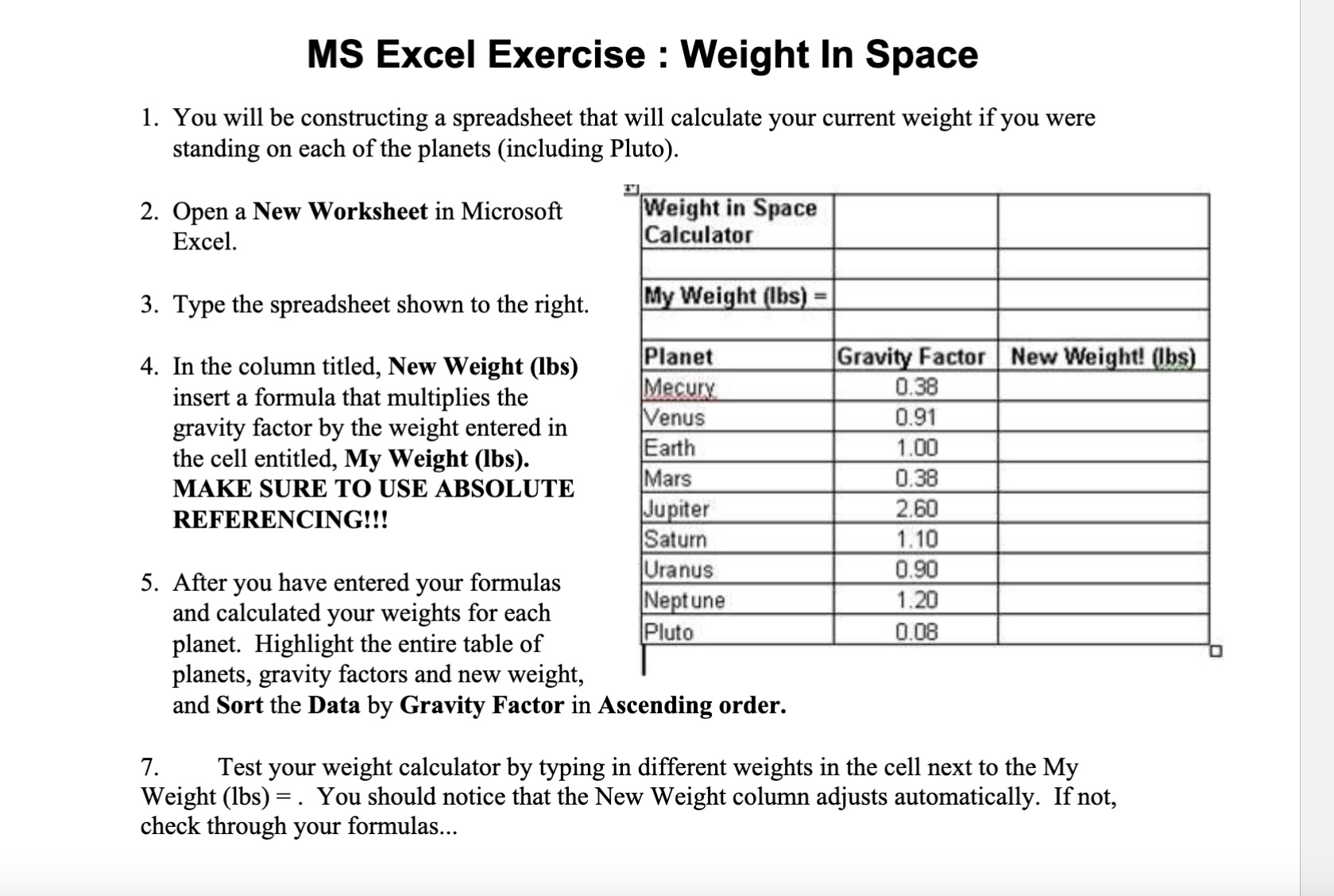
Type the spreadsheet shown to the right.
In the column titled, New Weight lbs
insert a formula that multiplies the
gravity factor by the weight entered in
the cell entitled, My Weight lbs
MAKE SURE TO USE ABSOLUTE
REFERENCING!!!
After you have entered your formulas
and calculated your weights for each
planet. Highlight the entire table of
planets, gravity factors and new weight,
and Sort the Data by Gravity Factor in Ascending order.
Test your weight calculator by typing in different weights in the cell next to the My
Weight You should notice that the New Weight column adjusts automatically. If not,
check through your formulas...
Step by Step Solution
There are 3 Steps involved in it
1 Expert Approved Answer
Step: 1 Unlock

Question Has Been Solved by an Expert!
Get step-by-step solutions from verified subject matter experts
Step: 2 Unlock
Step: 3 Unlock
 Study Help