







Question: mulpitle question, so please answer all just answer question 13 During initial computer power on and start up a number of events occur Below is
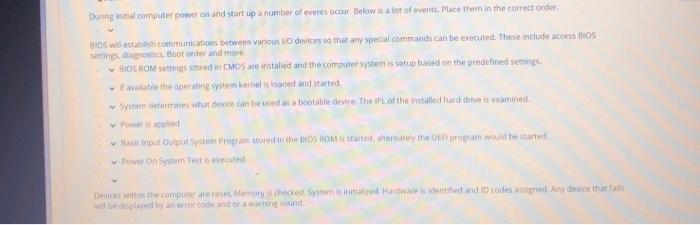


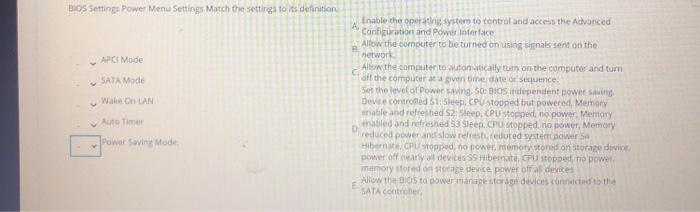
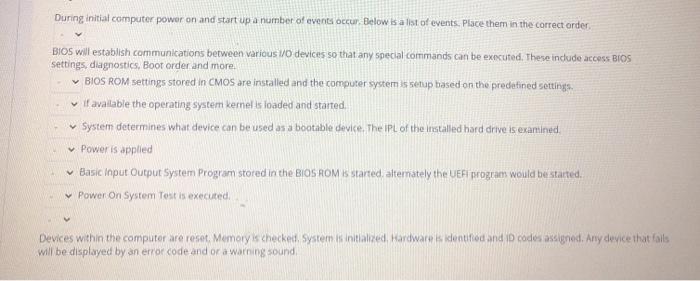
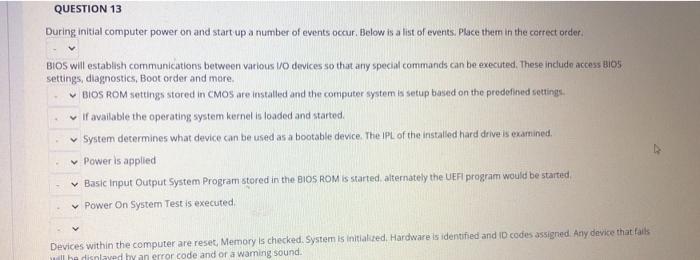
During initial computer power on and start up a number of events occur Below is a lot of events, Place them in the correct order, BIOS will estable communications between vanous to devices so that any special commands can be executed. These include access iOS Settings.postis, Boot onder and more BIOS ROM settings stored in CMOS are installed and the computer system is setup based on the predefined settings wil available the operating system kernel is loaded and started System determine what device can be used as a bootable device. The of the installed hard drives examined input Output System Program stored in the BIOSIOMIS State tematy na program would be startet Power on System is muted Cices within the computers are reset, Memory thacked inntartowstanited and codes assenet. Any device that is will be displayed by an error code and warning sound Match the following BIOS master menu settings and its definition Display System Information, sets date and time and saves or discards changes to setup program options. Determines Bos setup initially display screen and splashmien Displays Storage device information, configures and toss the 8. Storage Menu Tab storage device and select boot options 3. Power Menu Tab Set passwords and security settings for system devices and view c. Ple (Main screen menutab the system IDs for the computer D. Advanced Menu Tab Contiores power managementures E Security Menu The Confitures power on and bus options and device options such as the NUM lockey 5 HOS 5 Match the flowing Power Savin Sectings to their inition Se stopped and has no power, Memory reduced power and slow res reduced to power Hier Custopped and has no power, mary stored on store off devices SleebCPU stopped and line power Memory naband refresher power os independent power in Device controlled power management HCP stopped and has more on Morage owerhearly all Sleep Custopped but powered Memory enable and refreshed D BIOS Settings Power Menu Settings Match the settings to its definition APG Mode SATA Mode Wake on LAN Enable the operating system to control and access the Advanced Configuration and Power Interface Allow the computer to be turned on using signals sent on the network Allow the computer to automatically tum on the computer and tum off the computer at a given in de or sequence Set the level of power in SO: BIOS independent power saving Device controlled 51: Sleep CPU stopnied but powered Memory thable and refreshed S2: Sleep, CPU stopped, no power Memory enabled and refreshed 53 Sleep. CPU stopped, no power, Memory reduced power and slowest reduced syster Pers4 Hibernate, cu stopped, no power memory stored on storage device. power off any devices S5 Hibernate. CPU stopped, no power memory stored on storage device power off a devices Allow the 105 to power mange storage devices connected to the E SATA Control - Auto Timer Power Saving Mode During initial computer power on and start up a number of events occur Below is a list of events. Place them in the correct order BIOS will establish communications between various I/O devices so that any special commands can be executed. These indude access BIOS settings, diagnostics. Boor order and more. BIOS ROM settings stored in CMOs are installed and the computer system is setup based on the predefined settings It available the operating system kernels loaded and started. System determines what device can be used as a bootable device. The IPL of the installed hard drive is examined Power is applied Basic Input Output System Program stored in the BIOS ROM is started alternately the UEFI program would be started. Power On System Test is executed Devices within the computer are reset, Memory's checked. system is initialized, Hardware dentified and I codes assigned. Any device that falls will be displayed by an error code and or a warning sound QUESTION 13 During initial computer power on and start up a number of events occur. Below is a list of events. Place them in the correct order. BIOS will establish communications between various VO devices so that any special commands can be executed. These include access BIOS settings, diagnostics, Boot order and more BIOS ROM settings stored in CMOS are installed and the computer system is setup based on the prodefined settings If available the operating system kernel is loaded and started System determines what device can be used as a bootable device. The IPL of the installed hard drive is examined. Power is applied Basic Input Output System Program stored in the BIOS ROM is started alternately the UEFI program would be started Power On System Test is executed Devices within the computer are reset, Memory is checked. System is initialized Hardware is identified and I codes assigned. Any device that fails will be displayed by an error code and or a waming sound. During initial computer power on and start up a number of events occur Below is a lot of events, Place them in the correct order, BIOS will estable communications between vanous to devices so that any special commands can be executed. These include access iOS Settings.postis, Boot onder and more BIOS ROM settings stored in CMOS are installed and the computer system is setup based on the predefined settings wil available the operating system kernel is loaded and started System determine what device can be used as a bootable device. The of the installed hard drives examined input Output System Program stored in the BIOSIOMIS State tematy na program would be startet Power on System is muted Cices within the computers are reset, Memory thacked inntartowstanited and codes assenet. Any device that is will be displayed by an error code and warning sound Match the following BIOS master menu settings and its definition Display System Information, sets date and time and saves or discards changes to setup program options. Determines Bos setup initially display screen and splashmien Displays Storage device information, configures and toss the 8. Storage Menu Tab storage device and select boot options 3. Power Menu Tab Set passwords and security settings for system devices and view c. Ple (Main screen menutab the system IDs for the computer D. Advanced Menu Tab Contiores power managementures E Security Menu The Confitures power on and bus options and device options such as the NUM lockey 5 HOS 5 Match the flowing Power Savin Sectings to their inition Se stopped and has no power, Memory reduced power and slow res reduced to power Hier Custopped and has no power, mary stored on store off devices SleebCPU stopped and line power Memory naband refresher power os independent power in Device controlled power management HCP stopped and has more on Morage owerhearly all Sleep Custopped but powered Memory enable and refreshed D BIOS Settings Power Menu Settings Match the settings to its definition APG Mode SATA Mode Wake on LAN Enable the operating system to control and access the Advanced Configuration and Power Interface Allow the computer to be turned on using signals sent on the network Allow the computer to automatically tum on the computer and tum off the computer at a given in de or sequence Set the level of power in SO: BIOS independent power saving Device controlled 51: Sleep CPU stopnied but powered Memory thable and refreshed S2: Sleep, CPU stopped, no power Memory enabled and refreshed 53 Sleep. CPU stopped, no power, Memory reduced power and slowest reduced syster Pers4 Hibernate, cu stopped, no power memory stored on storage device. power off any devices S5 Hibernate. CPU stopped, no power memory stored on storage device power off a devices Allow the 105 to power mange storage devices connected to the E SATA Control - Auto Timer Power Saving Mode During initial computer power on and start up a number of events occur Below is a list of events. Place them in the correct order BIOS will establish communications between various I/O devices so that any special commands can be executed. These indude access BIOS settings, diagnostics. Boor order and more. BIOS ROM settings stored in CMOs are installed and the computer system is setup based on the predefined settings It available the operating system kernels loaded and started. System determines what device can be used as a bootable device. The IPL of the installed hard drive is examined Power is applied Basic Input Output System Program stored in the BIOS ROM is started alternately the UEFI program would be started. Power On System Test is executed Devices within the computer are reset, Memory's checked. system is initialized, Hardware dentified and I codes assigned. Any device that falls will be displayed by an error code and or a warning sound QUESTION 13 During initial computer power on and start up a number of events occur. Below is a list of events. Place them in the correct order. BIOS will establish communications between various VO devices so that any special commands can be executed. These include access BIOS settings, diagnostics, Boot order and more BIOS ROM settings stored in CMOS are installed and the computer system is setup based on the prodefined settings If available the operating system kernel is loaded and started System determines what device can be used as a bootable device. The IPL of the installed hard drive is examined. Power is applied Basic Input Output System Program stored in the BIOS ROM is started alternately the UEFI program would be started Power On System Test is executed Devices within the computer are reset, Memory is checked. System is initialized Hardware is identified and I codes assigned. Any device that fails will be displayed by an error code and or a waming sound
Step by Step Solution
There are 3 Steps involved in it

Get step-by-step solutions from verified subject matter experts
 Study Help