







Question: -Multiple conditions using AND/OR Sometimes a test condition may be more complex and test more than one cell's values: C8 and C9. E.g. If (economic
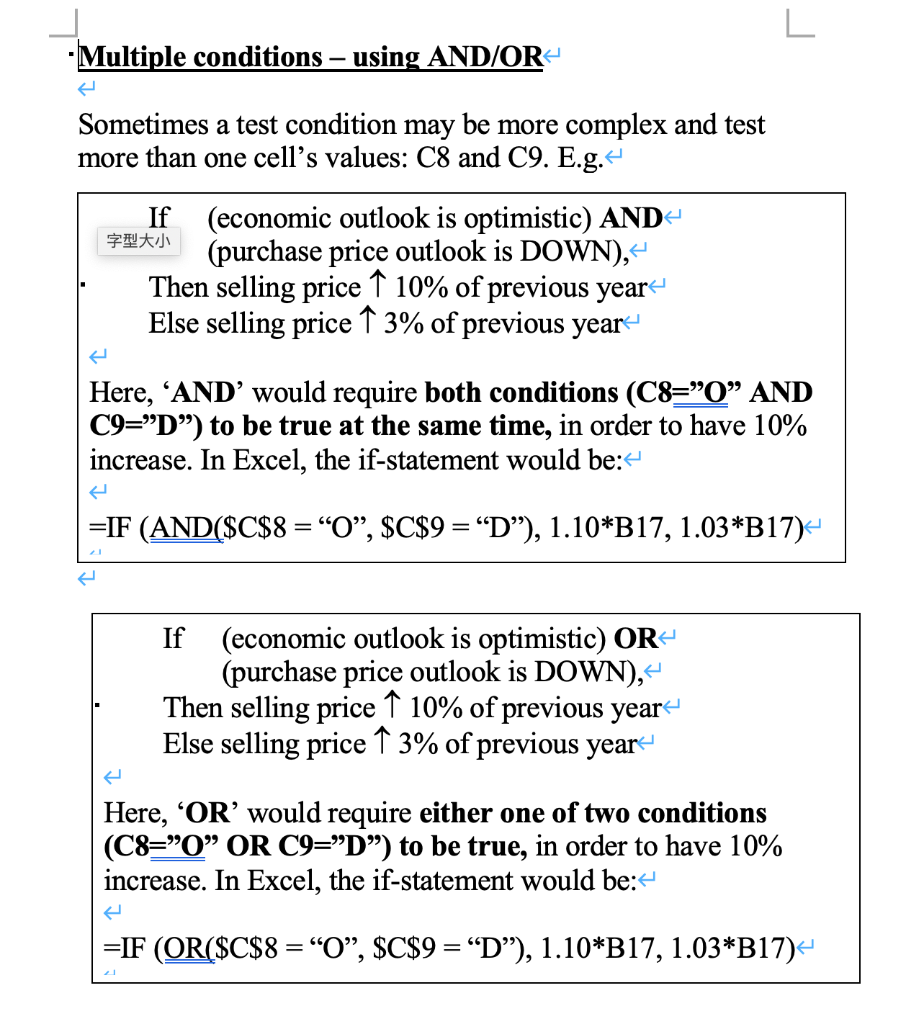
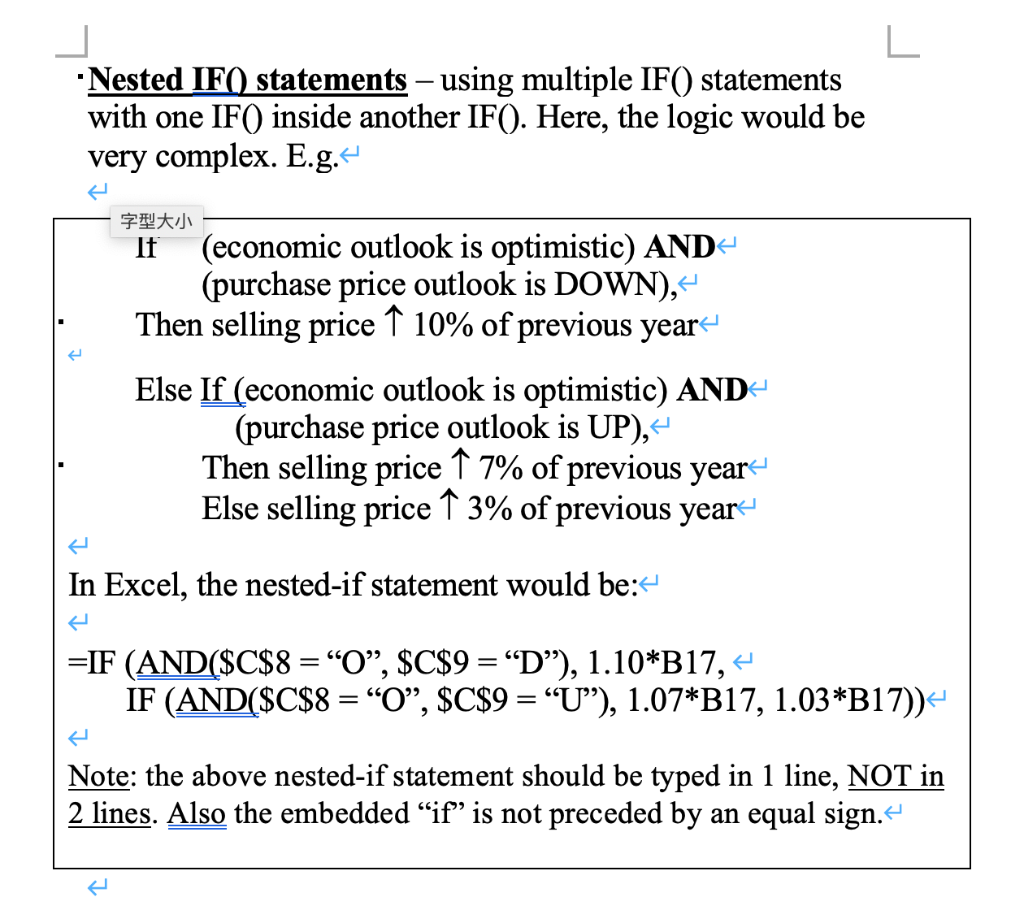
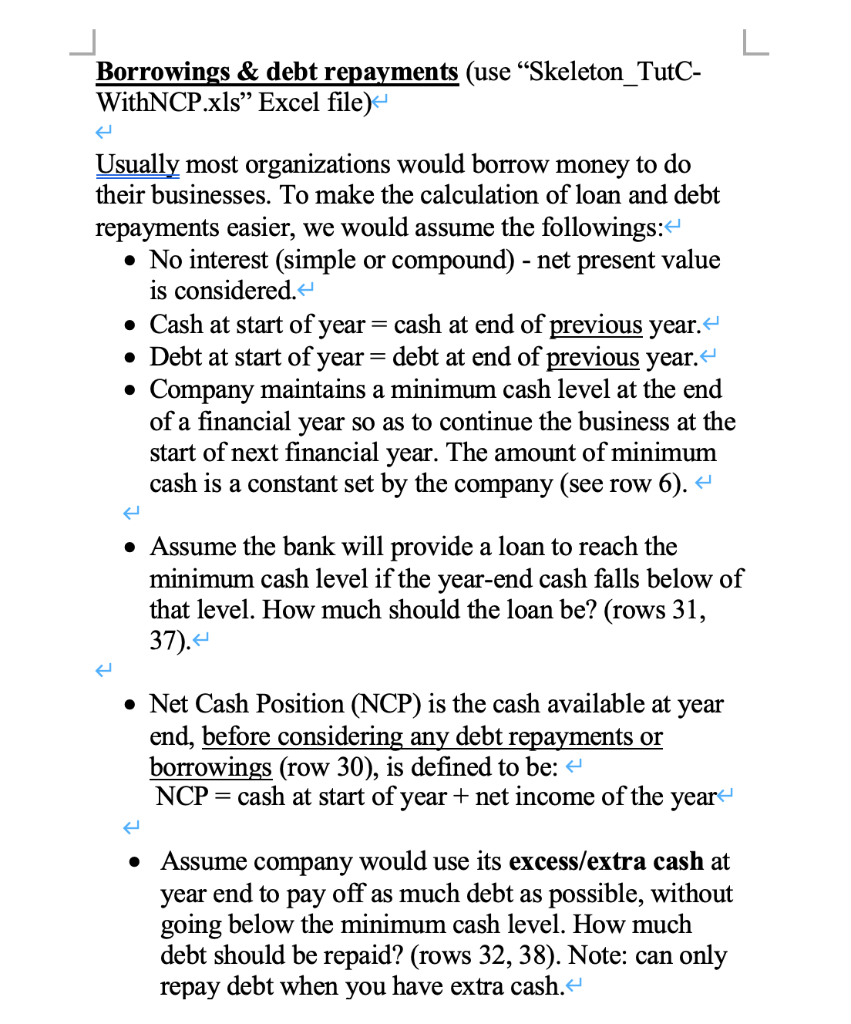
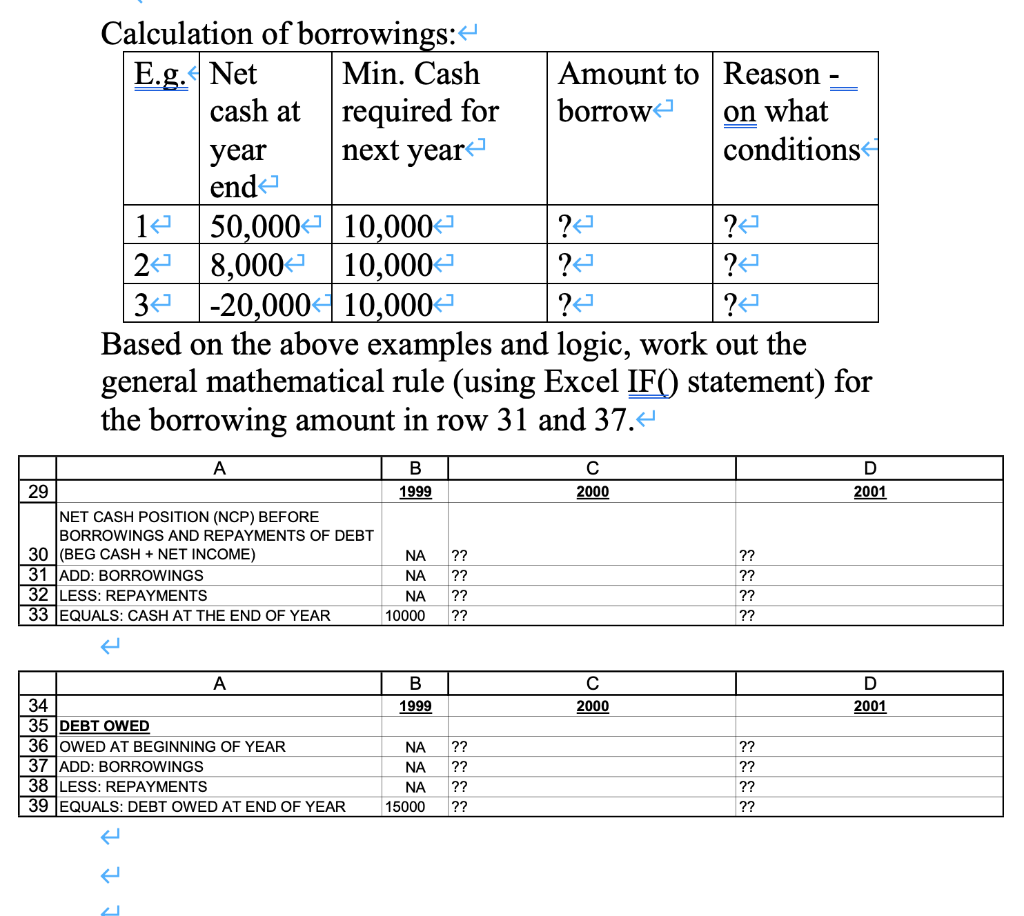
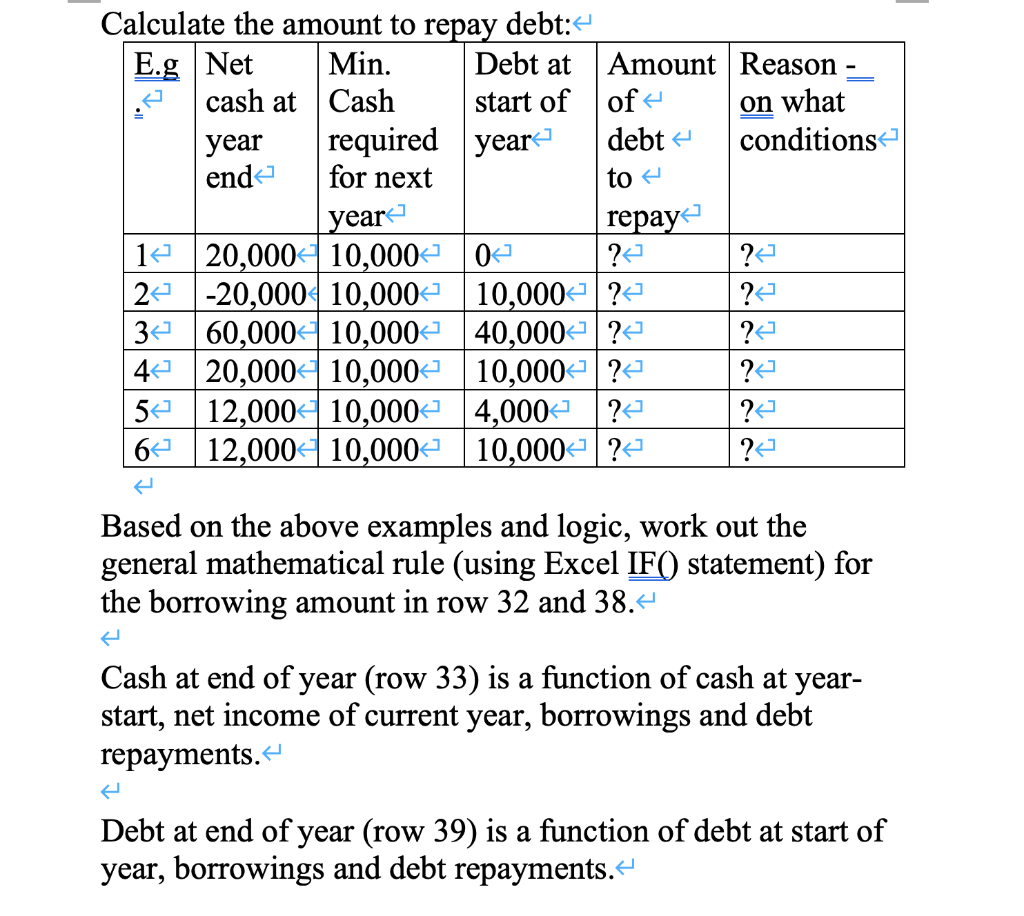
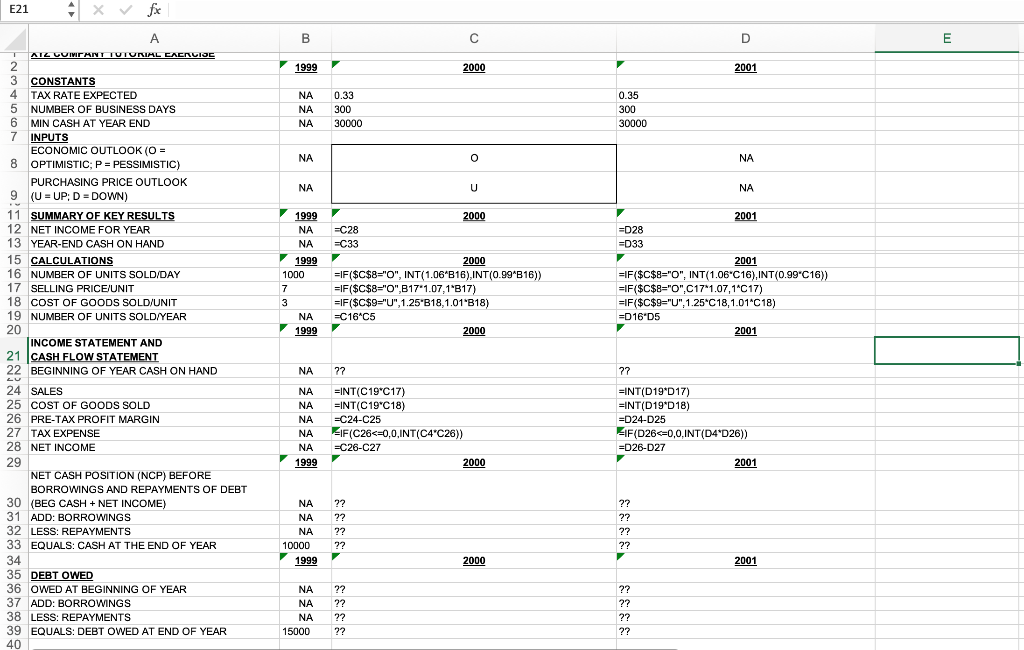
-Multiple conditions using AND/OR Sometimes a test condition may be more complex and test more than one cell's values: C8 and C9. E.g. If (economic outlook is optimistic) AND (purchase price outlook is DOWN), Then selling price 10% of previous year Else selling price 3% of previous year- Here, AND' would require both conditions (C8="O AND C9="D") to be true at the same time, in order to have 10% increase. In Excel, the if-statement would be: =IF (AND($C$8 = O, $C$9 = D), 1.10*B17, 1.03*B17) If (economic outlook is optimistic) OR (purchase price outlook is DOWN), Then selling price 10% of previous year Else selling price 3% of previous year Here, OR would require either one of two conditions (C8="O OR C9="D") to be true, in order to have 10% increase. In Excel, the if-statement would be: =IF (OR($C$8 = O, $C$9 = D), 1.10*B17, 1.03*B17) L *Nested IF() statements using multiple IF() statements with one IF() inside another IF(). Here, the logic would be very complex. E.g. If (economic outlook is optimistic) AND- (purchase price outlook is DOWN), - Then selling price 10% of previous year Else If (economic outlook is optimistic) AND- (purchase price outlook is UP), Then selling price 9 7% of previous year Else selling price 3% of previous year In Excel, the nested-if statement would be: =IF (AND($C$8 = O, $C$9 =D), 1.10*B17,4 IF (AND($C$8 = O, $C$9 = U), 1.07*B17, 1.03*B17)) Note: the above nested-if statement should be typed in 1 line, NOT in 2 lines. Also the embedded "if" is not preceded by an equal sign. L Borrowings & debt repayments (use Skeleton_TutC- WithNCP.xls Excel file) Usually most organizations would borrow money to do their businesses. To make the calculation of loan and debt repayments easier, we would assume the followings: No interest (simple or compound) - net present value is considered. Cash at start of year = cash at end of previous year. Debt at start of year = debt at end of previous year. Company maintains a minimum cash level at the end of a financial year so as to continue the business at the start of next financial year. The amount of minimum cash is a constant set by the company (see row 6). + Assume the bank will provide a loan to reach the minimum cash level if the year-end cash falls below of that level. How much should the loan be? (rows 31, 37). Net Cash Position (NCP) is the cash available at year end, before considering any debt repayments or borrowings (row 30), is defined to be: NCP = cash at start of year + net income of the year Assume company would use its excess/extra cash at year end to pay off as much debt as possible, without going below the minimum cash level. How much debt should be repaid? (rows 32, 38). Note: can only repay debt when you have extra cash. Calculation of borrowings: E.g. Net Min. Cash Amount to Reason - cash at required for borrow on what year next year conditions end 14 50,000+ 10,000+ ? ? 2 8,000 10,000 ? -20,000$10,000 Based on the above examples and logic, work out the general mathematical rule (using Excel IF() statement) for the borrowing amount in row 31 and 37. ? ?] ? ?] 34 ? ?] B 1999 2000 D 2001 A 29 NET CASH POSITION (NCP) BEFORE BORROWINGS AND REPAYMENTS OF DEBT 30 (BEG CASH + NET INCOME) 31 ADD: BORROWINGS 32 LESS: REPAYMENTS 33 EQUALS: CASH AT THE END OF YEAR NA NA NA 10000 ?? ?? ?? ?? ?? ?? ?? ?? B 2000 D 2001 1999 A 34 35 DEBT OWED 36 OWED AT BEGINNING OF YEAR 37 ADD: BORROWINGS 38 LESS: REPAYMENTS 39 EQUALS: DEBT OWED AT END OF YEAR NA NA NA 15000 ?? ?? ?? ?? ?? ?? ?? ?? Calculate the amount to repay debt:- E.g Net Min. Debt at Amount Reason cash at Cash start of of on what year required year debt conditions end for next to year repay 1 20,000+ 10,000+ 0- ? 24 -20,000 10,000+ 10,000? ? 34 60,000 10,000+ 40,000? ?? 4 20,000 10,000+ 10,000+ ?4 ?2 5 12,000+ 10,000+ 4,000 ?4 6 12,000+ 10,000+ 10,000+?4 ? ?4 Based on the above examples and logic, work out the general mathematical rule (using Excel IF() statement) for the borrowing amount in row 32 and 38.4 Cash at end of year (row 33) is a function of cash at year- start, net income of current year, borrowings and debt repayments. Debt at end of year (row 39) is a function of debt at start of year, borrowings and debt repayments.- E21 A X fix A B D E 1999 2000 2001 NA NA NA 0.33 300 30000 0.35 300 30000 NA 0 NA NA U NA 1999 NA NA 1999 1000 7 3 NA 1999 2000 =C28 =C33 2000 =IF($C$8="O", INT(1.06'B16),INT(0.99*B16)) =IF($C$8="0",117'1.07.16B17) =IF($C$9="U", 1.256B18,1.01'818) =C16 C5 2000 2001 =D28 =D33 = 2001 =IF($C$8="O", INT(1.06C16), INT(0.99"C16)) =IF ($C$8="O",C171.07,1-C17) =IF($C$9="U", 1.25 C18,1.01'C18) =D16'D5 2001 1 AIL CUIVANT TUTUNIAL LACNCISC 2 3 CONSTANTS 4 TAX RATE EXPECTED 5 NUMBER OF BUSINESS DAYS 6 MIN CASH AT YEAR END 7 INPUTS ECONOMIC OUTLOOK (O = 8 OPTIMISTIC; P = PESSIMISTIC) PURCHASING PRICE OUTLOOK 9 (U = UP: D = DOWN) 11 SUMMARY OF KEY RESULTS 12 NET INCOME FOR YEAR 13 YEAR-END CASH ON HAND 15 CALCULATIONS 16 NUMBER OF UNITS SOLD/DAY 17 SELLING PRICE/UNIT 18 COST OF GOODS SOLD/UNIT 19 NUMBER OF UNITS SOLD/YEAR 20 INCOME STATEMENT AND 21 CASH FLOW STATEMENT 22 BEGINNING OF YEAR CASH ON HAND 24 SALES 25 COST OF GOODS SOLD 26 PRE-TAX PROFIT MARGIN 27 TAX EXPENSE 28 NET INCOME 29 NET CASH POSITION (NCP) BEFORE BORROWINGS AND REPAYMENTS OF DEBT 30 (BEG CASH + NET INCOME) 31 ADD: BORROWINGS 32 LESS: REPAYMENTS 33 EQUALS: CASH AT THE END OF YEAR 34 35 DEBT OWED 36 OWED AT BEGINNING OF YEAR 37 ADD: BORROWINGS 38 LESS: REPAYMENTS 39 EQUALS: DEBT OWED AT END OF YEAR 40 NA 77 NA NA NA NA NA 1999 =INT(C19'C17) =INT(C19C18) =C24-C25 EIF(C26
Step by Step Solution
There are 3 Steps involved in it

Get step-by-step solutions from verified subject matter experts
 Study Help