







Question: Must be done using C++ This assignment is concerned with controlling the placement of output on the output window. The output window is called the
Must be done using C++
This assignment is concerned with controlling the placement of output on the output window. The output window is called the terminal window in the computers in the lab room. Description Make a C++ program that will display your two initials in large drawings of at least 16 characters in height. Use the character of the initial to make the initial. For example, if your name were Norene Jones then your program will draw the letters N and W using the characters 'N' and 'W'.
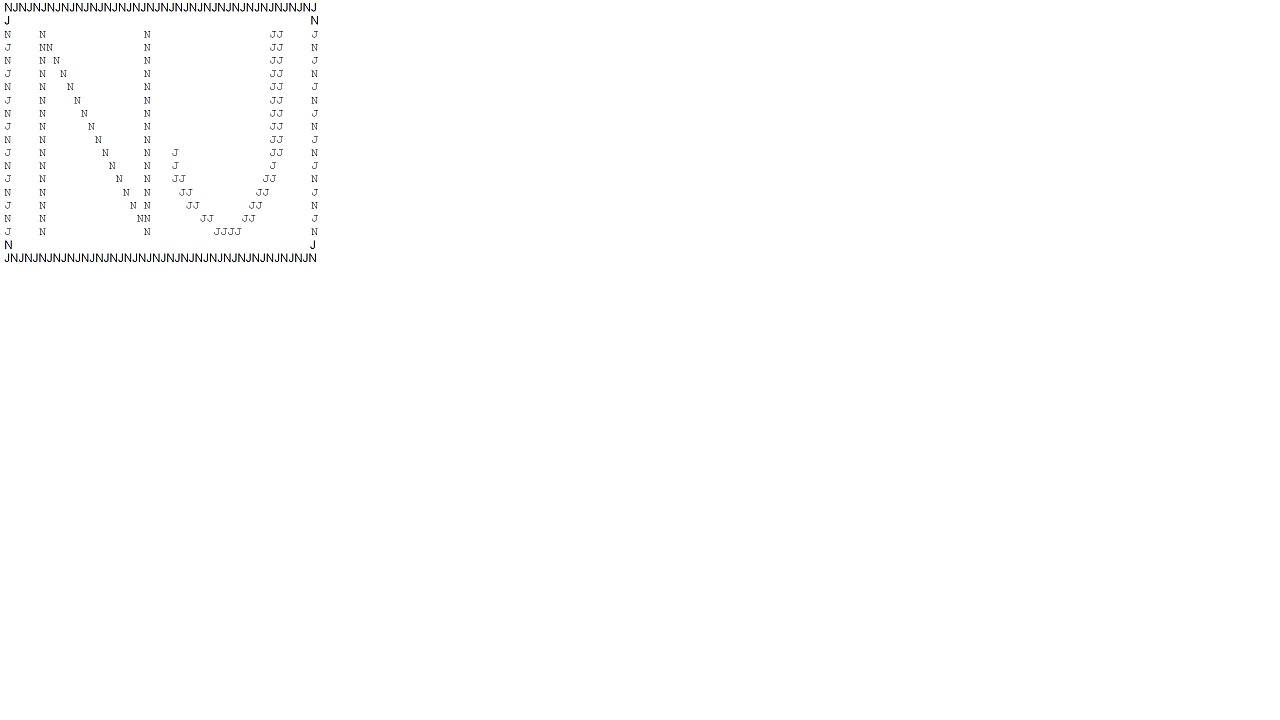 The program makes the output in this order.
First draw the large first initial. That is the large N in the picture above. The letter must have a height of at least sixteen characters. Second draw the second initial to the right of the first one. Make both of the large initials draw in the same sequence as if you were writing with a pencil. Third draw a rectangle around your two initials. Start the draw in the upper left corner and proceed to the upper right corner, then down to the lower right corner, then to the lower left corner, and lastly back to the start. The rectangle is composed of alternating the first character of your two names. If your first and last names begin with the same letter, then use the initial of your middle name in place of the initial of your first name. That means we want to see two different large letters drawn not two of the same. There are some more rules. The two letters must be displayed in slow motion in your terminal window as if an invisible hand were drawing the letter. For example, most people write the letter N in three steps: first a vertical line is drawn from top to bottom, then the pencil is moved to the top of that line and the diagonal line is drawn from top to bottom, and lastly the pencil is picked up and the right vertical line is drawn from top to bottom. Your program must draw each letter in the sequence that you use when you write it with a pencil. When the first letter is complete then the second letter must be drawn at the right side of the first letter. Draw your two letters in slow motion. Do not draw them so fast that human eyes cannot follow the process. What is slow speed? Somewhere between 200ms and 500ms delay between characters is a suitable slow speed. You will input the size of the delay interval when the program begins to run.
Here are the order of events when your program runs. 1. Display a title. For example: Character drawing program by Charles Findley. You put your own name in the title. 2. You are asked how slow you want the program to run. The program wants you to enter a positive number representing the number of milliseconds that the computer will pause after each character is displayed. Reminder: entering a small integer results in a fast run, and entering a large integer results in a slow run. 3. Your program clears the terminal window. 4. The program draws the first initial of height at least 16 characters. You are free to make it larger if you wish, but it needs to fit inside the terminal window. Use your mouse to make the terminal window as big as possible. 5. The program draws the second initial of the same height and places it on the right side of the first initial. 6. The program draws the box around the two large letters. 7. The program asks if you would like to see that again (Y or N). If the answer is Y then the program repeats steps 1 through 6. If the answer is N then a good-bye message is displayed and the program stops. Be sure that the good-bye message is written below the existing information already in the terminal window. Requirements for functions Make these functions and include them in your program. 1. A function that draws your first initial. 2. A function that draws your second initial. 3. A function that draws the box 4. A function that asks if you want to see it again, and it returns a bool. 5. A function that displays the starting welcome message. 6. A function that displays the ending good-bye message. 7. A function that ask the user to enter the time delay between characters. The function returns an unsigned integer representing the number of milliseconds between characters. Get credit for your work Print these items and staple them together to make a packet. 1. Your source code 2. A screen print showing your two initial in the terminal window. 3. The exact size of your source file and executable file. Use integers (bytes); don't use kB or MB or GB.
NJNJNJNJNJNJNJNJNJNJNJNJNJNJNJNJNJNJNJNJNJNJ J N N JJ N JDN JJ N J N JJ N N N JJ JNJNJNJNJNJNJNJNJNJNJNJNJNJNJNJNJNJNJNJNJNJN
Step by Step Solution
There are 3 Steps involved in it

Get step-by-step solutions from verified subject matter experts
 Study Help