







Question: Must be in C# class complex learned in class: using System; // namespace containing ArgumentOutOfRangeException public class Complex { private double rP; // real part
Must be in C# 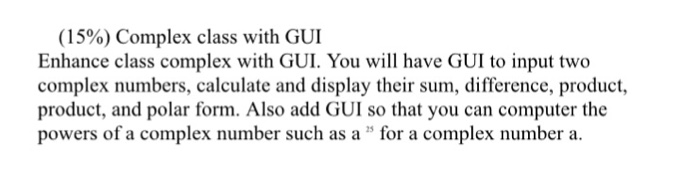
class complex learned in class:
using System; // namespace containing ArgumentOutOfRangeException
public class Complex
{
private double rP; // real part
private double iP; // imaginary part
public void SetComplex(double r, double i)
{
rP = r;
iP = i;
}
public void add(Complex c1)
{
rP += c1.rP;
iP += c1.iP;
}
public void addTwo(Complex c1, Complex c2)
{
rP = c1.rP + c2.rP;
iP = c1.iP + c2.iP;
}
public void mul(Complex c1)
{
// use the formula (a+bj) * (c+dj) = (ac-bd) + (ad+bc)j
rP = rP * c1.rP - iP * c1.iP;
iP = rP * c1.iP + iP * c1.rP;
}
public void mulfix (Complex c1)
{
// use the formula (a+bj) * (c+dj) = (ac-bd) + (ad+bc)j
Complex ccopy = new Complex();
ccopy.rP = rP * c1.rP - iP * c1.iP;
ccopy.iP = rP * c1.iP + iP * c1.rP;
rP = ccopy.rP;
iP = ccopy.iP;
}
public void print()
{
Console.WriteLine("{0} + {1}j", rP, iP);
}
}
(1590) Complex class with GUI Enhance class complex with GUI. You will have GUI to input two complex numbers, calculate and display their sum, difference, product, product, and polar form. Also add GUI so that you can computer the powers of a complex number such as a lor a complex number a
Step by Step Solution
There are 3 Steps involved in it
1 Expert Approved Answer
Step: 1 Unlock

Question Has Been Solved by an Expert!
Get step-by-step solutions from verified subject matter experts
Step: 2 Unlock
Step: 3 Unlock
 Study Help