







Question: Must be written in Python 3 using GUI and Tkinter interfaces. No advanced code please. 1. Write a Temperature class to represent Celsius and Fahrenheit
Must be written in Python 3 using GUI and Tkinter interfaces. No advanced code please.
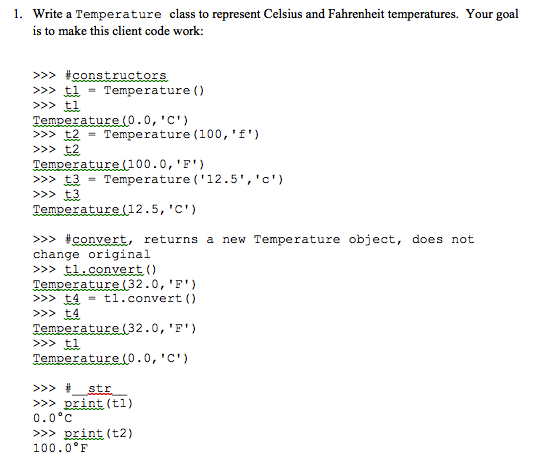
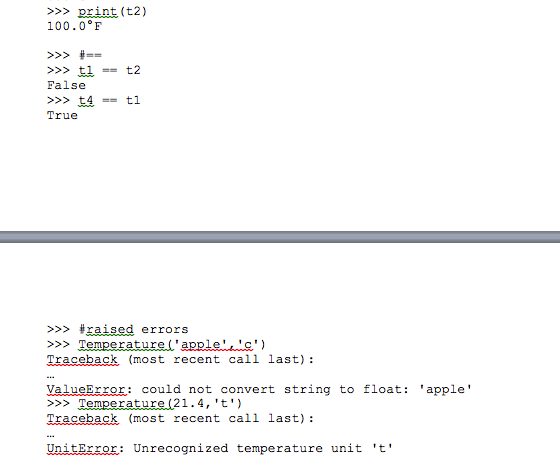
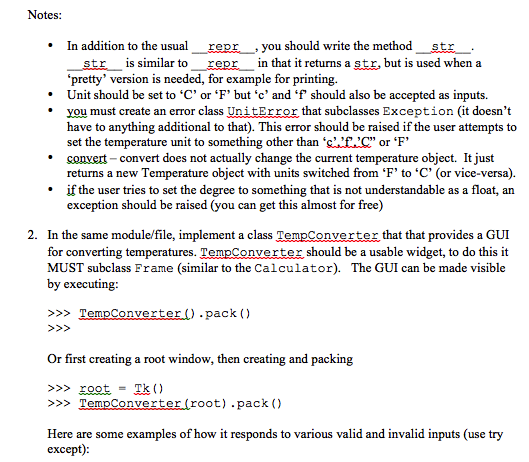
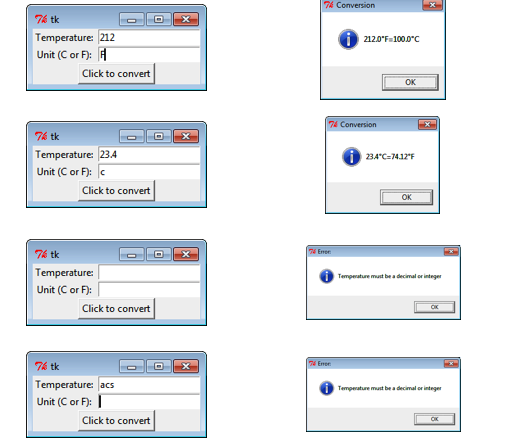
1. Write a Temperature class to represent Celsius and Fahrenheit temperatures. Your goal is to make this client code work: >>>= Temperature() >>> rature (O.0, "C') >>>2 = Temperature (100,'f') re (100.0, 'F) >>> = Temperature ( ' 125' , ' c ' ) >>> Temperature(12.5,'C') >>> convert, returns a new Tempe rature object, does not change original >>t1.convert ) >>> 4 >>> Temperature (32.0, 'F') >>> t1 = t1 . convert ( >>> # str >>>print (t1) 0.0C >>> print (t2) 100.0F 1. Write a Temperature class to represent Celsius and Fahrenheit temperatures. Your goal is to make this client code work: >>>= Temperature() >>> rature (O.0, "C') >>>2 = Temperature (100,'f') re (100.0, 'F) >>> = Temperature ( ' 125' , ' c ' ) >>> Temperature(12.5,'C') >>> convert, returns a new Tempe rature object, does not change original >>t1.convert ) >>> 4 >>> Temperature (32.0, 'F') >>> t1 = t1 . convert ( >>> # str >>>print (t1) 0.0C >>> print (t2) 100.0F
Step by Step Solution
There are 3 Steps involved in it

Get step-by-step solutions from verified subject matter experts
 Study Help