







Question: must input formulas Teparing a Make or Buy Analysis using Excel's SUM, IF and Basic Math Functions Wanco, Inc. manufactures a variety of products and
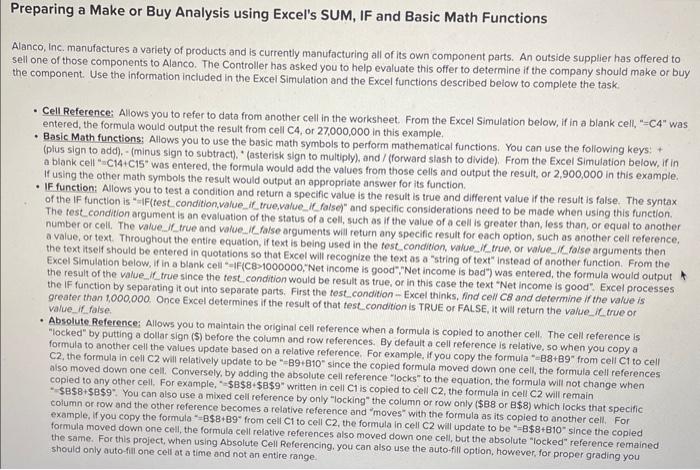
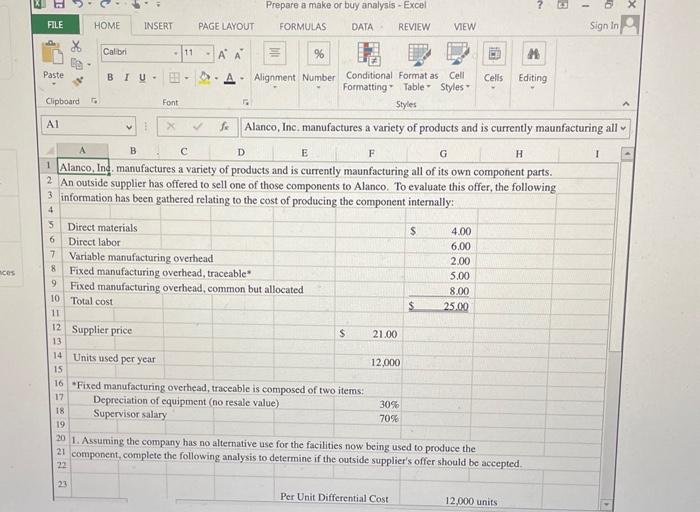
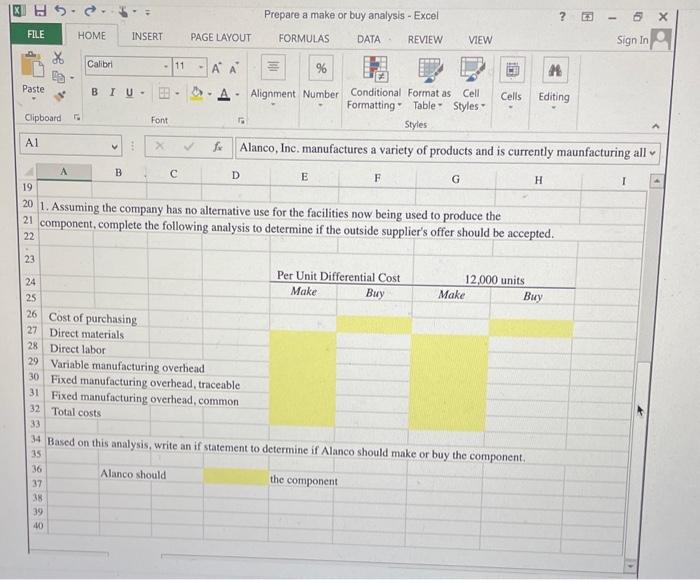
Teparing a Make or Buy Analysis using Excel's SUM, IF and Basic Math Functions Wanco, Inc. manufactures a variety of products and is currently manufacturing all of its own component parts. An outside supplier has offered to ell one of those components to Alanco. The Controller has asked you to help evaluate this offer to determine if the company should make or buy he component. Use the information included in the Excel Simulation and the Excel functions described below to complete the task: - Cell Reference: Allows you to refer to data from another cell in the worksheet. From the Excel Simulation below, if in a blank cell, "=C4" was entered, the formula would output the result from cell C4, or 27,000,000 in this example, - Basic Math functions; Allows you to use the basic math symbols to perform mathematical functions. You can use the following keys: + " (plus sign to add), - (minus sign to subtract). " (asterisk sign to multiply), and / (forward siash to divide), From the Excel Simulation below, If in a blank cell " C14+C15" was entered, the formula would add the values from those cells and output the result, or 2,900,000 in this example. If using the other math symbols the result would output an appropriate answer for its function. - IF function: Allows you to test a condition and return a specific value is the result is true and different value if the result is false. The syntax of the IF function is "IF(test condition,value_if true,value_ it false)" and specific considerations need to be made. when using this function. The test.condition argument is an evaluation of the status of a cell, such as if the value of a cell is greater than, less than, or equal to another number or cell. The value._f_true and value_it false arguments will return any specific result for each option, such as another cell reference. a value, or text. Throughout the entire equation, if text is being used in the testcondition, value, if true, or value. If false arguments then the IF function by separating it out the test condition would be result as true, of in this case the text "Net income is good". Excel processes greater than 1,000,000. Once Excel determines if the result of that test condition - Excel thinks, find cell C8 and determine if the value is value_if_false. - Absolute Reference: Allows you to maintain the original cell reference when a formula is copied to another cell. The cell reference is "locked" by putting a dollar sign (\$) before the column and row references. By default a cell reference is relative, so when you copy a C, the formula in cell the values update based on a relative reference. For example, if you copy the formula "=B8+B9" from cell C1 to cell also moved down one cell. Conversely, by adding the absolute cell reference "locks" to the equation, the formula will not change when " column or \$9". You can also use a mixed cell reference by only "locking" the column or row only ( $88 or B$8) which locks that specific example, fryou and the other reference becomes a relative reference and "moves" with the formula as its copied to another cell, For the same. For this project, when using Absolute Cell Peferences also moved down one cell, but the absolute "locked" reference remained should only auto-fill one cell at a time and not an entire range
Step by Step Solution
There are 3 Steps involved in it

Get step-by-step solutions from verified subject matter experts
 Study Help