



Question: Must use at least 1 try - catch in your project o Your try - catch / s should catch, handle, and recover from FileNotFoundExceptions,
Must use at least trycatch in your project
o Your trycatchs should catch, handle, and recover from FileNotFoundExceptions, and ParseExceptions.
All class files must be present in the submission.
o Pojectjava, FileHandler.java, RoadSpeed.java, RoadVolume.java, & RoadSection.java.
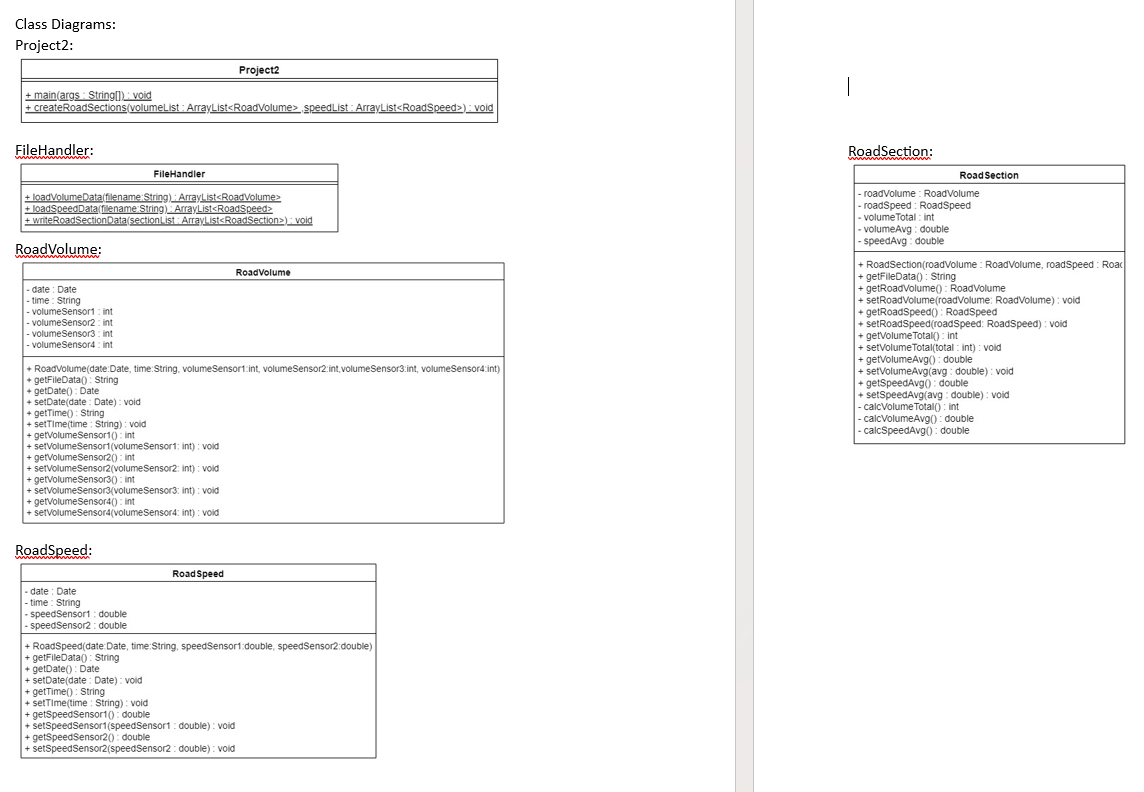
All methods and variables shown in the UML class diagrams must be present in each class file.
o See below for UML class diagram.
Use the method in FileHandler called loadVolumeData to handle this task.
Prompt the user for the pathfilename of the volume data file then pass the provided string to the loadVolumeData method.
o If the input given by the user results in a FileNotFoundException alert the user to the error and reprompt them for good input.
o The user providing an invalid path should not cause the program to crash or stop
running
Recommend setting the loadVolumeData method to throw the FileNotFoundException.
Catch and recover from the exception in the calling method that takes in the
filename.
Read in the data from the provided volume data file and store the data for each row in a RoadVolume object. Store each object created in an ArrayList.
o If the input file given by the user contains bad date data and results in a ParseException alert the user to the error and reprompt them for good input.
o The user providing a file with bad date data should not cause the program crash or stop running.
o Recommend setting the loadVolumeData method to throw the ParseException.
Catch and recover from the exception in the calling method that takes in the
filename.
Use the method in FileHandler called loadSpeedData to handle this task.
Prompt the user for the pathfilename of the speed data file then pass the provided string to the loadSpeedData method.
o If the input given by the user results in a FileNotFoundException alert the user to the error and reprompt them for good input.
o The user providing an invalid path should not cause the program to crash or stop
running.
o Recommend setting the loadSpeedData method to throw the FileNotFoundException
Catch and recover from the exception in the calling method that takes in the
filename.
Read in the data from the provided volume data file and store the data for each row in a RoadSpeed object. Store each object created in an ArrayList.
o If the input file given by the user contains bad date data and results in a ParseException alert the user to the error and reprompt them for good input.
o The user providing a file with bad date data should not cause the program crash or stop running.
o Recommend setting the loadSpeedData method to throw the ParseException
Catch and recover from the exception in the calling method that takes in the
filename.
Use the method in Project called createRoadSections to handle this task.
For each volume object find the matching speed object based on the date and time attributes.
o This can be done in reverse as well
Each speed object has a single volume object that contains a matching
datetime
Once a matching volume and speed object has been found create a RoadSection object that stores references to the matching volume and speed objects.
o Each RoadSection object created needs to be stored in an ArrayList.
When the RoadSection object is created calculate the volume total, volume average, and speed average based on the data stored in the matching objects.
o Use the private methods in the RoadSection to calculate the values mentioned above.
Use the method in FileHandler called writeRoadSectionData to handle this task. Along with the getFileData methods of each object.
getFileData Method:
The getFileData for the volume and speed data objects need to return their respective sensor data comma separated.
The RoadSection getFileData method needs to leverage the getFileData methods of the volume and speed objects while appending the additional data needed.
The string returned by RoadSection getFileData must be comma separated and contain the values for the attributes listed below.
o Date,Time,VolumeSensorVolumeSensorVolumeSensorVolumeSensor,SpeedSensorSpeedSensorVolumeTotal,
VolumeAvg,SpeedAvg.
writeRoadSectionData Method:
Create a new csv file called RoadSectionData.csv
Write out the following header to the csv file
o Header:
Date,Time,VolumeSensorVolumeSensorVolumeSensorVolumeSensor,SpeedSensorSpeedSensorVolumeTotal,
VolumeAvg,SpeedAvg.
Then for each RoadSection object created call getFileData and write the returned string to the new csv file.
Class Diagrams:
Project:
FileHandler:
RoadVolume:
RoadSpeed:
RoadSection:
Step by Step Solution
There are 3 Steps involved in it
1 Expert Approved Answer
Step: 1 Unlock

Question Has Been Solved by an Expert!
Get step-by-step solutions from verified subject matter experts
Step: 2 Unlock
Step: 3 Unlock