







Question: My code is showing a CPU utilization % of 1 0 0 % when it should be in the 8 0 - 9 0 range.
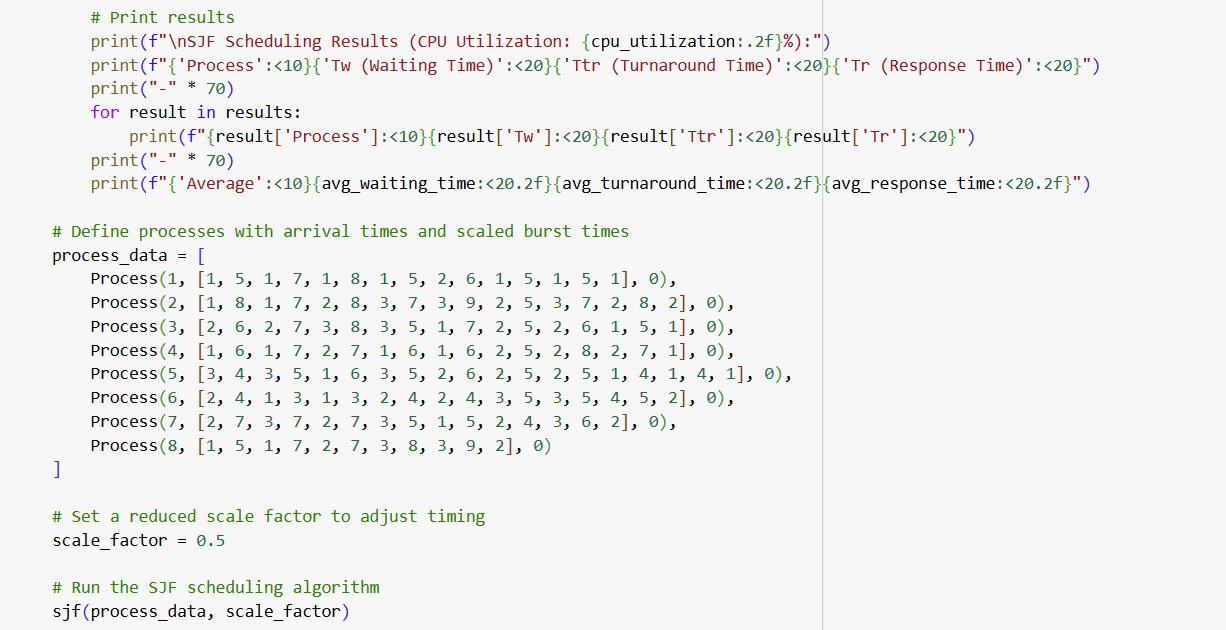
My code is showing a CPU utilization of when it should be in the range. Correct it and let me know what I did wrong. I cant post all the processes so I included a screenshot since im running out of word count. "class Process: def initself pid, burstiosequence, arrivaltime: self.pid pid self.burstiosequence burstiosequence self.currentphase self.remainingtime burstiosequence if burstiosequence else self.arrivaltime arrivaltime self.starttime None self.endtime None self.inio False self.totalwaitingtime self.waitingtimestart def strself: return fPselfpid def executeself currenttime: if self.starttime is None: self.starttime currenttime self.remainingtime if self.remainingtime : self.currentphase if self.currentphase lenselfburstiosequence: self.remainingtime self.burstiosequenceselfcurrentphase self.inio not self.inio else: self.endtime currenttime # Record final completion time def sjfprocesses scalefactor: readyqueue ioqueue currenttime runningprocess None totalcputime results while anypcurrentphase lenpburstiosequence for p in processes: # Move arrived processes to ready queue for p in processes: if parrivaltime currenttime and p not in readyqueue and not pinio and pcurrentphase lenpburstiosequence: pwaitingtimestart currenttime readyqueue.appendp # Sort ready queue by remaining burst time for SJF readyqueue.sortkeylambda x: xremainingtime # Debug: Print current state printfCurrent Time: currenttime scalefactor:f Running Process: runningprocess Ready Queue: strp for p in readyqueue IO Queue: strp for p in ioqueue # If no process is running, start the next process in the ready queue if runningprocess is None and readyqueue: runningprocess readyqueue.pop runningprocess.totalwaitingtime currenttime runningprocess.waitingtimestart # Execute the running process if any if runningprocess: runningprocess.executecurrenttime totalcputime if runningprocess.endtime is not None and runningprocess.currentphase lenrunningprocess.burstiosequence: # Calculate turnaround time and response time turnaroundtime runningprocess.endtime runningprocess.arrivaltime responsetime runningprocess.starttime runningprocess.arrivaltime results.append "Process": runningprocess.pid, Tw: runningprocess.totalwaitingtime, Ttr: turnaroundtime, Tr: responsetime runningprocess None # Process is complete # Process IO queue elif runningprocess and runningprocess.inio: ioqueue.appendrunningprocess runningprocess None # Check IO queue for p in ioqueue:: pexecutecurrenttime if not pinio: # IO is complete, so it's ready for CPU again pwaitingtimestart currenttime readyqueue.appendp ioqueue.removep # Increment current time currenttime if not runningprocess and not readyqueue: # Simulate idle time currenttime # Calculate CPU utilization and average metrics cpuutilization totalcputime currenttime avgwaitingtime sumrTw for r in results lenresults avgturnaroundtime sumrTtr for r in results lenresults avgresponsetime sumrTr for r in results lenresults # Print tablelike results printf
SJF Scheduling Results CPU Utilization: cpuutilization:: printfProcess:Tw Waiting Time:Ttr Turnaround Time:Tr Response Time: print for result in results: printfresultProcess:resultTw:resultTtr:resultTr: print printfAverage:avgwaitingtime:favgturnaroundtime:favgresponsetime:f # Define processes with arrival times and scaled burst times processdata Process Process Process
# Print
Step by Step Solution
There are 3 Steps involved in it
1 Expert Approved Answer
Step: 1 Unlock

Question Has Been Solved by an Expert!
Get step-by-step solutions from verified subject matter experts
Step: 2 Unlock
Step: 3 Unlock
 Study Help