







Question: my code is written but i couldnt implement my file according to Products.h header file can you rewrite my code according to the header file
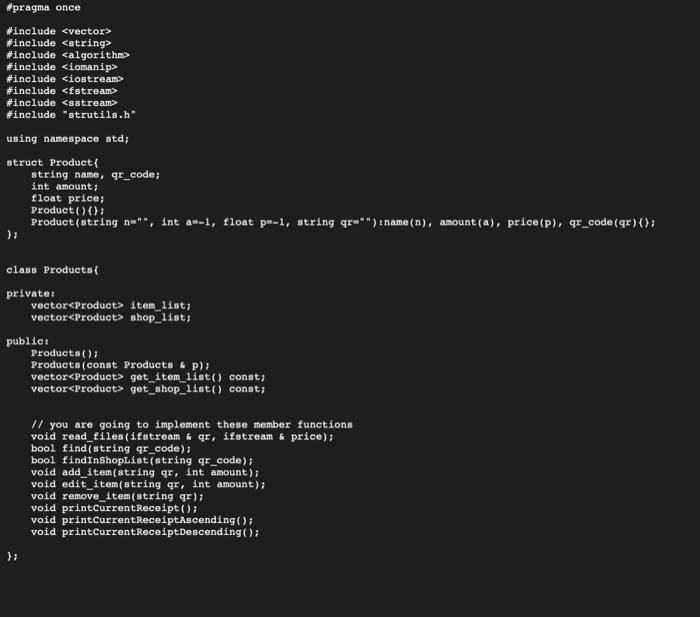
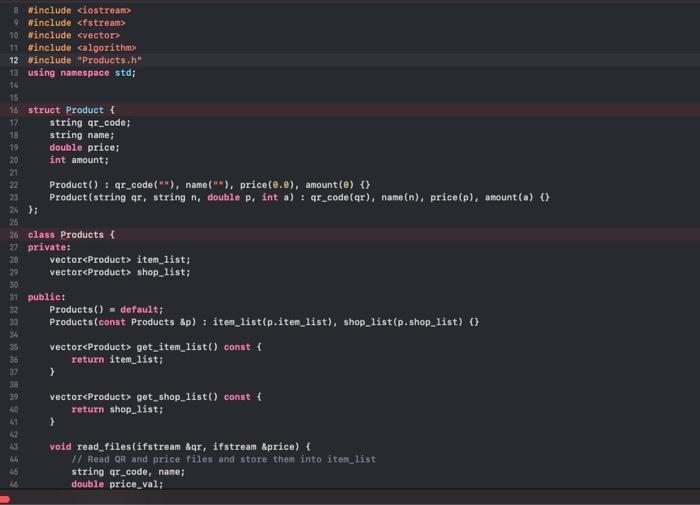
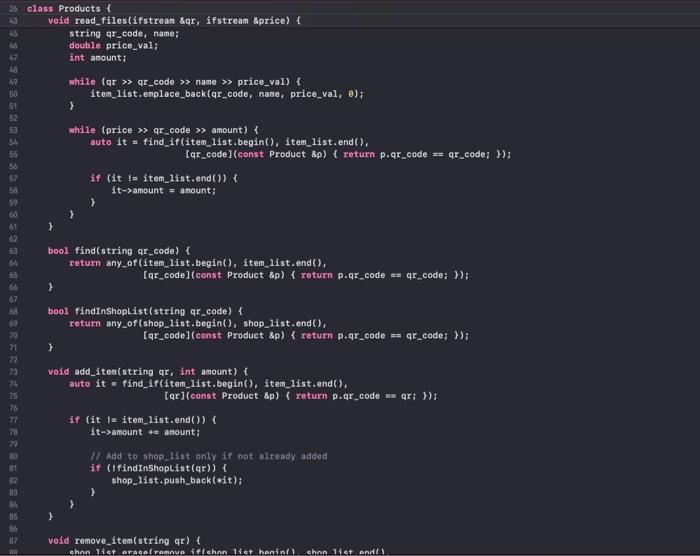
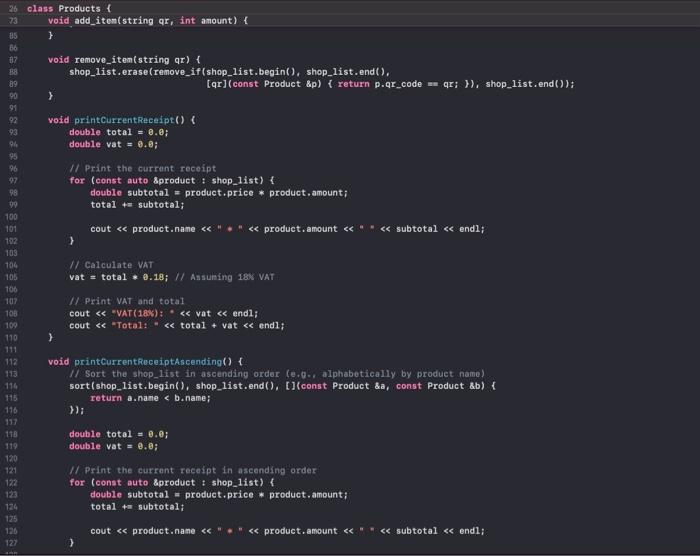
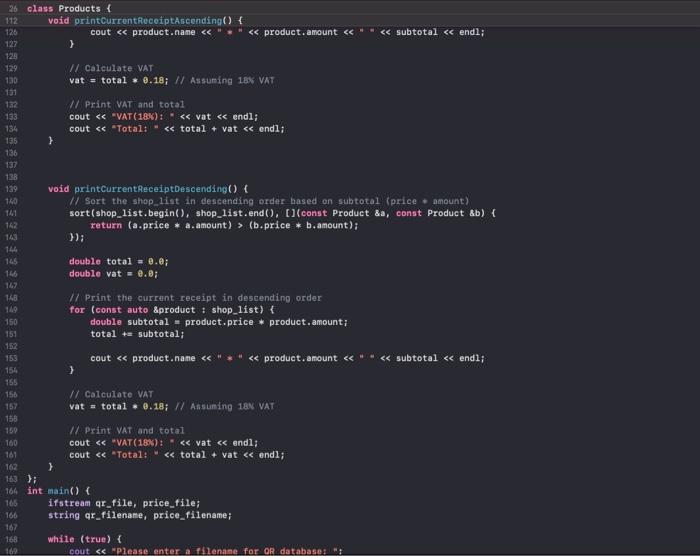
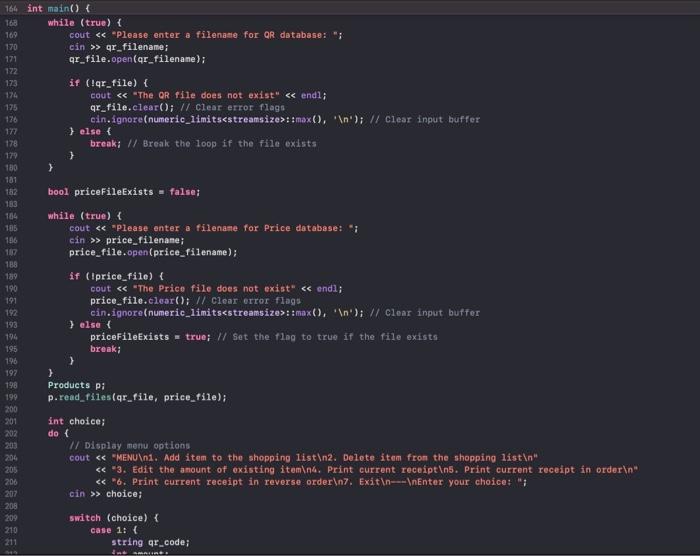
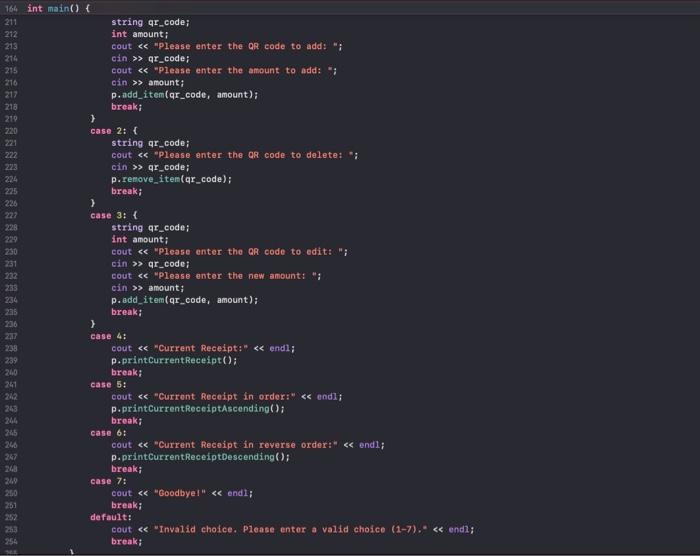
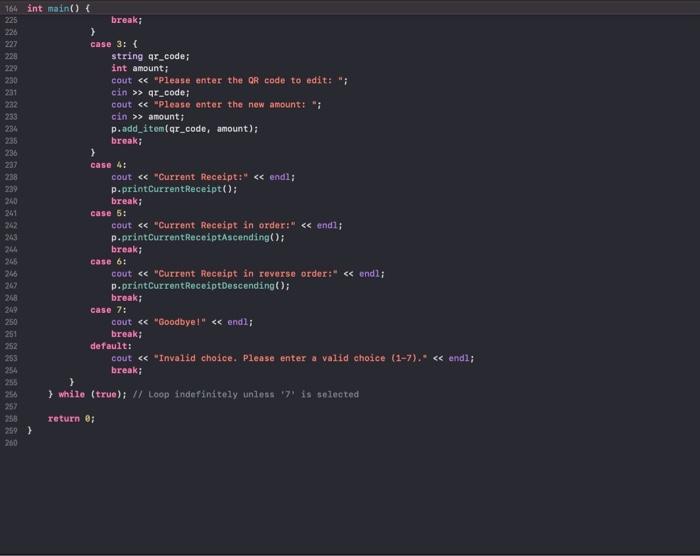
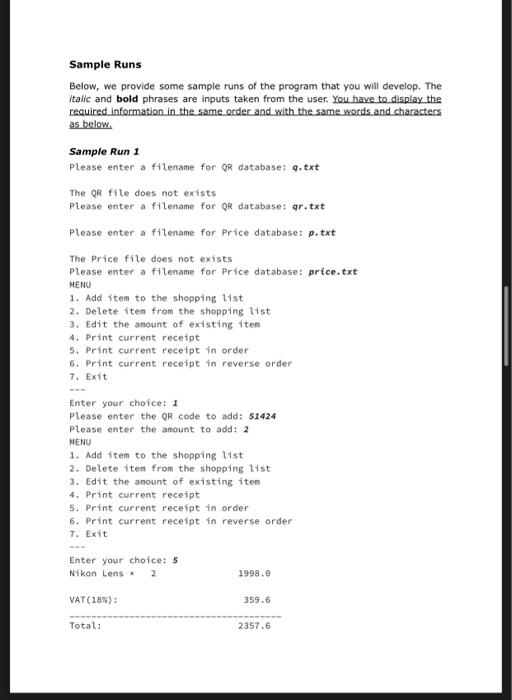
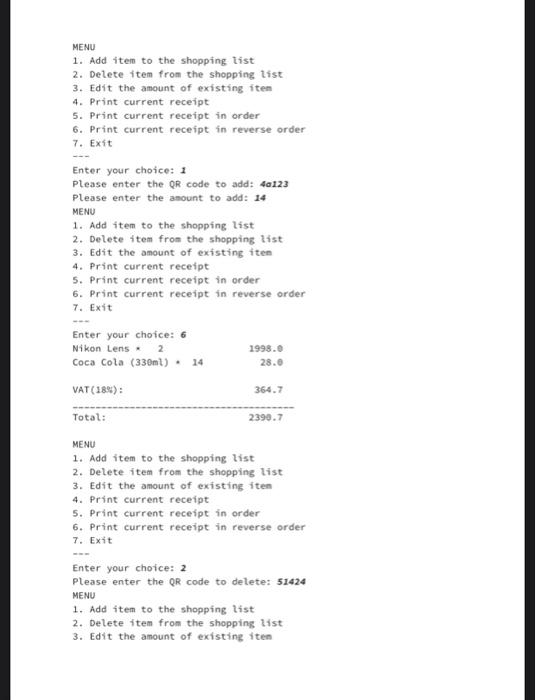
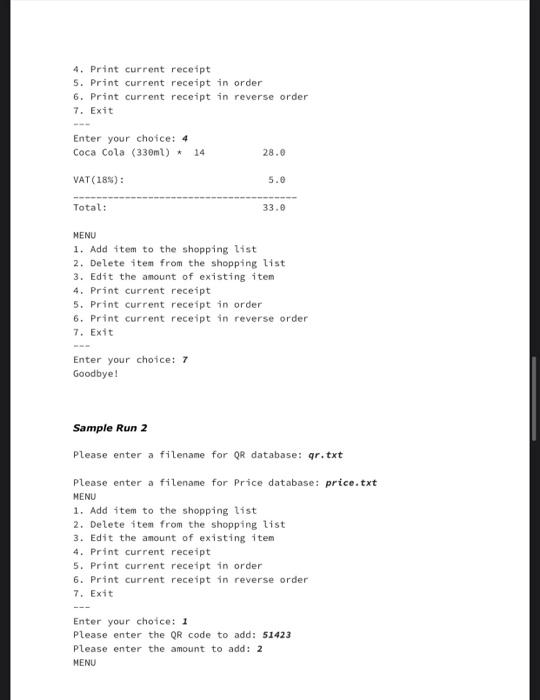
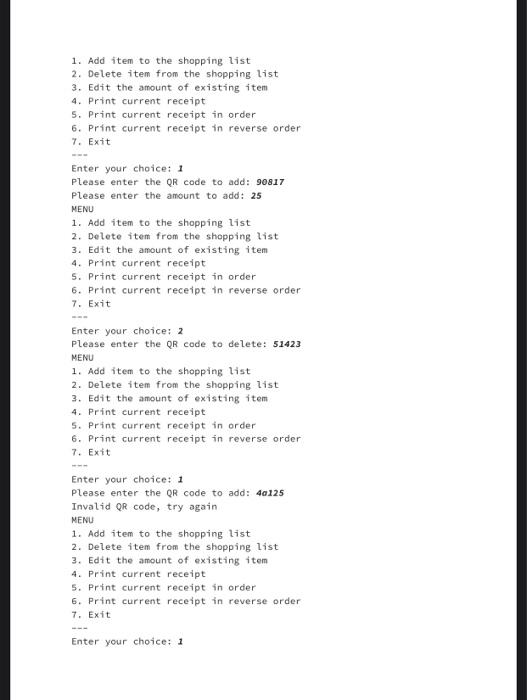
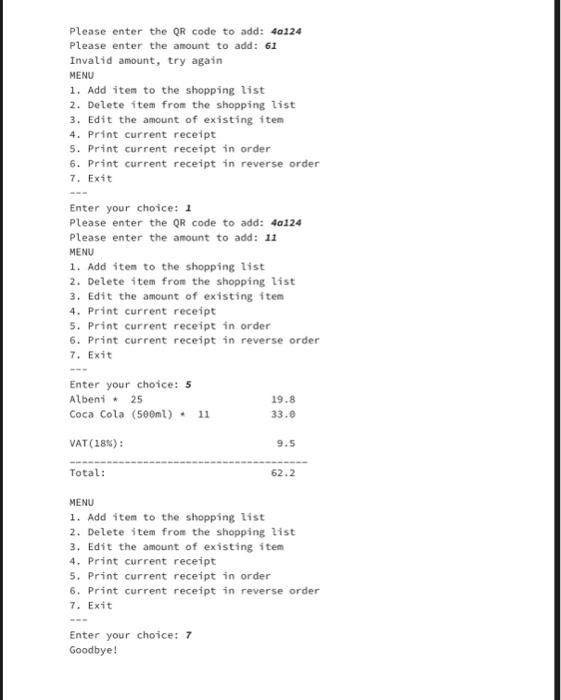
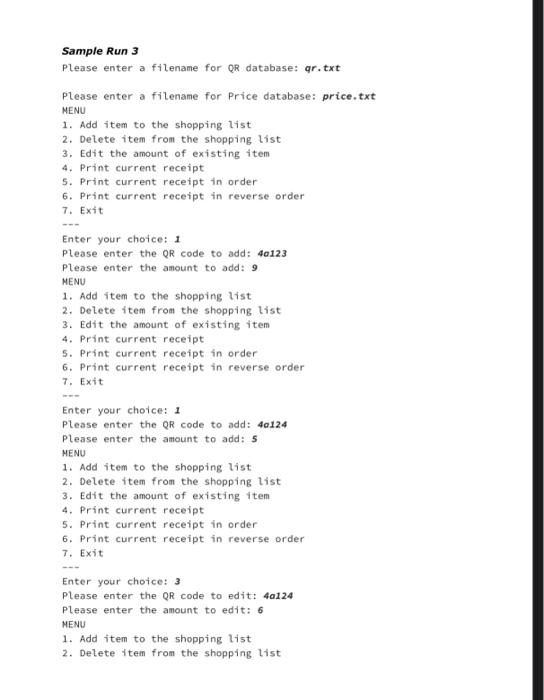
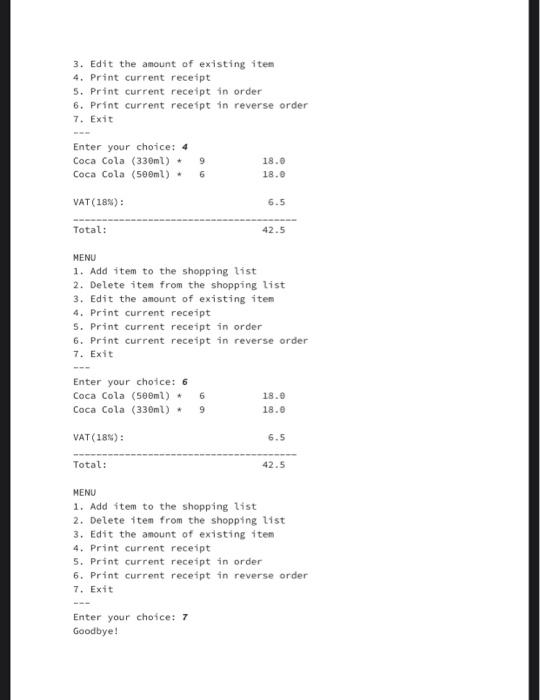
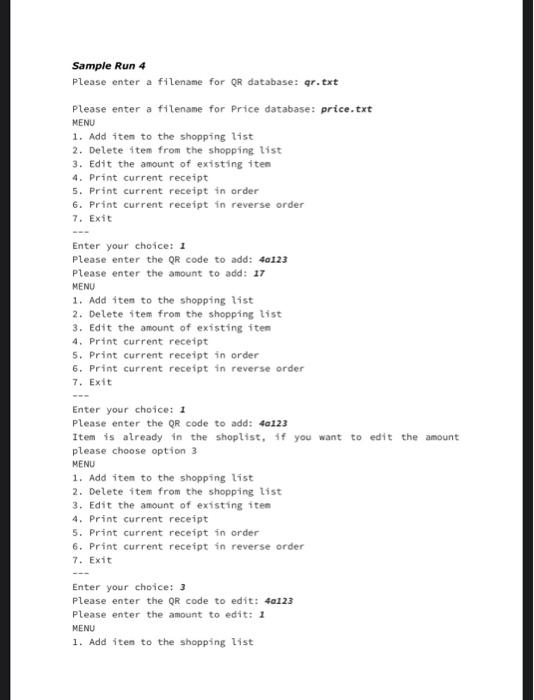
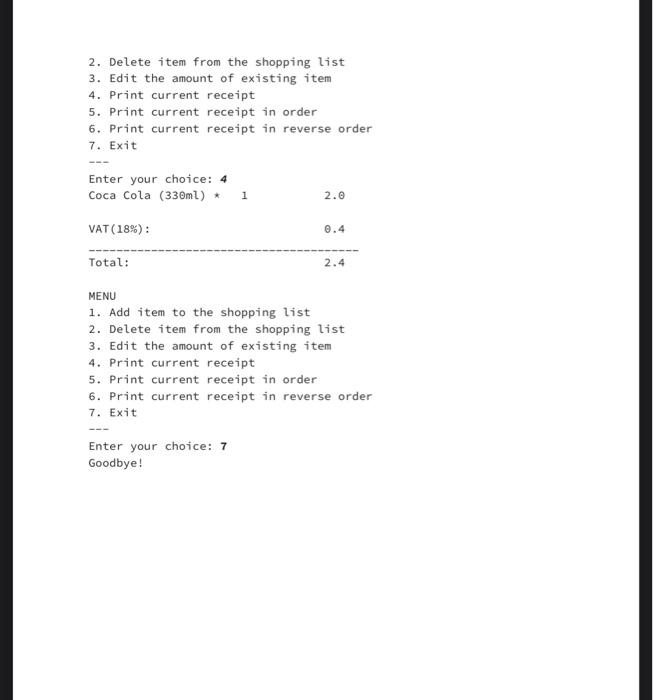
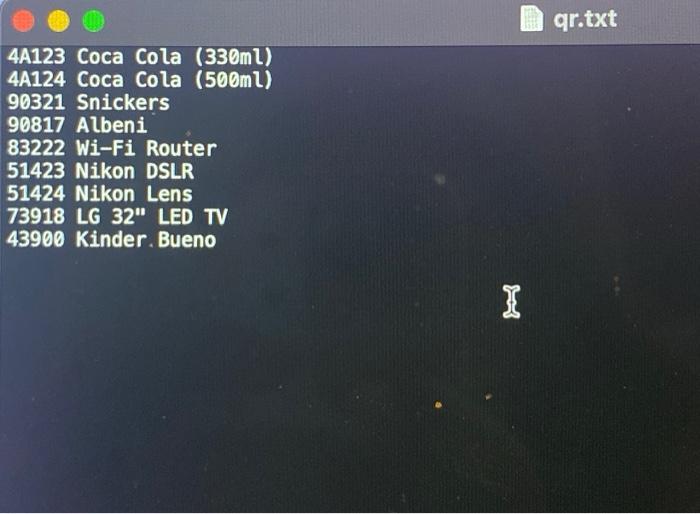

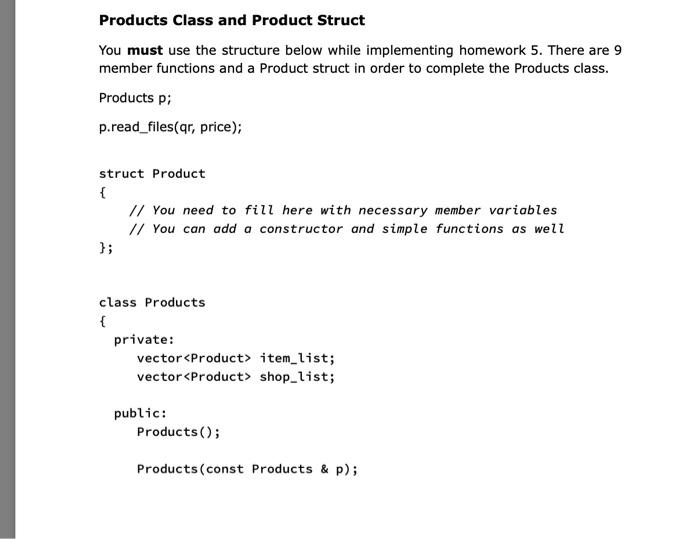
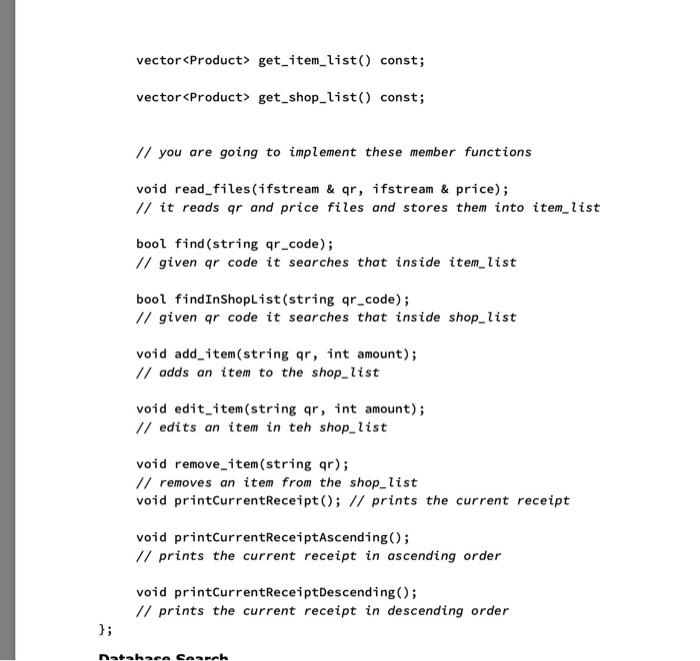
fpragma once Hinclude Hinclude *Include Hinclude Hinclude \#include \#include "strutils.h" using namespace std; struct Product string name, qr_code; int amount; float price; Product () \{\}; 1; class Products 1 private: vector 1 ten_11st) vectoreproduct> ahop_11at; publict Products (); Products (conat products 5 p); vector get item iist () const; vector get_shop_1ist() const; // you are going to implement these member functions void read_files(ifstream t qr, ifatream o price); bool find(string qr_code); bool findinshopList(string qr_code); vold add_item(string qr, int amount); void edit_item(string qr, int amount); vold remove_item (string qr); void printcurrentReceipt(); void printCurrentReceiptAscending(); void printCurrentReceiptDescending(); ; Hinclude siostreams Hinclude cfstreams winclude item_1ist; vectoreProduct> shop_1ist; public: Products () = default; Products(const Products 8p) : item_1ist(p.item_list), shop_list(p.shop_1ist). (\}) vector get_item_list() const \{ return item_1ist; \} vectoreProduct> get_shop_Iist() const \{ return shop_1ist; \} void read_files(ifstream sqr, ifstream sprice) i U Read OR and price files and store then into item-list string qr_code, name; double price_val; crass Products 1 void read_files(ifstrean \&qr, ifstrean \&price) f string qr code, name; double price_val; int amount; iten_list.emplace_back(qr_code, name, price_val, ) ; \} while (price qr_code amount) \& auto it = find_if(iten_list.begin(), item_list.end (), [qr_code](const Product 8p ) (return p.qr_code ==qrcode;}); if (it t= item_list, end (1) \{ it amount = amount; \} + \} bool find(string ar_code) f return any_of(item_1ist.begin(), item_list.end(), [qr_code](const Product &p ) { return p.qrcode =qrcode;}); ? bool findInShoplist (string qr_code) f. return any_of (shop_1ist.begin(), shop_1ist .end(), [qr_code](const Product Ap) \{return pqrcode \( \left.\left.=q r_{\text {_code }} ; ight\} ight) \); \}. void add_iten(string qr, int amount) f auto it = find_if(item_list.begin(), item_list.end(), [qr] (const Product ip) ( roturn p.qr_code = qr; ) ); if (it I= item_list.end()) (b.price * b.amount); H); double total =8; double vat =.; // Print the current receipt in descending order for (const auto \&product : shop_list) \{ double subtotal = product.price * product.amount; total += subtotal; 3 1/ Colculate VAT vat = total 0.18;// Assuning 18V VAT II Print VAT and total cout *VAT (183) : " vat end ; cout "Total; " total + vat endl; \} r; int main () 1 ifstream qr_file, price_file; string qrifilenane, price,filename; while (true) if while (true) f cout *Please enter a filenate for QR database: "; cin qr_filename; qr_file.open(qr_filenane); if ( tqr. file) i cout "The OR file does not exist" endl; qr_file.clear(); // clear error flags cin.ignore(numeric_1imits:tmax(), ' (n '); // clear input buffor t else t break; // Break the loop if the file exists \} \} bool priceFileExists = false; while (true) 1 cin price_filenane; price_file.open(price_filename); if (Iprice_file) 1 cout "The Prico file does not exist" endl; price_file,cleor(); // cloar error flags cin.ignore(numeric_limitsestreamsize>: max( ), " n ); // cloar input buffor t else t pricefileExists = true; // Sot the flog to true if the file exists break; \} \} Products p; p.read_files(qr_file, price_file); Int choice; do 1 I/ Display menu options cout *MENUln1. Add item to the shopping 1istln2. Delote item from the shopping list 3. Edit the anount of existing itemin4. Print current receiptin5. Print curr: =6. Print current receipt in reverse orderla7. Exitin-inEnter your choice: cin choice; switch (choice) 1 case 1: 1 string qr_code; int amount; cout "Please enter the or code to add: "; cin qr_code; cout *please enter the amount to add: "; oin amount; p. add_item(qr_code, amount); break: t. case 2: 1 string qr_code; cout \& eplease enter the an code to delete: "; oin gr_code; p.renove_iten(ar_code) ; break; ) case 3:1 string qr_code; int amount; cout MPlease enter the QR code to edit: "; cin qr_code; cout es please enter the new amount: "; cin amount; p. add_item(qr_code, amount); break; \} case 4: cout "Current Receipt:" endi; p. printcurrentReceipt(); break: case 5 : cout "Curront Recoipt in order:" endl; p. printCurrentReceiptAscending(); break; case 6 : cout "Current Recoipt in reverse order:" endl; p. printCurrentReceiptbescending( ) ; break; case 7: cout \& "Goodbyel" (17), * endi; break; r case 3: 1 string gr_code; int amount; cout "Please enter the QR code to edit: "; cin qr_code; cout "please enter the now amount: "; cin amount; p. add_item(qr_code, amount) ; break; \} case 4: cout "Current Recelpt:" endl; p. printCurrentReceipt(); break; case 5 : cout "Current Receipt in order:" endl; p.printCurrentReceiptascending(); break; case 6 : cout "Current Receipt in reverse order:" endl; p.prntCurrentRecoiptoescending(); break; case 7: cout \&e "Goodbyel" e endl; break; default: cout "Invalid choice. Please enter a valid choice (17)," endl; break; 3 3. while (true); // Loop indefinitely unless ' 7 ' is seleoted return ; \} Sample Runs Below, we provide some sample runs of the program that you will develop. The italic and bold phrases are inputs taken from the user. You have to display the required information in the same order and with the same words and characters as below. Sample Run 1 Please enter a filename for QR database: q.txt The QR file does not exists Please enter a filename for QR database: qr.txt Please enter a filename for Price database: p.txt The Price file does not exists Please enter a filename for Price database: price.txt MENU 1. Add item to the shopping list 2. Delete iten from the shopping tist 3. Edit the anount of existing iten 4. Print current receipt 5. Print current receipt in order 6. Print current receipt in reverse order 7. Exit Enter your choice: 1 Please enter the QR code to add: 51424 please enter the amount to add: 2 MENU 1. Add item to the shopping tist 2. Delete iten from the shopping list 3. Edit the anount of existing item 4. Print current receipt 5. Print current receipt in order 6. Print current receipt in reverse order 7. Exit Enter your choice: 5 Nikon Lens * 2 1998.0 VAT(18%):359.6 Total: 2357.6 MENU 1. Add item to the shopping tist 2. Delete item from the shopping list 3. Edit the amount of existing iten 4. Print current receipt 5. Print current receipt in order 6. Print current receipt in reverse order 7. Exit Enter your choice: 2 Please enter the QR code to delete: 51424 MENU 1. Add item to the shopping list 2. Delete item from the shopping list 3. Edit the amount of existing iten 4. Print current receipt 5. Print current receipt in order 6. Print current receipt in reverse order 7. Exit Enter your choice: 4 Coca Cola (330ml)14 28.0 VAT(185) : 5.0 Total: 33.0 MENU 1. Add item to the shopping list 2. Delete item from the shopping list 3. Edit the amount of existing item 4. Print current receipt 5. Print current receipt in order 6. Print current receipt in reverse order 7. Exit Enter your choice: 7 Goodbye ! Sample Run 2 Please enter a filename for QR database: qr.txt Please enter a filename for Price database: price.txt MENU 1. Add item to the shopping list 2. Delete item from the shopping list 3. Edit the amount of existing item 4. Print current receipt 5. Print current receipt in order 6. Print current receipt in reverse order 7. Exit Enter your chotce: 1 Please enter the QR code to add: 51423 please enter the amount to add: 2 MENU 1. Add item to the shopping list 2. Delete item from the shopping list 3. Edit the amount of existing item 4. Print current receipt 5. Print current receipt in order 6. Print current receipt in reverse order 7. Exit Enter your choice: 1 Please enter the QR code to add: 90817 Please enter the amount to add: 25 MENU 1. Add item to the shopping list 2. Delete item from the shopping list 3. Edit the amount of existing item 4. Print current receipt 5. Print current receipt in order 6. Print current receipt in reverse order 7. Exit Enter your choice: 2 Please enter the QR code to delete: 51423 MENU 1. Add item to the shopping list 2. Delete item from the shopping list 3. Edit the amount of existing item 4. Print current receipt 5. Print current receipt in order 6. Print current receipt in reverse order 7. Exit Enter your choice: 1 Please enter the QR code to add: 40125 Invalid QR code, try again NENU 1. Add item to the shopping list 2. Delete item from the shopping list 3. Edit the amount of existing item 4. Print current receipt 5. Print current receipt in order 6. Print current receipt in reverse order 7. Exit Enter your choice: 1 Please enter the QR code to add: 40124 Please enter the amount to add: 61 Invalid amount, try again MENU 1. Add item to the shopping list 2. Delete item from the shopping list 3. Edit the amount of existing item 4. Print current receipt 5. Print current receipt in order 6. Print current receipt in reverse order 7. Exit Enter your choice: 1 Please enter the QR code to add: 4a124 Please enter the amount to add: 11 MENU 1. Add iten to the shopping list 2. Delete item from the shopping list 3. Edit the amount of existing ftem 4. Print current receipt 5. Print current receipt in order 6. Print current receipt in reverse order 7. Exit Enter your choice: 5 \begin{tabular}{ll} Albeni * 25 \\ Coca Cola (500ml) * 11 & 19.8 \\ & \\ VAT(185): & 93.6 \\ \hline Total: & 62.2 \\ \hline \end{tabular} MENU 1. Add item to the shopping list 2. Delete item from the shopping list 3. Edit the amount of existing item 4. Print current receipt 5. Print current receipt in order 6. Print current receipt in reverse order 7. Exit Enter your choice: 7 Goodbye! Sample Run 3 Please enter a filename for QR database: qr.txt Please enter a filename for Price database: pric MENU 1. Add item to the shopping list 2. Delete item from the shopping tist 3. Edit the amount of existing item 4. Print current receipt 5. Print current receipt in order 6. Print current receipt in reverse order 7. Exit Enter your chotce: 1 Please enter the QR code to add: 4a123 Please enter the amount to add: 9 MENU 1. Add item to the shopping list 2. Delete item from the shopping list 3. Edit the amount of existing item 4. Print current receipt 5. Print current receipt in order 6. Print current receipt in reverse order 7. Exit Enter your choice: 1 Please enter the QR code to add: 4a124 Please enter the amount to add: s MENU 1. Add item to the shopping list 2. Delete item from the shopping list 3. Edit the amount of existing item 4. Print current receipt 5. Print current receipt in order 6. Print current receipt in reverse order 7. Exit Enter your choice: 3 Please enter the QR code to edit: 4a124 Please enter the amount to edit: 6 MENU 1. Add item to the shopping list 2. Delete item from the shopping tist 3. Edit the amount of existing item 4. Print current receipt 5. Print current receipt in order 6. Print current receipt in reverse order 7. Exit MENU 1. Add item to the shopping list 2. Delete item from the shopping list 3. Edit the amount of existing item 4. Print current receipt 5. Print current receipt in order 6. Print current receipt in reverse order 7. Exit Enter your choice: 6 \begin{tabular}{lll} Coca Cola (5ml) & 6 & 18.0 \\ Coca Cola (33ml) & 9 & 18.0 \\ & & 6.5 \\ \hline VAT (188): & 42.5 \end{tabular} MENU 1. Add item to the shopping list 2. Delete iten from the shopping list 3. Edit the amount of existing item 4. Print current receipt 5. Print current receipt in order 6. Print current receipt in reverse order 7. Exit Enter your choice: 7 Goodbye : Sample Run 4 Please enter a filename for QR database: qr.txt Please enter a filename for Price database: price.txt NENU 1. Add iten to the shopping list 2. Delete item from the shopping list 3. Edit the amount of existing iten 4. Print current receipt 5. Print current receipt in order 6. Print current receipt in reverse order 7. Exit Enter your choice: 1 Please enter the QR code to add: 4a1.23 Please enter the amount to add: 17 NENU 1. Add iten to the shopping list 2. Delete item from the shopping list 3. Edit the amount of existing item 4. Print current receipt 5. Print current receipt in order 6. Print current receipt in reverse order 7. Exit Enter your choice: 1 Please enter the QR code to add: 401.23 Item is already in the shoplist, if you want to edit the amount please choose option 3 NENU 1. Add iten to the shopping list 2. Delete item from the shopping list 3. Edit the amount of existing iten 4. Print current receipt 5. Print current receipt in order 6. Print current receipt in reverse order 7. Exit Enter your choice: 3 Please enter the QR code to edit: 40123 Please enter the amount to edit: 1 MENU 1. Add iten to the shopping list 2. Delete item from the shopping list 3. Edit the amount of existing item 4. Print current receipt 5. Print current receipt in order 6. Print current receipt in reverse order 7. Exit MENU 1. Add item to the shopping list 2. Delete item from the shopping list 3. Edit the amount of existing item 4. Print current receipt 5. Print current receipt in order 6. Print current receipt in reverse order 7. Exit Enter your choice: 7 Goodbye! 4A123 Coca Cola (330ml) 4A124 Coca Cola (500ml) 90321 Snickers 90817 Albeni 83222 Wi-Fi Router 51423 Nikon DSLR 51424 Nikon Lens 73918 LG 32" LED TV 43900 Kinder. Bueno 4A1232 4A1243 903210.99 908170.79 83222243.79 514231599 51424999 73918799.90 439001.19 Products Class and Product Struct You must use the structure below while implementing homework 5 . There are 9 member functions and a Product struct in order to complete the Products class. Products p; p.read_files(qr, price); struct Product \{ // You need to fill here with necessary member variables // You can add a constructor and simple functions as well \}; class Products \{ private: vector item_list; vector shop_list; public: Products(); Products(const Products \& p); vector get_item_list() const; vector get_shop_list() const; // you are going to implement these member functions void read_files(ifstream \& qr, ifstream \& price); // it reads gr and price files and stores them into item_list bool find(string qr_code); // given ar code it searches that inside item_list bool findInShoplist(string qr_code); // given ar code it searches that inside shop_list void add_item(string qr, int amount); // adds an item to the shop_list void edit_item(string qr, int amount); // edits an item in teh shop_list void remove_item(string qr); // removes an item from the shop_list void printCurrentReceipt(); // prints the current receipt void printCurrentReceiptAscending(); // prints the current receipt in ascending order void printCurrentReceiptDescending(); // prints the current receipt in descending order fpragma once Hinclude Hinclude *Include Hinclude Hinclude \#include \#include "strutils.h" using namespace std; struct Product string name, qr_code; int amount; float price; Product () \{\}; 1; class Products 1 private: vector 1 ten_11st) vectoreproduct> ahop_11at; publict Products (); Products (conat products 5 p); vector get item iist () const; vector get_shop_1ist() const; // you are going to implement these member functions void read_files(ifstream t qr, ifatream o price); bool find(string qr_code); bool findinshopList(string qr_code); vold add_item(string qr, int amount); void edit_item(string qr, int amount); vold remove_item (string qr); void printcurrentReceipt(); void printCurrentReceiptAscending(); void printCurrentReceiptDescending(); ; Hinclude siostreams Hinclude cfstreams winclude item_1ist; vectoreProduct> shop_1ist; public: Products () = default; Products(const Products 8p) : item_1ist(p.item_list), shop_list(p.shop_1ist). (\}) vector get_item_list() const \{ return item_1ist; \} vectoreProduct> get_shop_Iist() const \{ return shop_1ist; \} void read_files(ifstream sqr, ifstream sprice) i U Read OR and price files and store then into item-list string qr_code, name; double price_val; crass Products 1 void read_files(ifstrean \&qr, ifstrean \&price) f string qr code, name; double price_val; int amount; iten_list.emplace_back(qr_code, name, price_val, ) ; \} while (price qr_code amount) \& auto it = find_if(iten_list.begin(), item_list.end (), [qr_code](const Product 8p ) (return p.qr_code ==qrcode;}); if (it t= item_list, end (1) \{ it amount = amount; \} + \} bool find(string ar_code) f return any_of(item_1ist.begin(), item_list.end(), [qr_code](const Product &p ) { return p.qrcode =qrcode;}); ? bool findInShoplist (string qr_code) f. return any_of (shop_1ist.begin(), shop_1ist .end(), [qr_code](const Product Ap) \{return pqrcode \( \left.\left.=q r_{\text {_code }} ; ight\} ight) \); \}. void add_iten(string qr, int amount) f auto it = find_if(item_list.begin(), item_list.end(), [qr] (const Product ip) ( roturn p.qr_code = qr; ) ); if (it I= item_list.end()) (b.price * b.amount); H); double total =8; double vat =.; // Print the current receipt in descending order for (const auto \&product : shop_list) \{ double subtotal = product.price * product.amount; total += subtotal; 3 1/ Colculate VAT vat = total 0.18;// Assuning 18V VAT II Print VAT and total cout *VAT (183) : " vat end ; cout "Total; " total + vat endl; \} r; int main () 1 ifstream qr_file, price_file; string qrifilenane, price,filename; while (true) if while (true) f cout *Please enter a filenate for QR database: "; cin qr_filename; qr_file.open(qr_filenane); if ( tqr. file) i cout "The OR file does not exist" endl; qr_file.clear(); // clear error flags cin.ignore(numeric_1imits:tmax(), ' (n '); // clear input buffor t else t break; // Break the loop if the file exists \} \} bool priceFileExists = false; while (true) 1 cin price_filenane; price_file.open(price_filename); if (Iprice_file) 1 cout "The Prico file does not exist" endl; price_file,cleor(); // cloar error flags cin.ignore(numeric_limitsestreamsize>: max( ), " n ); // cloar input buffor t else t pricefileExists = true; // Sot the flog to true if the file exists break; \} \} Products p; p.read_files(qr_file, price_file); Int choice; do 1 I/ Display menu options cout *MENUln1. Add item to the shopping 1istln2. Delote item from the shopping list 3. Edit the anount of existing itemin4. Print current receiptin5. Print curr: =6. Print current receipt in reverse orderla7. Exitin-inEnter your choice: cin choice; switch (choice) 1 case 1: 1 string qr_code; int amount; cout "Please enter the or code to add: "; cin qr_code; cout *please enter the amount to add: "; oin amount; p. add_item(qr_code, amount); break: t. case 2: 1 string qr_code; cout \& eplease enter the an code to delete: "; oin gr_code; p.renove_iten(ar_code) ; break; ) case 3:1 string qr_code; int amount; cout MPlease enter the QR code to edit: "; cin qr_code; cout es please enter the new amount: "; cin amount; p. add_item(qr_code, amount); break; \} case 4: cout "Current Receipt:" endi; p. printcurrentReceipt(); break: case 5 : cout "Curront Recoipt in order:" endl; p. printCurrentReceiptAscending(); break; case 6 : cout "Current Recoipt in reverse order:" endl; p. printCurrentReceiptbescending( ) ; break; case 7: cout \& "Goodbyel" (17), * endi; break; r case 3: 1 string gr_code; int amount; cout "Please enter the QR code to edit: "; cin qr_code; cout "please enter the now amount: "; cin amount; p. add_item(qr_code, amount) ; break; \} case 4: cout "Current Recelpt:" endl; p. printCurrentReceipt(); break; case 5 : cout "Current Receipt in order:" endl; p.printCurrentReceiptascending(); break; case 6 : cout "Current Receipt in reverse order:" endl; p.prntCurrentRecoiptoescending(); break; case 7: cout \&e "Goodbyel" e endl; break; default: cout "Invalid choice. Please enter a valid choice (17)," endl; break; 3 3. while (true); // Loop indefinitely unless ' 7 ' is seleoted return ; \} Sample Runs Below, we provide some sample runs of the program that you will develop. The italic and bold phrases are inputs taken from the user. You have to display the required information in the same order and with the same words and characters as below. Sample Run 1 Please enter a filename for QR database: q.txt The QR file does not exists Please enter a filename for QR database: qr.txt Please enter a filename for Price database: p.txt The Price file does not exists Please enter a filename for Price database: price.txt MENU 1. Add item to the shopping list 2. Delete iten from the shopping tist 3. Edit the anount of existing iten 4. Print current receipt 5. Print current receipt in order 6. Print current receipt in reverse order 7. Exit Enter your choice: 1 Please enter the QR code to add: 51424 please enter the amount to add: 2 MENU 1. Add item to the shopping tist 2. Delete iten from the shopping list 3. Edit the anount of existing item 4. Print current receipt 5. Print current receipt in order 6. Print current receipt in reverse order 7. Exit Enter your choice: 5 Nikon Lens * 2 1998.0 VAT(18%):359.6 Total: 2357.6 MENU 1. Add item to the shopping tist 2. Delete item from the shopping list 3. Edit the amount of existing iten 4. Print current receipt 5. Print current receipt in order 6. Print current receipt in reverse order 7. Exit Enter your choice: 2 Please enter the QR code to delete: 51424 MENU 1. Add item to the shopping list 2. Delete item from the shopping list 3. Edit the amount of existing iten 4. Print current receipt 5. Print current receipt in order 6. Print current receipt in reverse order 7. Exit Enter your choice: 4 Coca Cola (330ml)14 28.0 VAT(185) : 5.0 Total: 33.0 MENU 1. Add item to the shopping list 2. Delete item from the shopping list 3. Edit the amount of existing item 4. Print current receipt 5. Print current receipt in order 6. Print current receipt in reverse order 7. Exit Enter your choice: 7 Goodbye ! Sample Run 2 Please enter a filename for QR database: qr.txt Please enter a filename for Price database: price.txt MENU 1. Add item to the shopping list 2. Delete item from the shopping list 3. Edit the amount of existing item 4. Print current receipt 5. Print current receipt in order 6. Print current receipt in reverse order 7. Exit Enter your chotce: 1 Please enter the QR code to add: 51423 please enter the amount to add: 2 MENU 1. Add item to the shopping list 2. Delete item from the shopping list 3. Edit the amount of existing item 4. Print current receipt 5. Print current receipt in order 6. Print current receipt in reverse order 7. Exit Enter your choice: 1 Please enter the QR code to add: 90817 Please enter the amount to add: 25 MENU 1. Add item to the shopping list 2. Delete item from the shopping list 3. Edit the amount of existing item 4. Print current receipt 5. Print current receipt in order 6. Print current receipt in reverse order 7. Exit Enter your choice: 2 Please enter the QR code to delete: 51423 MENU 1. Add item to the shopping list 2. Delete item from the shopping list 3. Edit the amount of existing item 4. Print current receipt 5. Print current receipt in order 6. Print current receipt in reverse order 7. Exit Enter your choice: 1 Please enter the QR code to add: 40125 Invalid QR code, try again NENU 1. Add item to the shopping list 2. Delete item from the shopping list 3. Edit the amount of existing item 4. Print current receipt 5. Print current receipt in order 6. Print current receipt in reverse order 7. Exit Enter your choice: 1 Please enter the QR code to add: 40124 Please enter the amount to add: 61 Invalid amount, try again MENU 1. Add item to the shopping list 2. Delete item from the shopping list 3. Edit the amount of existing item 4. Print current receipt 5. Print current receipt in order 6. Print current receipt in reverse order 7. Exit Enter your choice: 1 Please enter the QR code to add: 4a124 Please enter the amount to add: 11 MENU 1. Add iten to the shopping list 2. Delete item from the shopping list 3. Edit the amount of existing ftem 4. Print current receipt 5. Print current receipt in order 6. Print current receipt in reverse order 7. Exit Enter your choice: 5 \begin{tabular}{ll} Albeni * 25 \\ Coca Cola (500ml) * 11 & 19.8 \\ & \\ VAT(185): & 93.6 \\ \hline Total: & 62.2 \\ \hline \end{tabular} MENU 1. Add item to the shopping list 2. Delete item from the shopping list 3. Edit the amount of existing item 4. Print current receipt 5. Print current receipt in order 6. Print current receipt in reverse order 7. Exit Enter your choice: 7 Goodbye! Sample Run 3 Please enter a filename for QR database: qr.txt Please enter a filename for Price database: pric MENU 1. Add item to the shopping list 2. Delete item from the shopping tist 3. Edit the amount of existing item 4. Print current receipt 5. Print current receipt in order 6. Print current receipt in reverse order 7. Exit Enter your chotce: 1 Please enter the QR code to add: 4a123 Please enter the amount to add: 9 MENU 1. Add item to the shopping list 2. Delete item from the shopping list 3. Edit the amount of existing item 4. Print current receipt 5. Print current receipt in order 6. Print current receipt in reverse order 7. Exit Enter your choice: 1 Please enter the QR code to add: 4a124 Please enter the amount to add: s MENU 1. Add item to the shopping list 2. Delete item from the shopping list 3. Edit the amount of existing item 4. Print current receipt 5. Print current receipt in order 6. Print current receipt in reverse order 7. Exit Enter your choice: 3 Please enter the QR code to edit: 4a124 Please enter the amount to edit: 6 MENU 1. Add item to the shopping list 2. Delete item from the shopping tist 3. Edit the amount of existing item 4. Print current receipt 5. Print current receipt in order 6. Print current receipt in reverse order 7. Exit MENU 1. Add item to the shopping list 2. Delete item from the shopping list 3. Edit the amount of existing item 4. Print current receipt 5. Print current receipt in order 6. Print current receipt in reverse order 7. Exit Enter your choice: 6 \begin{tabular}{lll} Coca Cola (5ml) & 6 & 18.0 \\ Coca Cola (33ml) & 9 & 18.0 \\ & & 6.5 \\ \hline VAT (188): & 42.5 \end{tabular} MENU 1. Add item to the shopping list 2. Delete iten from the shopping list 3. Edit the amount of existing item 4. Print current receipt 5. Print current receipt in order 6. Print current receipt in reverse order 7. Exit Enter your choice: 7 Goodbye : Sample Run 4 Please enter a filename for QR database: qr.txt Please enter a filename for Price database: price.txt NENU 1. Add iten to the shopping list 2. Delete item from the shopping list 3. Edit the amount of existing iten 4. Print current receipt 5. Print current receipt in order 6. Print current receipt in reverse order 7. Exit Enter your choice: 1 Please enter the QR code to add: 4a1.23 Please enter the amount to add: 17 NENU 1. Add iten to the shopping list 2. Delete item from the shopping list 3. Edit the amount of existing item 4. Print current receipt 5. Print current receipt in order 6. Print current receipt in reverse order 7. Exit Enter your choice: 1 Please enter the QR code to add: 401.23 Item is already in the shoplist, if you want to edit the amount please choose option 3 NENU 1. Add iten to the shopping list 2. Delete item from the shopping list 3. Edit the amount of existing iten 4. Print current receipt 5. Print current receipt in order 6. Print current receipt in reverse order 7. Exit Enter your choice: 3 Please enter the QR code to edit: 40123 Please enter the amount to edit: 1 MENU 1. Add iten to the shopping list 2. Delete item from the shopping list 3. Edit the amount of existing item 4. Print current receipt 5. Print current receipt in order 6. Print current receipt in reverse order 7. Exit MENU 1. Add item to the shopping list 2. Delete item from the shopping list 3. Edit the amount of existing item 4. Print current receipt 5. Print current receipt in order 6. Print current receipt in reverse order 7. Exit Enter your choice: 7 Goodbye! 4A123 Coca Cola (330ml) 4A124 Coca Cola (500ml) 90321 Snickers 90817 Albeni 83222 Wi-Fi Router 51423 Nikon DSLR 51424 Nikon Lens 73918 LG 32" LED TV 43900 Kinder. Bueno 4A1232 4A1243 903210.99 908170.79 83222243.79 514231599 51424999 73918799.90 439001.19 Products Class and Product Struct You must use the structure below while implementing homework 5 . There are 9 member functions and a Product struct in order to complete the Products class. Products p; p.read_files(qr, price); struct Product \{ // You need to fill here with necessary member variables // You can add a constructor and simple functions as well \}; class Products \{ private: vector item_list; vector shop_list; public: Products(); Products(const Products \& p); vector get_item_list() const; vector get_shop_list() const; // you are going to implement these member functions void read_files(ifstream \& qr, ifstream \& price); // it reads gr and price files and stores them into item_list bool find(string qr_code); // given ar code it searches that inside item_list bool findInShoplist(string qr_code); // given ar code it searches that inside shop_list void add_item(string qr, int amount); // adds an item to the shop_list void edit_item(string qr, int amount); // edits an item in teh shop_list void remove_item(string qr); // removes an item from the shop_list void printCurrentReceipt(); // prints the current receipt void printCurrentReceiptAscending(); // prints the current receipt in ascending order void printCurrentReceiptDescending(); // prints the current receipt in descending order
Step by Step Solution
There are 3 Steps involved in it

Get step-by-step solutions from verified subject matter experts
 Study Help