





Question: My python lap is about practicing vectors and matrices. Here is the first part of my lab. For the second part Im supposed to get

My python lap is about practicing vectors and matrices. Here is the first part of my lab.
My python lap is about practicing vectors and matrices. Here is the

first part of my lab. For the second part Im supposed to
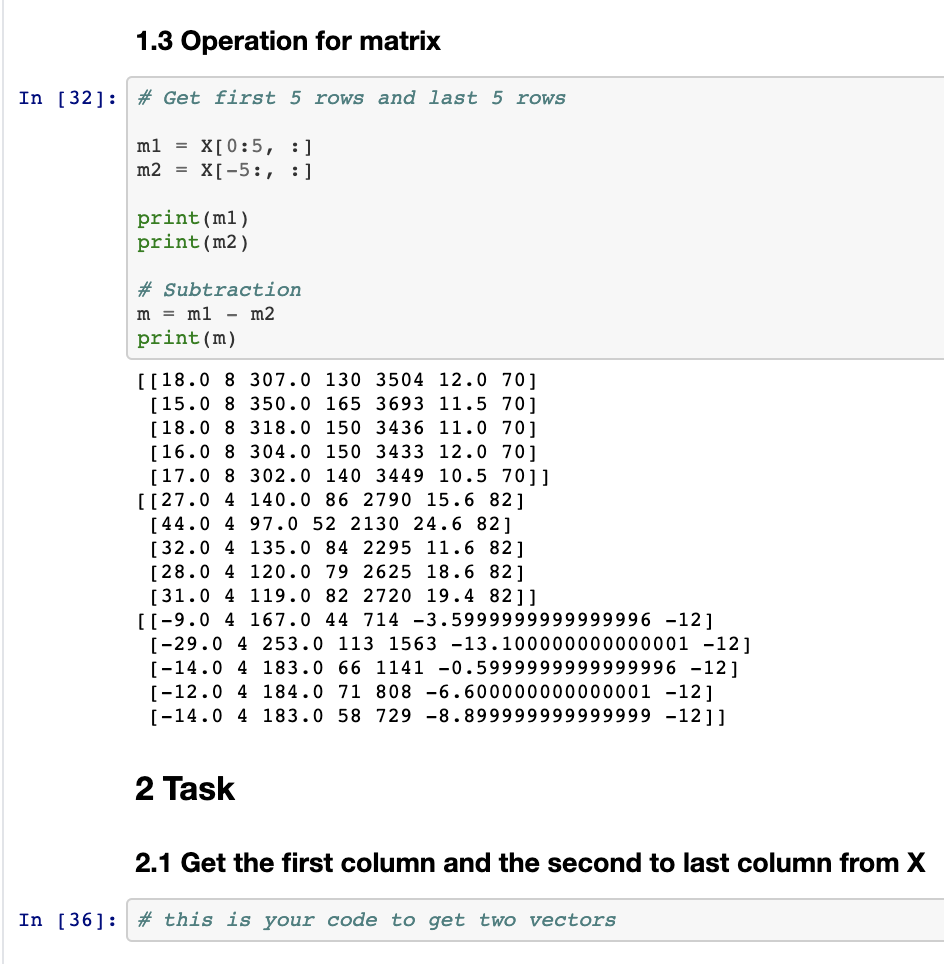
For the second part Im supposed to get the first column and second to last column from X, but Im not sure how to do this.

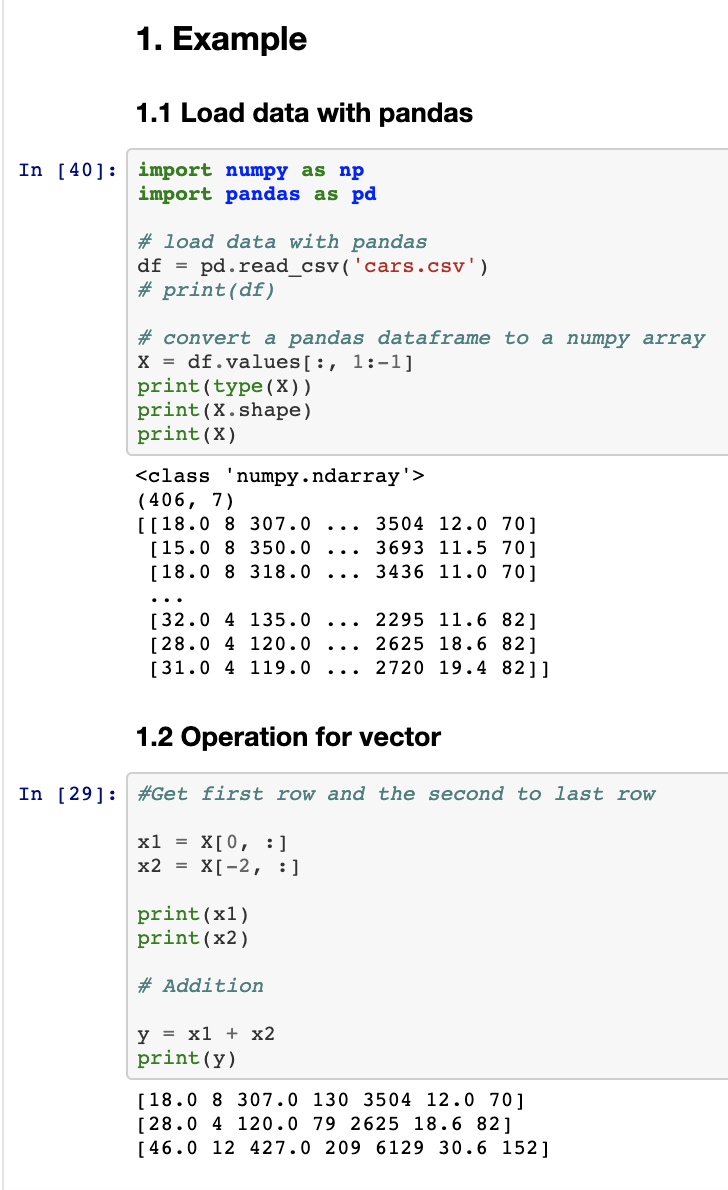
1. Example 1.1 Load data with pandas In [40]; import numpy as np import pandas as pd # load data with pandas df = pd. read_csv('cars.csv') # print (df) # convert a pandas dataframe to a numpy array X = df.values[:, 1:-1] print(type (x)) print(X.shape) print(X) (406, 7) [[18.0 8 307.0 3504 12.0 70 ] [15.0 8 350.0 3693 11.5 70] [18.0 8 318.0 3436 11.0 70] [32.0 4 135.0 [28.0 4 120.0 [31.0 4 119.0 2295 11.6 82] 2625 18.6 82] 2720 19.4 82]] 1.2 Operation for vector In [29]: #Get first row and the second to last row xl = X[0, :] x2 X[-2, :] print(x1) print(x2) # Addition y = x1 + x2 print(y) [18.0 8 307.0 130 3504 12.0 70] [28.0 4 120.0 79 2625 18.6 82] [ 46.0 12 427.0 209 6129 30.6 152] 1.3 Operation for matrix In [32]: # Get first 5 rows and last 5 rows ml = X[0:5, :] m2 = X[ -5:, :] print(ml) print (m2) # Subtraction m = ml - m2 print(m) [[18.0 8 307.0 130 3504 12.0 70] [15.0 8 350.0 165 3693 11.5 70] [18.0 8 318.0 150 3436 11.0 70 ] [16.0 8 304.0 150 3433 12.0 70] [17.0 8 302.0 140 3449 10.5 70]] [[27.0 4 140.0 86 2790 15.6 82] [44.0 4 97.0 52 2130 24.6 82] [32.0 4 135.0 84 2295 11.6 82] [28.0 4 120.0 79 2625 18.6 82] [31.0 4 119.0 82 2720 19.4 82]] [[-9.0 4 167.0 44 714 -3.5999999999999996 -12] [-29.0 4 253.0 113 1563 -13.100000000000001 -12] [-14.0 4 183.0 66 1141 -0.5999999999999996 -12] [-12.0 4 184.0 71 808 -6.600000000000001 -12] [-14.0 4 183.0 58 729 -8.899999999999999 -12]] 2 Task 2.1 Get the first column and the second to last column from X In [36]: # this is your code to get two vectors

Step by Step Solution

There are 3 Steps involved in it

1 Expert Approved Answer
Step: 1 Unlock blur-text-image
Question Has Been Solved by an Expert!

Get step-by-step solutions from verified subject matter experts

Step: 2 Unlock
Step: 3 Unlock

Students Have Also Explored These Related Databases Questions!