







Question: myatoi.c #include //more header files and declarations as needed #define SIZE 10 int main(int argc, char *argv[]){ int a,b; char arr [SIZE]; printf(Enter a word
![10 int main(int argc, char *argv[]){ int a,b; char arr [SIZE]; printf("Enter](https://dsd5zvtm8ll6.cloudfront.net/si.experts.images/questions/2024/09/66f3d26e45a05_14966f3d26da7ef8.jpg)
myatoi.c
#include//more header files and declarations as needed #define SIZE 10 int main(int argc, char *argv[]){ int a,b; char arr [SIZE]; printf("Enter a word of positive number or 'quit': " ); scanf("%s", arr); while( ... ) { printf("%s ", arr); a = atoi(arr); printf("atoi: %d (%#o, %#X)\t%d\t%d ", a,a,a, a*2, a*a); b = my_atoi(arr); printf("my_atoi: %d (%#o, %#X)\t%d\t%d ", b,b,b, b*2, b*b); .... } return 0; } /* convert an array of digit characters into a decimal int. Input is either a valid Decimal or Octal or Hex integer literal. */ int my_atoi (char c[]) { }
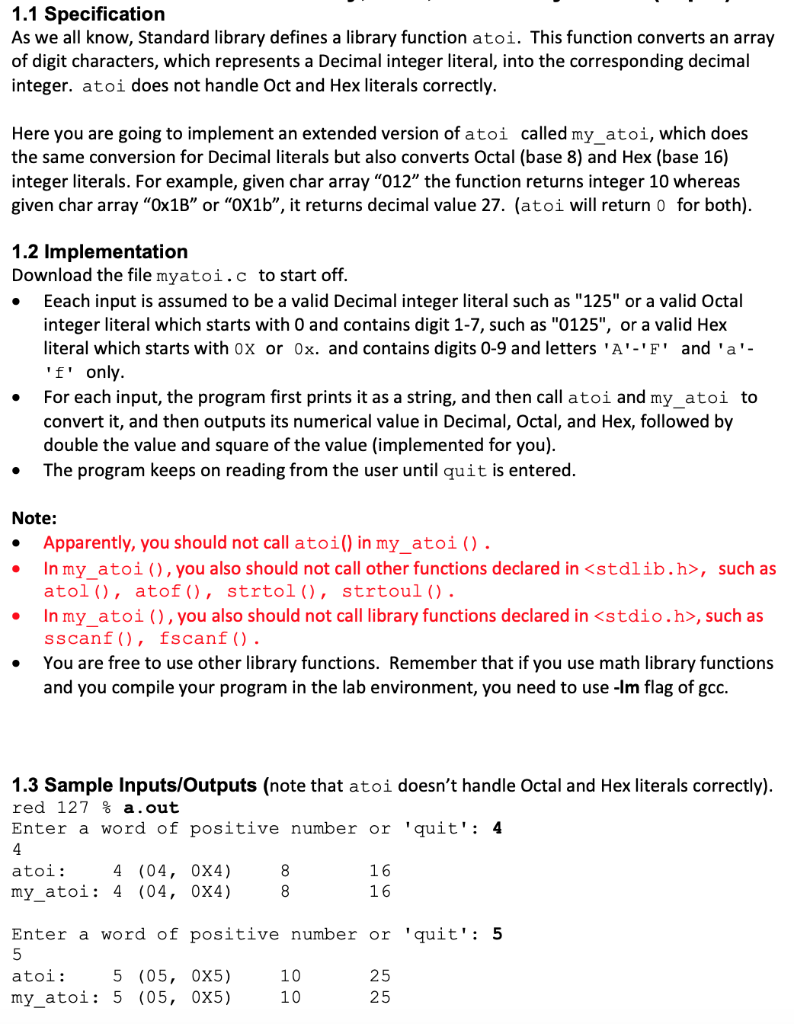
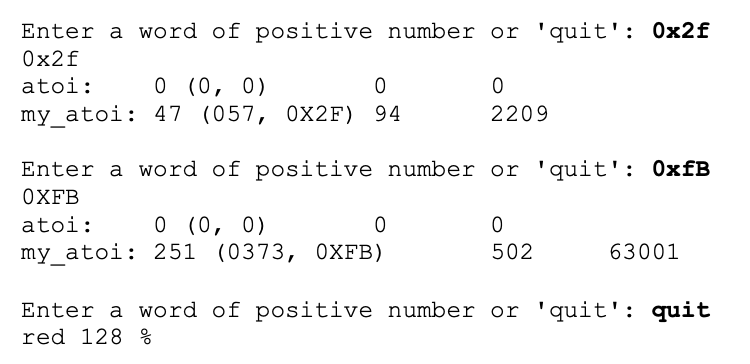
1.1 Specification As we all know, Standard library defines a library function atoi. This function converts an array of digit characters, which represents a Decimal integer literal, into the corresponding decimal integer. atoi does not handle Oct and Hex literals correctly. Here you are going to implement an extended version of atoi called my_atoi, which does the same conversion for Decimal literals but also converts Octal (base 8) and Hex (base 16) integer literals. For example, given char array "012" the function returns integer 10 whereas given char array "0x1B" or "OX1b", it returns decimal value 27. (atoi will return o for both). C 1.2 Implementation Download the file myatoi.c to start off. Eeach input is assumed to be a valid Decimal integer literal such as "125" or a valid Octal integer literal which starts with O and contains digit 1-7, such as "0125", or a valid Hex literal which starts with ox or Ox. and contains digits 0-9 and letters 'A''F' and 'a'. 'f' only. For each input, the program first prints it as a string, and then call atoi and my_atoi to convert it, and then outputs its numerical value in Decimal, Octal, and Hex, followed by double the value and square of the value (implemented for you). The program keeps on reading from the user until quit is entered. . Note: Apparently, you should not call atoi() in my_atoi(). In my_atoi (), you also should not call other functions declared in
Step by Step Solution
There are 3 Steps involved in it

Get step-by-step solutions from verified subject matter experts
 Study Help