







Question: MySQL /* Query 1. Write a SELECT statement that returns four columns from the Orders table: -OrderDate, which is the original OrderDate -OrderDateConverted, which is
MySQL
/* Query 1.
Write a SELECT statement that returns four columns from the Orders table:
-OrderDate, which is the original OrderDate
-OrderDateConverted, which is a column that uses the CONVERT function to return
the OrderDate column in this format: MM/DD/YYYY. In other words, use 2-digit
months and days and a 4-digit year, and separate each date component with slashes.
-AMPM, which is a column that uses the CONVERT function to return the OrderDate
column with the date, and the hours and minutes on a 12-hour clock with an am/pm
indicator.
-OrderTime, which is a column that uses the CONVERT function to return the OrderDate
column with 2-digit hours, minutes, and seconds on a 24-hour clock. Use leading zeros
for all date/time components.
Hint: https://docs.microsoft.com/en-us/sql/t-sql/functions/cast-and-convert-transact-sql
*/
/* Query 2.
Write a SELECT statement that returns these columns from the Orders table:
-The OrderID column
-The OrderDate column
-ApproxShipDate, which is a column calculated by adding 2 days to the OrderDate column
-The ShipDate column
-DaysToShip, which is a column that shows the number of days between the order date and
the ship date
When you have this working, add a WHERE clause that retrieves just the orders for
March 2016.
*/
/* Query 3.
Write a SELECT statement that returns four columns from the Addresses table:
-City, which is the original City column
-City_FirstWord, which shows the first word of city. For example, 'New' for 'New York'
and 'San' for 'San Francisco'.
Hint 1: use CHARINDEX to find the position of first space
Hint 2: use CASE...WHEN...THEN to handle cities with a single word and cities with two
or more words
Hint 3: in case of two or more words, use LEFT or SUBSTRING to extract the first word
*/
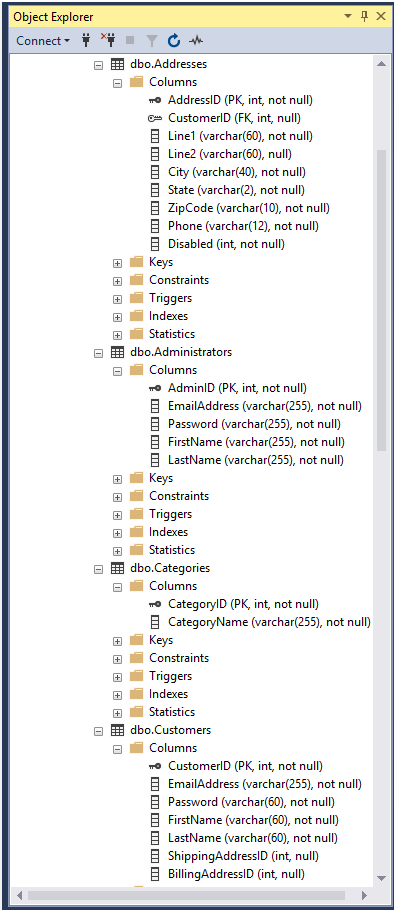
Object Explorer ConnectY& EE dboAddresses Columns o AddresslD (PK, int, not null) o CustomerlD (FK, int, null) Line! (varchar(60), not null) E Line2 (varchar(60), null) City (varchar(40), not null) State (varchar(2), not null) ZipCode (varchar(10), not null) Phone (varchar(12), not null) Disabled (int, not null) Keys Constraints Triggers Indexes " Statistics E dboAdministrators Columns o AdminlD (PK, int, not null) E EmailAddress (varchar(255), not null) Password (varchar(255), not null) | FirstName (varchar(255), not null) E LastName (varchar(255), not null) Keys Constraints Triggers Indexes " Statistics E dboCategories Columns O CategorylD (PK, int, not null) CategoryName (varchar(255), not null) Keys Constraints Triggers Indexes Statistics dboCustomers Columns CustomerlD (PK, int, not null) EmailAddress (varchar(255), not null) Password (varchar(60), not null) FirstName (varchar(60), not null) | E LastName (varchar(60), not null) ShippingAddressID (int, null) BillingAddressID (int, null) Object Explorer ConnectY& EE dboAddresses Columns o AddresslD (PK, int, not null) o CustomerlD (FK, int, null) Line! (varchar(60), not null) E Line2 (varchar(60), null) City (varchar(40), not null) State (varchar(2), not null) ZipCode (varchar(10), not null) Phone (varchar(12), not null) Disabled (int, not null) Keys Constraints Triggers Indexes " Statistics E dboAdministrators Columns o AdminlD (PK, int, not null) E EmailAddress (varchar(255), not null) Password (varchar(255), not null) | FirstName (varchar(255), not null) E LastName (varchar(255), not null) Keys Constraints Triggers Indexes " Statistics E dboCategories Columns O CategorylD (PK, int, not null) CategoryName (varchar(255), not null) Keys Constraints Triggers Indexes Statistics dboCustomers Columns CustomerlD (PK, int, not null) EmailAddress (varchar(255), not null) Password (varchar(60), not null) FirstName (varchar(60), not null) | E LastName (varchar(60), not null) ShippingAddressID (int, null) BillingAddressID (int, null)
Step by Step Solution
There are 3 Steps involved in it

Get step-by-step solutions from verified subject matter experts
 Study Help