







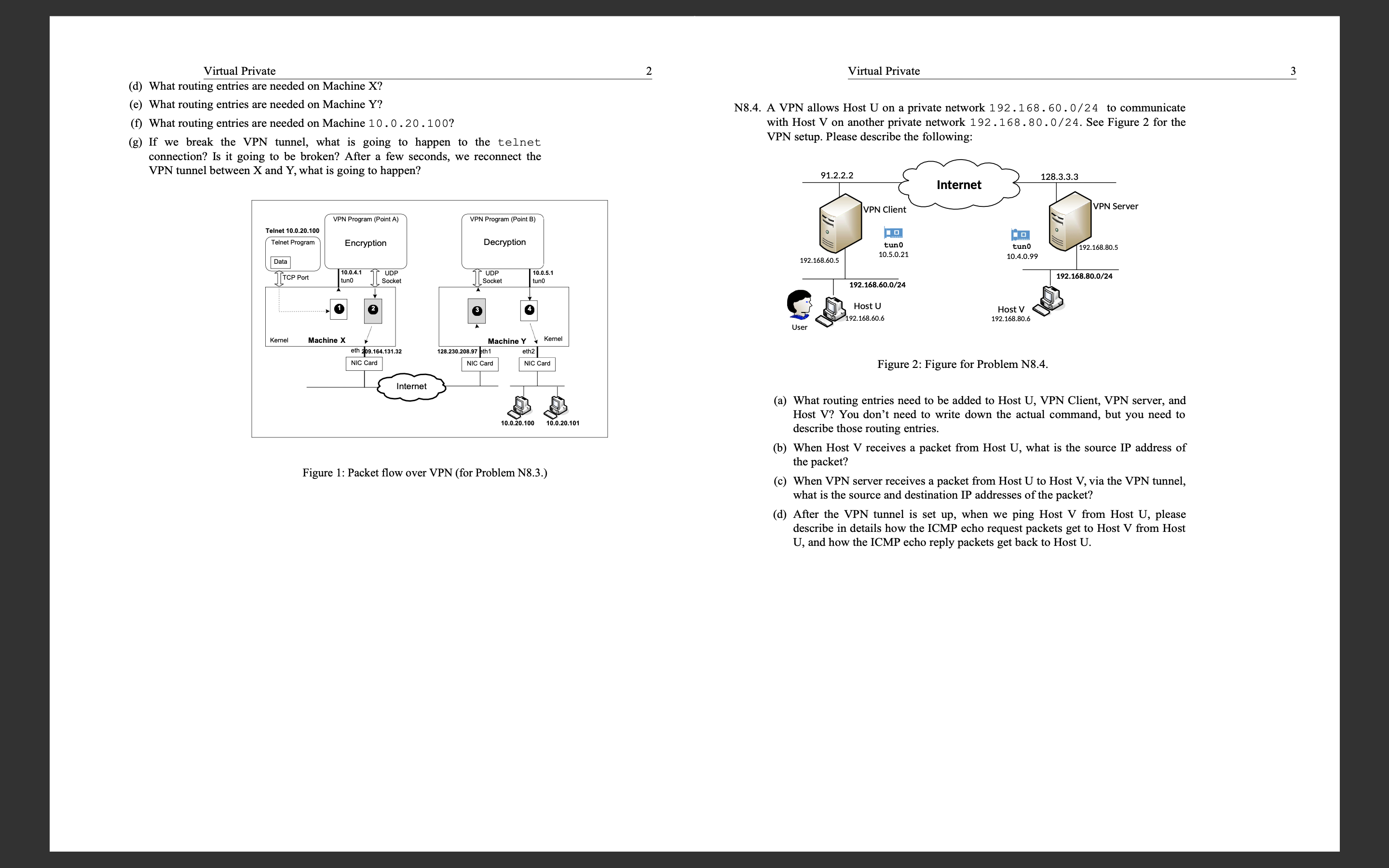
Question: N 8 . 3 . In Figure 1 , Machine x has established a VPN with Machine Y , which is a VPN server connected
N In Figure Machine has established a VPN with Machine Y which is a VPN
server connected to the private network With the VPN a user on
Machine X can now access machines on the network. The user
runs the following command on Machine X: "telnet Figure
shows the packet flow triggered by this command. Please answer the following
questions:
a What is the relationship between packets and
b What is the relationship between packets and
c What is the source IP and destination IP of packets and
d What routing entries are needed on Machine
e What routing entries are needed on Machine Y
f What routing entries are needed on Machine
g If we break the VPN tunnel, what is going to happen to the telnet
connection? Is it going to be broken? After a few seconds, we reconnect the
VPN tunnel between and what is going to happen?
Figure : Packet flow over VPN for Problem N
N A VPN allows Host U on a private network to communicate
with Host V on another private network See Figure for the
VPN setup. Please describe the following:
Figure : Figure for Problem N
a What routing entries need to be added to Host U VPN Client, VPN server, and
Host V You don't need to write down the actual command, but you need to
describe those routing entries.
b When Host V receives a packet from Host U what is the source IP address of
the packet?
c When VPN server receives a packet from Host U to Host V via the VPN tunnel,
what is the source and destination IP addresses of the packet?
d After the VPN tunnel is set up when we ping Host V from Host U please
describe in details how the ICMP echo request packets get to Host V from Host
U and how the ICMP echo reply packets get back to Host U
Step by Step Solution
There are 3 Steps involved in it
1 Expert Approved Answer
Step: 1 Unlock

Question Has Been Solved by an Expert!
Get step-by-step solutions from verified subject matter experts
Step: 2 Unlock
Step: 3 Unlock
 Study Help