







Question: n this exercise, you ll update the JavaFX MPG application to handle invalid data. When you re done, the application should display a dialog box
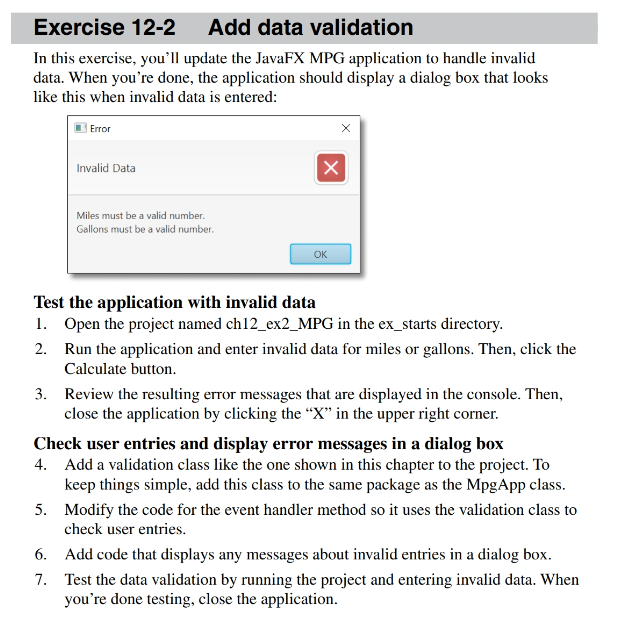
n this exercise, youll update the JavaFX MPG application to handle invalid data. When youre done, the application should display a dialog box that looks like this when invalid data is entered:
Test the application with invalid data Open the project named chexMPG in the exstarts directory. Run the application and enter invalid data for miles or gallons. Then, click the Calculate button.
Review the resulting error messages that are displayed in the console. Then, close the application by clicking the X in the upper right corner.
Check user entries and display error messages in a dialog box Add a validation class like the one shown in this chapter to the project. To keep things simple, add this class to the same package as the MpgApp class.
Modify the code for the event handler method so it uses the validation class to check user entries.
Add code that displays any messages about invalid entries in a dialog box. Test the data validation by running the project and entering invalid data. When youre done testing, close the application.Exercise Add data validation
In this exercise, you'll update the JavaFX MPG application to handle invalid
data. When you're done, the application should display a dialog box that looks
like this when invalid data is entered:
Test the application with invalid data
Open the project named chexMPG in the exstarts directory.
Run the application and enter invalid data for miles or gallons. Then, click the
Calculate button.
Review the resulting error messages that are displayed in the console. Then,
close the application by clicking the in the upper right corner.
Check user entries and display error messages in a dialog box
Add a validation class like the one shown in this chapter to the project. To
keep things simple, add this class to the same package as the MpgApp class.
Modify the code for the event handler method so it uses the validation class to
check user entries.
Add code that displays any messages about invalid entries in a dialog box.
Test the data validation by running the project and entering invalid data. When
you're done testing, close the application.
My code:
import javafx.application.Application;
import javafx.event.ActionEvent;
import javafx.event.EventHandler;
import javafx.geometry.Insets;
import javafx.scene.Scene;
import javafx.scene.control.Button;
import javafx.scene.control.Label;
import javafx.scene.control.TextField;
import javafx.scene.layout.GridPane;
import javafx.stage.Stage;
public class MPGApplication extends Application
@Override
public void startStage primaryStage
Button btn new Button;
TextField miles new TextField;
TextField gallons new TextField;
TextField mpg new TextField;
mpgsetEditablefalse;
btnsetTextCalculate;
btnsetOnActionnew EventHandler
@Override
public void handleActionEvent event
try
double mil Double.parseDoublemilesgetText;
double gall Double.parseDoublegallonsgetText;
double mpgVal milgall;
mpgsetTextmpgVal;
catchException e
System.out.printlnError;
;
GridPane root new GridPane;
root.setVgap;
root.setHgap;
root.setPaddingnew Insets;
root.addnew LabelMiles : ;
root.addmiles;
root.addnew LabelGallons : ;
root.addgallons;
root.addnew LabelMPG : ;
root.addmpg;
root.addbtn;
Scene scene new Sceneroot;
primaryStage.setTitleMiles Per Gallon Calculator";
primaryStage.setScenescene;
primaryStage.show;
public static void mainString args
launchargs;
Step by Step Solution
There are 3 Steps involved in it
1 Expert Approved Answer
Step: 1 Unlock

Question Has Been Solved by an Expert!
Get step-by-step solutions from verified subject matter experts
Step: 2 Unlock
Step: 3 Unlock
 Study Help