







Question: N23 B 1 Function: RATE, Formula: Multiply, Subtract; Cell Referencing 2 3 Using Excel to Account for Notes Payable 4 PROBLEM X fx 9
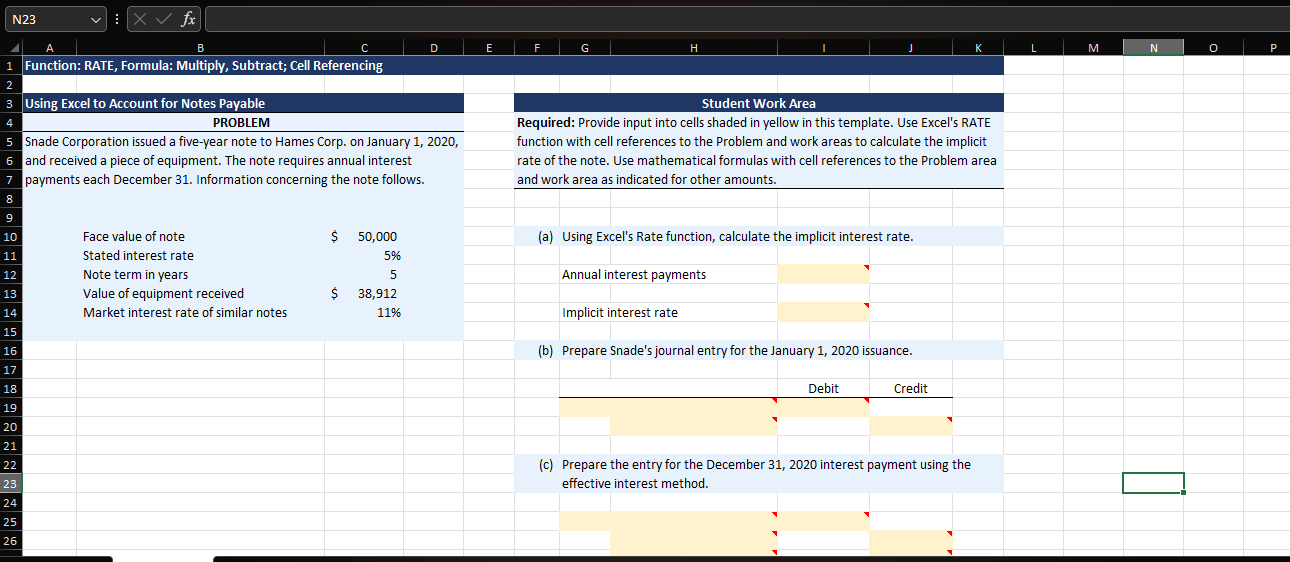
N23 B 1 Function: RATE, Formula: Multiply, Subtract; Cell Referencing 2 3 Using Excel to Account for Notes Payable 4 PROBLEM X fx 9 10 5 Snade Corporation issued a five-year note to Hames Corp. on January 1, 2020, 6 and received a piece of equipment. The note requires annual interest 7 payments each December 31. Information concerning the note follows. 8 11 12 13 14 15 16 17 18 19 20 21 22 23 24 25 26 Face value of note Stated interest rate Note term in years Value of equipment received Market interest rate of similar notes $ D 50,000 5% 5 38,912 11% E F G H Student Work Area Required: Provide input into cells shaded in yellow in this template. Use Excel's RATE function with cell references to the Problem and work areas to calculate the implicit rate of the note. Use mathematical formulas with cell references to the Problem area and work area as indicated for other amounts. (a) Using Excel's Rate function, calculate the implicit interest rate. Annual interest payments Implicit interest rate (b) Prepare Snade's journal entry for the January 1, 2020 issuance. Debit Credit (c) Prepare the entry for the December 31, 2020 interest payment using the effective interest method. M N O P
Step by Step Solution
3.40 Rating (147 Votes )
There are 3 Steps involved in it
Solving for Implicit Interest Rate and Journal Entries Implicit Interest Rate a Well use the RATE fu... View full answer

Get step-by-step solutions from verified subject matter experts
 Study Help