







Question: Name the range N 2 1 :P 3 1 Name Lookup Use VLOOKUP formulas to find an exact match for the First and Last names
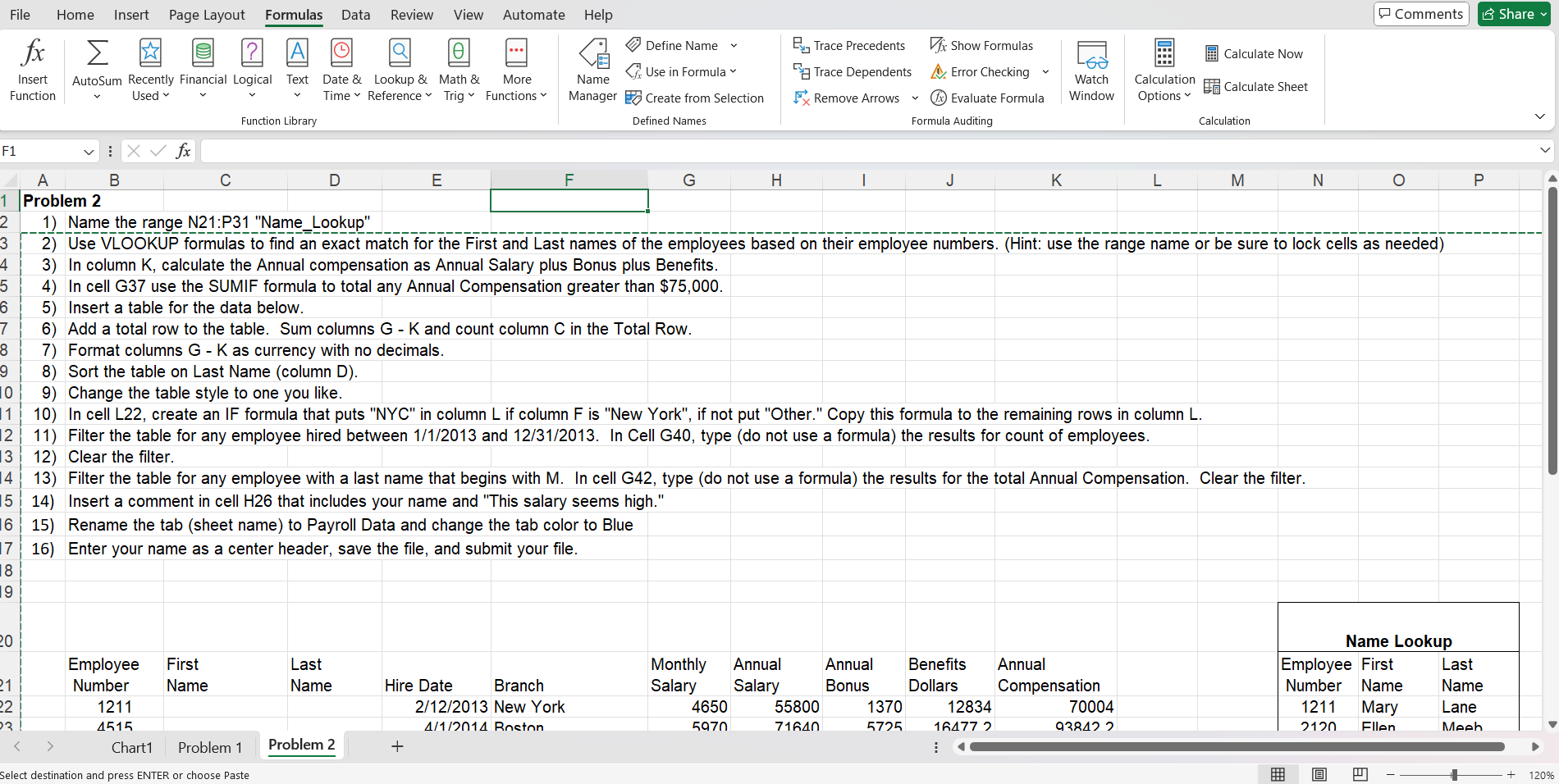
Name the range N:P "Name Lookup"
Use VLOOKUP formulas to find an exact match for the First and Last names of the employees based on their employee numbers. Hint: use the range name or be sure to lock cells as needed
In column K calculate the Annual compensation as Annual Salary plus Bonus plus Benefits.
In cell G use the SUMIF formula to total any Annual Compensation greater than $
Insert a table for the data below.
Add a total row to the table. Sum columns and count column in the Total Row.
Format column G K as currency with no decimals.
Sort the table on Last Name column D
Change the table style to one you like.
In cell L create an IF formula that puts NYC in column if column is "New York", if not put "Other." Copy this formula to the remaining rows in column
Filter the table for any employee hired between and In Cell G type do not use a formula the results for count of employees.
Clear the filter.
Filter the table for any employee with a last name that begins with M In cell G type do not use a formula the results for the total Annual Compensation. Clear the filter.
Insert a comment in cell H that includes your name and "This salary seems high."
Rename the tab sheet name to Payroll Data and change the tab color to Blue
Enter your name as a center header, save the file, and submit your file Use VLOOKUP formulas to find an exact match for the First and Last names of the employees based on their employee numbers. Hint: use the range name or be sure to lock cells as needed
In column K calculate the Annual compensation as Annual Salary plus Bonus plus Benefits.
In cell G use the SUMIF formula to total any Annual Compensation greater than $
Insert a table for the data below.
Add a total row to the table. Sum columns G K and count column C in the Total Row.
Format columns G K as currency with no decimals.
Sort the table on Last Name column D
Change the table style to one you like.
In cell L create an IF formula that puts NYC in column L if column F is "New York", if not put "Other." Copy this formula to the remaining rows in column L
Filter the table for any employee hired between and In Cell G type do not use a formula the results for count of employees.
Clear the filter.
Filter the table for any employee with a last name that begins with M In cell G type do not use a formula the results for the total Annual Compensation. Clear the filter.
Insert a comment in cell H that includes your name and "This salary seems high."
Rename the tab sheet name to Payroll Data and change the tab color to Blue
Enter your name as a center header, save the file, and submit your file.
Name Lookup
"Employee
Number" "First
Name" "Last
Name" Hire Date Branch "Monthly
Salary" "Annual
Salary" "Annual
Bonus" "Benefits
Dollars" "Annual
Compensation" "Employee
Number" "First
Name" "Last
Name"
New York Mary Lane
Boston Ellen Meeb
Philadelphia Jake Gray
Boston Martha Macky
Boston Jen Richards
New York Debbie Davie
New York Mark Mollen
Philadelphia Leanne Waters
Philadelphia Paul Early
Boston Hank Randal
Compensation
Count of employees hired between and
Total Compensation for employee with a last name that begins with M
Step by Step Solution
There are 3 Steps involved in it
1 Expert Approved Answer
Step: 1 Unlock

Question Has Been Solved by an Expert!
Get step-by-step solutions from verified subject matter experts
Step: 2 Unlock
Step: 3 Unlock
 Study Help