







Question: Narrative/Case Study For this lab, you will be creating SQL statements to build a series of relational tables, using SQL CREATE statements in a script
Narrative/Case Study
For this lab, you will be creating SQL statements to build a series of relational tables, using SQL CREATE statements in a script file format for the Student Database. You will then populate those tables through the use of INSERT statements with sample data.
You will need to create a script file and name it YourName_Lab3.txt containing the following code.
The drop table statements listed later in the specifications of this lab.
The CREATE TABLE statements required to build the six tables.
The INSERT statements necessary to insert all of the sample data.
Six select statements to verify that the data is in the tables and accessible.
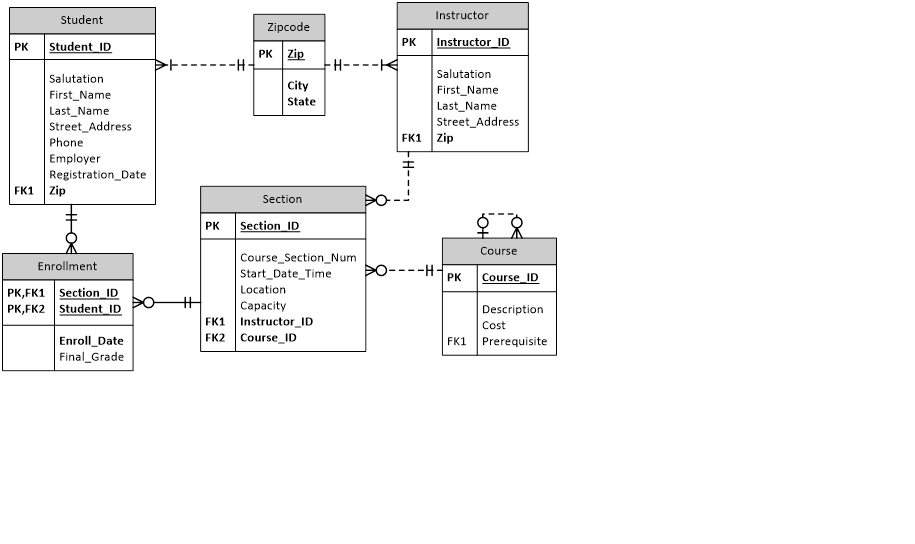
To help you accomplish this task successfully, you are being supplied with the ERD Diagram which follows, and the exact data to be inserted into each table, which may be found via the Doc Sharing tab on the course website.
The following guidelines are being provided to help assist you in creating your script file.
Use the names for the tables and columns as listed in the ERD. Do not change them as it will affect your grade.
Creating Constraints
Create all NOT NULL constraints as indicated in the ERD.
Create all PK constraints as indicated in the ERD.
Create all FK constraints as indicated in the ERD.
Create all of the tables and all of the constraints before populating any of the tables with data.
Because FK constraints will be in place when the insert statements are executed, you will need to consider carefully which tables must be created before others in order to ensure that FK constraints are not violated.
The COURSE table has a self-referencing FK constraint. Specifically, some courses have prerequisite courses. Consequently, the record for a course possessing a prerequisite course cannot be successfully inserted into the table unless the record for the prerequisite course has already been inserted. This may require you to reorder the insert statements to resolve FK violations when loading the table. You may reorder the data provided for this table, but do not alter it.
The data for one table intentionally contains a record containing an FK constraint that is not resolved by a record in the parent table. This orphaned record has been included as an exercise for you to find. Because this record has an unreconciled FK constraint, it cannot be successfully inserted. You will need to delete or comment out the insert statement for this one record in order to produce a script that runs without errors.
Aside from reordering the data for the COURSE table as necessary, and commenting out/deleting the ONE record whose FK dependency cannot be resolved by the data provided, you are NOT to modify, add to, or delete from the data provided. Your SQL script must produce tables containing data identical to the expected solution set, or points will be deducted.
ALL character strings must be enclosed in single quotes. This includes alpha strings and alphanumeric (remember that any formatting within a numeric string makes it alphanumeric).
If you are inserting a NULL, do not enclose the word NULL in single quotes, as this will insert the word NULL into the row. To insert a null you simply use the word NULL.
LAB STEPS
STEP 1: The DROP Statements
A DROP TABLE statement must appear in your script file, prior to the SQL statements for creating the table in question. This will allow you to run and re-run your script file as often as you need to. The very first time you run your script the table does not exist, so the IF EXISTS clause causes the statement to be ignored. Thereafter, the table will be deleted, ensuring that your CREATE TABLE statement creates the table fresh and clean, with only the attributes present in the current revision of the CREATE statement. Here is an example of one of the six DROP TABLE statements you will need to create.
DROP TABLE IF EXISTS `ENROLLMENT` ;
STEP 2: The CREATE TABLE Statements
Next, define the CREATE TABLE statements for the six tables that you are to create based upon the ERD (provided above) for this lab. Be sure to follow the guidelines given above on how and where to create the different types of constraints for each table. This will include PK, FK, and NOT NULL constraints.
STEP 3: The INSERT Statements for the Data
The third step is to create the insert statements to insert the sample data into the tables created in Step 2. The data for each table is contained in text files, named for the table whose data it contains. Modify the format of the data (e.g., date formats and add or eliminate quote marks) as needed to craft your insert statements, but do not change the inherent value of the data.
STEP 4: The SELECT Statements
The next step of the lab will be to create the select statements to verify the data was inserted correctly. You should have six select statements; one for each table. The command is SELECT * FROM Table_Name; For example, to select all columns from the Student table, the command would be SELECT * FROM student;
Be sure to save all of the above statements in your script file.
STEP 5: Testing and Verifying Your Script
Now we come to the point of verifying that your script file works by creating all of the tables and inserting and selecting all of the data. Your script should execute without errors, and select the entire contents of each table in turn. Inspect your query results to ensure that each column and row from each of the tables is as expected. Correct and repeat testing of your script until no errors occur, and the results match expectations. You may also use the DESCRIBE command to display the table structure of each table, and verify that PK and NULL constraints have been properly created. The SHOW CREATE TABLE statement is useful for displaying the SQL that would regenerate a given table, which is a useful way for checking that FKs have been properly created.
Examples:
DESCRIBE STUDENT;
SHOW CREATE TABLE STUDENT;
| CIS336 Lab #3 Data Dictionary | |||||||||
| Table Name | Column Name | Description of Data | Data Type | Lgth | NOT NULL | PK | FK | Default | |
| ZIPCODE | |||||||||
| Zip | Zipcode | INTEGER | 11 | Y | |||||
| City | City name | VARCHAR | 25 | Y | |||||
| State | State | CHAR | 2 | Y | |||||
| INSTRUCTOR | |||||||||
| Instructor_ID | Instructor id number | INTEGER | 6 | Y | |||||
| Salutation | Greeting | VARCHAR | 5 | ||||||
| First_name | First name | VARCHAR | 25 | Y | |||||
| Last_Name | Last name | VARCHAR | 25 | Y | |||||
| Street_Address | Street address | VARCHAR | 50 | ||||||
| Zip | Zipcode | INTEGER | 11 | Y | Y | ||||
| STUDENT | |||||||||
| Student_ID | Student id number | INTEGER | 6 | Y | |||||
| Salutation | Greeting | VARCHAR | 5 | ||||||
| First_name | First name | VARCHAR | 25 | Y | |||||
| Last_Name | Last name | VARCHAR | 25 | Y | |||||
| Street_Address | Street address | VARCHAR | 50 | ||||||
| Zip | Zipcode | INTEGER | 11 | Y | Y | ||||
| Phone | Local phone number | VARCHAR | 15 | Y | |||||
| Employer | Employer | VARCHAR | 50 | ||||||
| Registration_Date | Date registered | DATE | Y | ||||||
| COURSE | |||||||||
| Course_ID | Course identifier | INTEGER | 6 | Y | |||||
| Description | Course description | VARCHAR | 50 | Y | |||||
| Cost | Cost of course | DECIMAL | 8,2 | ||||||
| Prerequisite | Prerequisite course | INTEGER | 6 | Y | |||||
| SECTION | |||||||||
| Section_ID | Section identifier | INTEGER | 8 | Y | |||||
| Course_Section_Num | Section number in course | INTEGER | 6 | Y | |||||
| Start_Date_Time | Date and time course begins | DATETIME | Y | ||||||
| Location | Building and room | VARCHAR | 10 | ||||||
| Capacity | Max number of students | INTEGER | 3 | ||||||
| Instructor_ID | Instructor identifier | INTEGER | 6 | Y | Y | ||||
| Course_ID | Course identifier | INTEGER | 6 | Y | Y | ||||
| ENROLLMENT | |||||||||
| Section_ID | Section identifier | INTEGER | 8 | Y | Y | ||||
| Student_ID | Student identifier | INTEGER | 6 | Y | Y | ||||
| Enroll_Date | Date of enrollment | DATE | Y | ||||||
| Final_Grade | Grade | CHAR | 1 | ||||||
Data for STUDENT TABLE
(StudentID, Salutation, First_Name, Last_Name, Street_Address, Phone, Employer, Registration_Date, Zip)
102,Mr.,Fred,Crocitto,101-09 120th St.,718-555-5555,Albert Hildegard Co.,1/22/2007,11419
103,Ms.,J.,Landry,7435 Boulevard East #45,201-555-5555,Albert Hildegard Co.,1/22/2007,7047
104,Ms.,Laetia,Enison,144-61 87th Ave,718-555-5555,Albert Hildegard Co.,1/22/2007,11435
105,Mr.,Angel,Moskowitz,320 John St.,201-555-5555,Alex. & Alexander,1/22/2007,7024
163,Ms.,Nicole,Gillen,4301 N Ocean #103,904-555-5555,Oil of America Corp.,2/2/2007,10025
223,Mr.,Frank,Pace,13 Burlington Dr.,203-555-5555,Board Utilities,2/8/2007,10025
399,Mr.,Jerry,Abdou,460 15th St. #4,718-555-5555,Health Mgmt.Systems,2/23/2007,10025
Data for INSTRUCTOR Table
(Instructor_ID,Salutation,First_Name,Last_Name,Street_Address,Zip)
101,Mr,Fernand,Hanks,100 East 87th,10015
102,Mr,Tom,Wojick,518 West 120th,10025
103,Ms,Nina,Schorin,210 West 101st,10025
104,Mr,Gary,Pertez,34 Sixth Ave,10035
105,Ms,Anita,Morris,34 Maiden Lane,10015
106,Rev,Todd,Smythe,210 West 101st,10025
107,Dr,Marilyn,Frantzen,254 Bleeker,10005
Data For ZIPCODE Table
(Zip,City,State)
7024,Ft. Lee,NJ
7047,North Bergen,NJ
10005,New York,NY
10015,New York,NY
10025,New York,NY
10035,New York,NY
11419,Richmond Hill,NY
11435,Jamaica,NY
Data for COURSE Table
(Course_No,Description,Cost,Prerequisite)
330,Network Administration,1195,130
310,Operating Systems,1195,NULL
142,Project Management,1195,20
140,Systems Analysis,1195,20
130,Intro to Unix,1195,310
25,Intro to Programming,1195,140
20,Intro to Information Systems,1195,NULL
Data for SECTION Table
(Section_ID,Course_ID,Course_Section_Num,Start_Date_Time,Location,Instructor_ID,Capacity)
81,20,2,7/24/2007 9:30,L210,103,15
86,25,2,6/10/2007 9:30,L210,107,15
89,25,5,5/15/2007 9:30,L509,103,25
92,25,8,6/13/2007 9:30,L509,106,25
104,330,1,7/14/2007 10:30,L511,104,25
119,142,1,7/14/2007 9:30,L211,103,25
155,122,4,5/4/2007 9:30,L210,107,15
Data for ENROLLMENT Table
Student_ID,Section_ID,Enroll_Date,Final_Grade
102,86,1/30/2007,B
102,89,1/30/2007,A
103,81,1/30/2007,NULL
104,81,1/30/2007,A
163,92,2/10/2007,NULL
223,104,2/16/2007,C
223,119,2/16/2007,NULL
Student Instructor Zipcode PK Instructor ID PK Student ID PKZip Salutation First_Name Last Name Street Address Phone Employer Registration Date Salutation First_Name Last Name Street Address City State FK1 Zip FK1 Zip Section PK Section ID Course Course Section Num Start Date_Time Location Capacity Enrollment --HPK PK Course ID PK,FK1 Section ID PK,FK2Student ID Description Cost FK1 Instructor ID FK2 Course ID Enroll_Date Final Grade FK1 Prerequisite
Step by Step Solution
There are 3 Steps involved in it

Get step-by-step solutions from verified subject matter experts
 Study Help