







Question: Need a program in FORTRAN that meets these specs program Lab4 implicit none !declare variables real:: Fahrenheit, Kelvin integer:: start_temp, stop_temp, i, j, k1 !
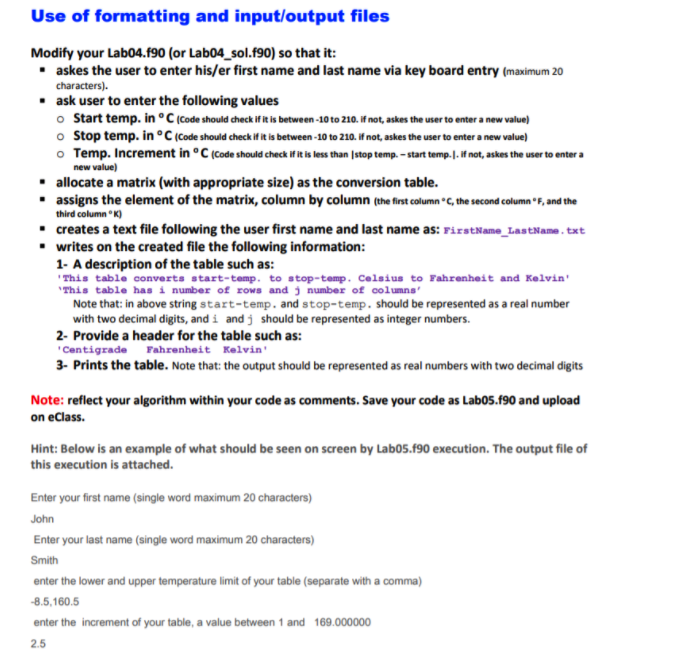
Need a program in FORTRAN that meets these specs
program Lab4
implicit none
!declare variables
real:: Fahrenheit, Kelvin
integer:: start_temp, stop_temp, i, j, k1
! array named temp_array
real, dimension (:,:), allocatable :: temp_array
print*,"Type start temperature in Centigrate"
read*, start_temp
print*, "Type stop temperature in Centigrate"
read*, stop_temp
print*, "Type the difference"
read*, j
if (start_temp200 .or. j>(stop_temp-start_temp)) then
do
print*, "Invalid Value Type the difference"
read*, j
if (start_temp>-10 .or. stop_temp(stop_temp-start_temp)) exit
! if the user eneters the correct number it ends
end do
end if
! allocate memory to temp_array
allocate ( temp_array(((stop_temp-start_temp)/j)+1,3) )
write(*,*) '| ','Centigrate','()','|',' ', 'Fahrenhite','()' ,'|','Kelvin','()', '|'
k1=1
do i = start_temp, stop_temp, +j
Kelvin=i+273.15
Fahrenheit= (32.0+i*1.8)
temp_array(k1,1)=i
temp_array(k1,2)= Fahrenheit
temp_array(k1,3)=Kelvin
k1=k1+1
end do
k1=1
! print the values
do while(k1
write(*,*) '| ',temp_array(k1,1),'|',' ', temp_array(k1,2) ,'|',temp_array(k1,3), '|'
k1=k1+1
end do
! To display size of Array
write(*,*) 'Size of Matrix',size(temp_array)
deallocate (temp_array)
end program Lab4
new value) Use of formatting and input/output files Modify your Lab04.190 (or Lab04_sol.f90) so that it: askes the user to enter his/er first name and last name via key board entry (maximum 20 characters). . ask user to enter the following values Start temp. inC (Code should check if it is between-10 to 210. If not, askes the user to enter a new value) o Stop temp. in C (Code should check if it is between -10 to 210. If not, askes the user to enter a new value) o Temp. Increment in Code should check if it is less than stop temp.-start temp.). If not, askes the user to enter a allocate a matrix (with appropriate size) as the conversion table. assigns the element of the matrix, column by column (the first column.C, the second column", and the third column) creates a text file following the user first name and last name as: FirstName_LastName.txt writes on the created file the following information: 1- A description of the table such as: This table converts start-temp. to stop-temp. Celsius to Fahrenheit and Kelvin' This table has i number of rows and number of columns' Note that: in above string start-temp. and stop-temp. should be represented as a real number with two decimal digits, and i and j should be represented as integer numbers. 2- Provide a header for the table such as: Centigrade Fahrenheit Kelvin' 3- Prints the table. Note that: the output should be represented as real numbers with two decimal digits Note: reflect your algorithm within your code as comments. Save your code as Labo5.f90 and upload on eClass. Hint: Below is an example of what should be seen on screen by Labo5.f90 execution. The output file of this execution is attached. Enter your first name (single word maximum 20 characters) John Enter your last name (single word maximum 20 characters) Smith enter the lower and upper temperature limit of your table (separate with a comma) -8.5,160.5 enter the increment of your table, a value between 1 and 169.000000 2.5 new value) Use of formatting and input/output files Modify your Lab04.190 (or Lab04_sol.f90) so that it: askes the user to enter his/er first name and last name via key board entry (maximum 20 characters). . ask user to enter the following values Start temp. inC (Code should check if it is between-10 to 210. If not, askes the user to enter a new value) o Stop temp. in C (Code should check if it is between -10 to 210. If not, askes the user to enter a new value) o Temp. Increment in Code should check if it is less than stop temp.-start temp.). If not, askes the user to enter a allocate a matrix (with appropriate size) as the conversion table. assigns the element of the matrix, column by column (the first column.C, the second column", and the third column) creates a text file following the user first name and last name as: FirstName_LastName.txt writes on the created file the following information: 1- A description of the table such as: This table converts start-temp. to stop-temp. Celsius to Fahrenheit and Kelvin' This table has i number of rows and number of columns' Note that: in above string start-temp. and stop-temp. should be represented as a real number with two decimal digits, and i and j should be represented as integer numbers. 2- Provide a header for the table such as: Centigrade Fahrenheit Kelvin' 3- Prints the table. Note that: the output should be represented as real numbers with two decimal digits Note: reflect your algorithm within your code as comments. Save your code as Labo5.f90 and upload on eClass. Hint: Below is an example of what should be seen on screen by Labo5.f90 execution. The output file of this execution is attached. Enter your first name (single word maximum 20 characters) John Enter your last name (single word maximum 20 characters) Smith enter the lower and upper temperature limit of your table (separate with a comma) -8.5,160.5 enter the increment of your table, a value between 1 and 169.000000 2.5
Step by Step Solution
There are 3 Steps involved in it

Get step-by-step solutions from verified subject matter experts
 Study Help