







Question: need asap MATLAB CODE Matlab Functions you may use Clear all, clc, rand, size, length zeros, ones. [] (empty array), sort, flip, rem mod Lab
need asap MATLAB CODE
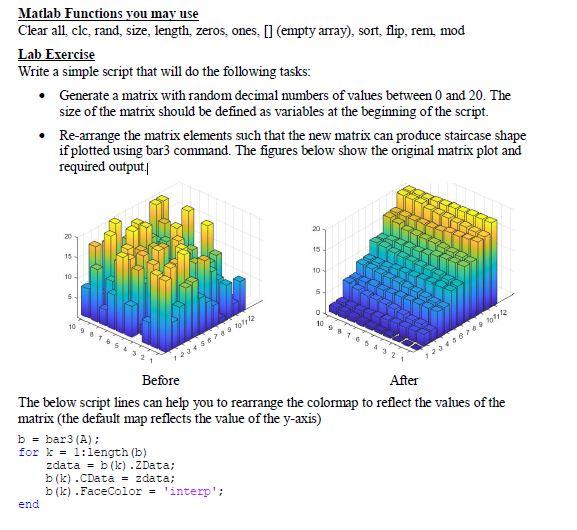
Matlab Functions you may use Clear all, clc, rand, size, length zeros, ones. [] (empty array), sort, flip, rem mod Lab Exercise Write a simple script that will do the following tasks: Generate a matrix with random decimal numbers of values between 0 and 20. The size of the matrix should be defined as variables at the beginning of the script. Re-arrange the matrix elements such that the new matrix can produce staircase shape if plotted using bar3 command. The figures below show the original matrix plot and required output. 1 20 20 15 15 10 10 5 5 O 109105 23:09 12 Str 1072 Before After The below script lines can help you to rearrange the colormap to reflect the values of the matrix (the default map reflects the value of the y-axis) b = bar3 (A) : for k=1:length (b) zdata = b (b).Data; b(k). Data = zdata; b(k).FaceColor = 'interp'; end Matlab Functions you may use Clear all, clc, rand, size, length zeros, ones. [] (empty array), sort, flip, rem mod Lab Exercise Write a simple script that will do the following tasks: Generate a matrix with random decimal numbers of values between 0 and 20. The size of the matrix should be defined as variables at the beginning of the script. Re-arrange the matrix elements such that the new matrix can produce staircase shape if plotted using bar3 command. The figures below show the original matrix plot and required output. 1 20 20 15 15 10 10 5 5 O 109105 23:09 12 Str 1072 Before After The below script lines can help you to rearrange the colormap to reflect the values of the matrix (the default map reflects the value of the y-axis) b = bar3 (A) : for k=1:length (b) zdata = b (b).Data; b(k). Data = zdata; b(k).FaceColor = 'interp'; end
Step by Step Solution
There are 3 Steps involved in it

Get step-by-step solutions from verified subject matter experts
 Study Help