







Question: need code c 2 Requirements Write a C program, convert. c, with the usage: usage: convert IN OUT SIZE NUMBER IN: -inB NUMBER is binary.
need code c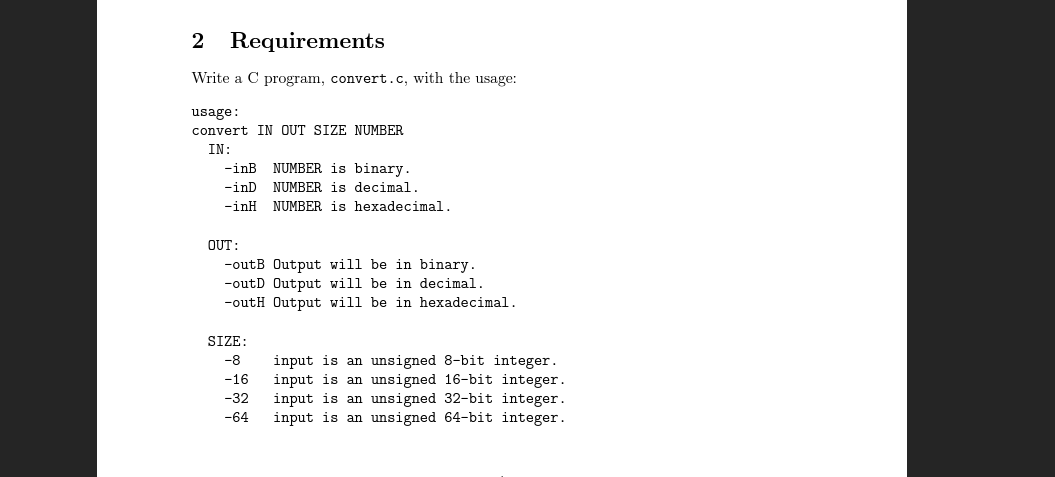
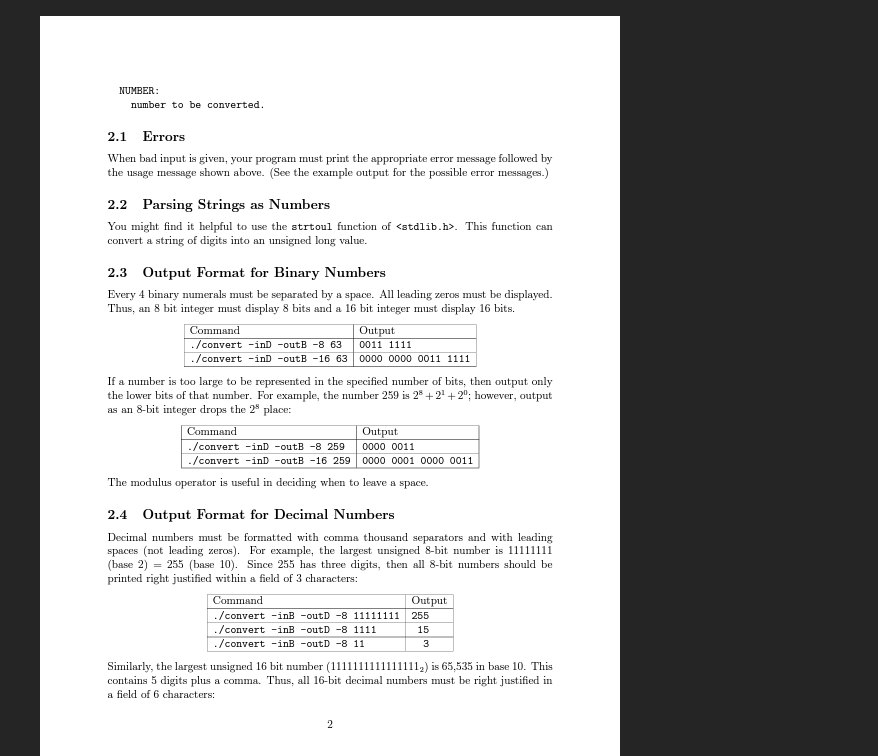
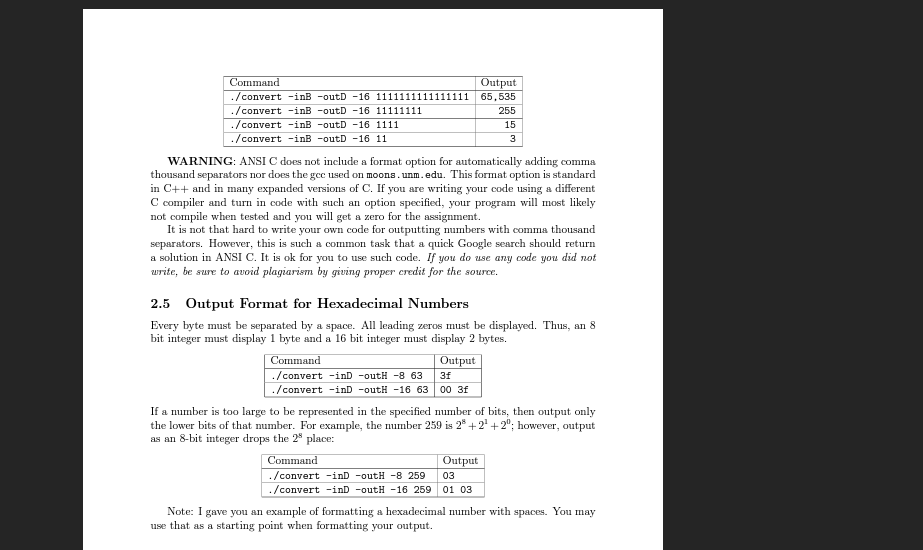
2 Requirements Write a C program, convert. c, with the usage: usage: convert IN OUT SIZE NUMBER IN: -inB NUMBER is binary. -inD NUMBER is decimal. -inH NUMBER is hexadecimal. OUT: -outB Output will be in binary. -outD Output will be in decimal. -outH Output will be in hexadecimal. SIZE: -8 input is an unsigned 8-bit integer. -16 input is an unsigned 16-bit integer. -32 input is an unsigned 32-bit integer. -64 input is an unsigned 64-bit integer. 2.1 Errors When bad input is given, your program must print the appropriate error message followed by the usage message shown above. (See the example output for the possible error messages.) 2.2 Parsing Strings as Numbers convert a string of digits into an unsigned long value. 2.3 Output Format for Binary Numbers Every 4 binary numerals must be separated by a space. All leading zeros must be displayed. Thus, an 8 bit integer must display 8 bits and a 16 bit integer must display 16 bits. If a number is too large to be represented in the specified number of bits, then output only the lower bits of that number. For example, the number 259 is 28+21+20; however, output as an 8-bit integer drops the 28 place: The modulus operator is useful in deciding when to leave a space. 2.4 Output Format for Decimal Numbers Decimal numbers must be formatted with comma thousand separators and with leading spaces (not leading zeros). For example, the largest unsigned 8-bit number is 1111111 (base 2) =255 (base 10). Since 255 has three digits, then all 8 -bit numbers should be printed right justified within a field of 3 characters: Similarly, the largest unsigned 16 bit number (1111111111111112) is 65,535 in base 10 . This contains 5 digits plus a comma. Thus, all 16-bit decimal numbers must be right justified in a field of 6 characters: WARNING: ANSI C does not include a format option for automatically adding comma thousand separators nor does the gec used on moons. unm. edu. This format option is standard in C++and in many expanded versions of C. If you are writing your code using a different C compiler and turn in code with such an option specified, your program will most likely not compile when tested and you will get a zero for the assignment. It is not that hard to write your own code for outputting numbers with comma thousand separators. However, this is such a common task that a quick Google search should return a solution in ANSI C. It is ok for you to use such code. If you do use any code you did not write, be sure to avoid plagiarism by giving proper credit for the source. 2.5 Output Format for Hexadecimal Numbers Every byte must be separated by a space. All leading zeros must be displayed. Thus, an 8 bit integer must display 1 byte and a 16 bit integer must display 2 bytes. If a number is too large to be represented in the specified number of bits, then output only the lower bits of that number. For example, the number 259 is 28+21+20; however, output as an 8-bit integer drops the 28 place: Note: I gave you an example of formatting a hexadecimal number with spaces. You may use that as a starting point when formatting your output
Step by Step Solution
There are 3 Steps involved in it

Get step-by-step solutions from verified subject matter experts
 Study Help