







Question: Need help debugging The following hint(s) may help you locate some ways in which your solution may be improved: The program did not produce the

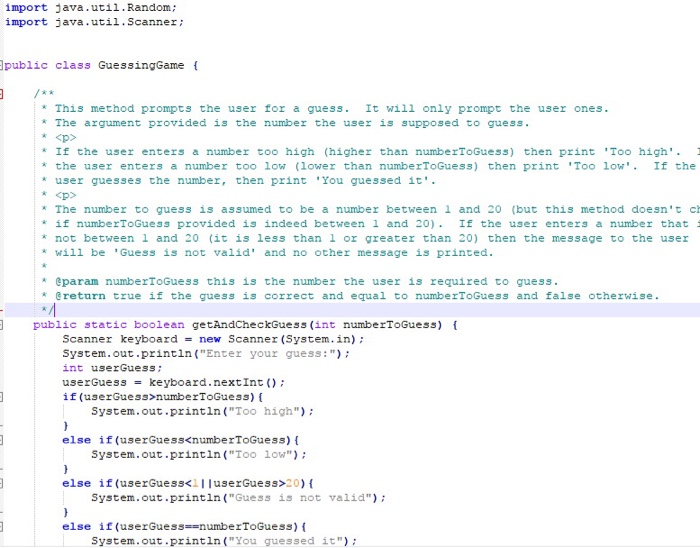
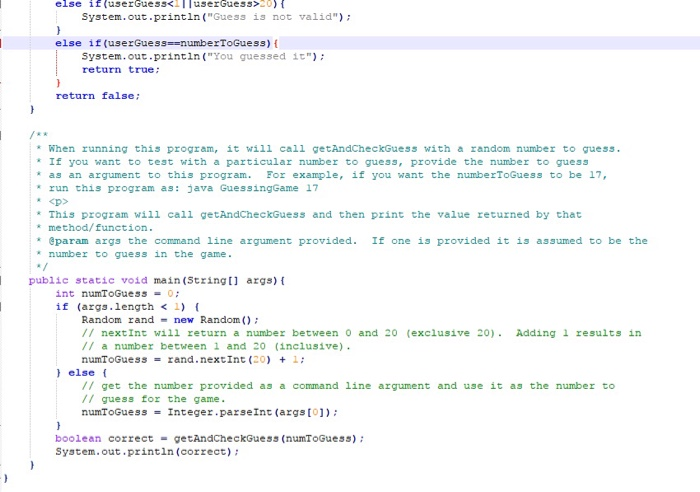
The following hint(s) may help you locate some ways in which your solution may be improved: The program did not produce the correct output. There should be a single prompt followed by exactly one message as output after entering a guess. (The prompt should not end with a new line.) (9 occurrences) import Java.util.Random; import java.util.Scanner public class GuessingGame t This method prompts the user for a guess. It will only prompt the user ones. The argument provided is the number the user is supposed to guess If the user enters a number too high (higher than numberToGuess) then print 'Too high'. *the user enters a number too low (lower than numberToGuess) then print 'Too low'. If the user guesses the number, then print 'You guessed it' ap> *The number to guess is assumed to be a number betwee 1 and 20 (but this method doesn't ch * if numberToGuess provided is indeed between 1 and 20). If the user enters a number that not between 1 and 20 (it is less than 1 or greater than 20) then the message to the user will be 'Guess is not valid' and no other message is printed. eparam numberToGuess this is the number the user is required to guess. @return true if the guess is correct and equal to numberToGuess and false otherwise. public static boolean getAndCheckGuess (int numberToGuess) Scanner keyboard = new Scanner (System.in); System.out.printin("Enter your guess: int userGuess userGuess keyboard, nextInt() ; if (userGuess>numberToGuess) ( System.out.println (Too high") else if (userGuess
Step by Step Solution
There are 3 Steps involved in it

Get step-by-step solutions from verified subject matter experts
 Study Help