







Question: Need help doing this in AUTOCAD 3 D program. PLEASE STEP by STEP production as i need help better understanding autocad 3 d will leave
Need help doing this in
AUTOCAD D program. PLEASE
STEP by STEP production as i need help better understanding autocad d will leave a like if steps are clear and understandable
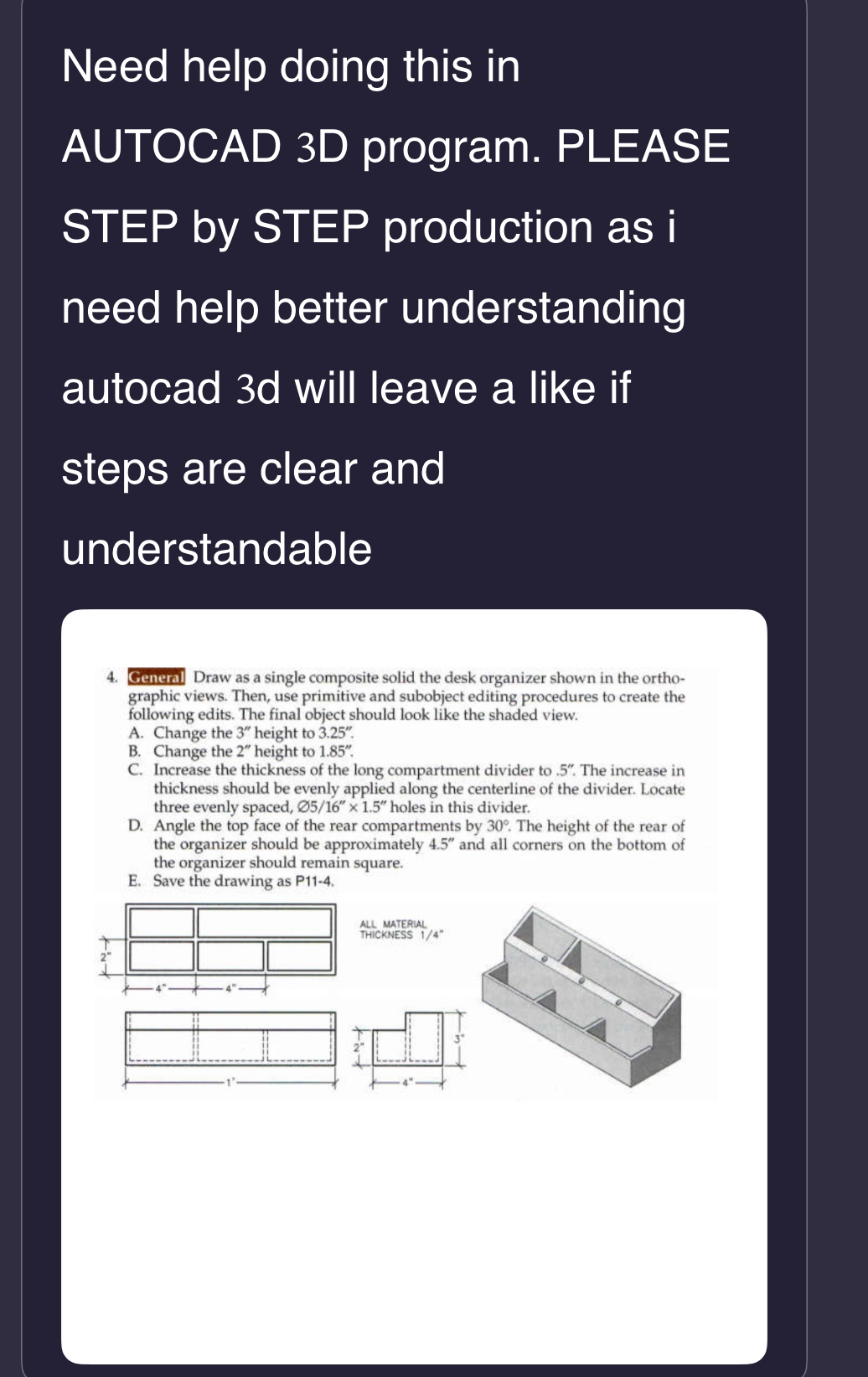
General Draw as a single composite solid the desk organizer shown in the orthographic views. Then, use primitive and subobject editing procedures to create the following edits. The final object should look like the shaded view.
A Change the height to
B Change the height to
C Increase the thickness of the long compartment divider to The increase in thickness should be evenly applied along the centerline of the divider. Locate three evenly spaced, holes in this divider.
D Angle the top face of the rear compartments by The height of the rear of the organizer should be approximately and all corners on the bottom of the organizer should remain square.
E Save the drawing as P
Step by Step Solution
There are 3 Steps involved in it
1 Expert Approved Answer
Step: 1 Unlock

Question Has Been Solved by an Expert!
Get step-by-step solutions from verified subject matter experts
Step: 2 Unlock
Step: 3 Unlock
 Study Help