







Question: Need Help finishing Code! Seems like I am missing some steps please Help! Step 1. Implement the Walker class. The Walker only needs two pieces
Need Help finishing Code! Seems like I am missing some steps please Help!
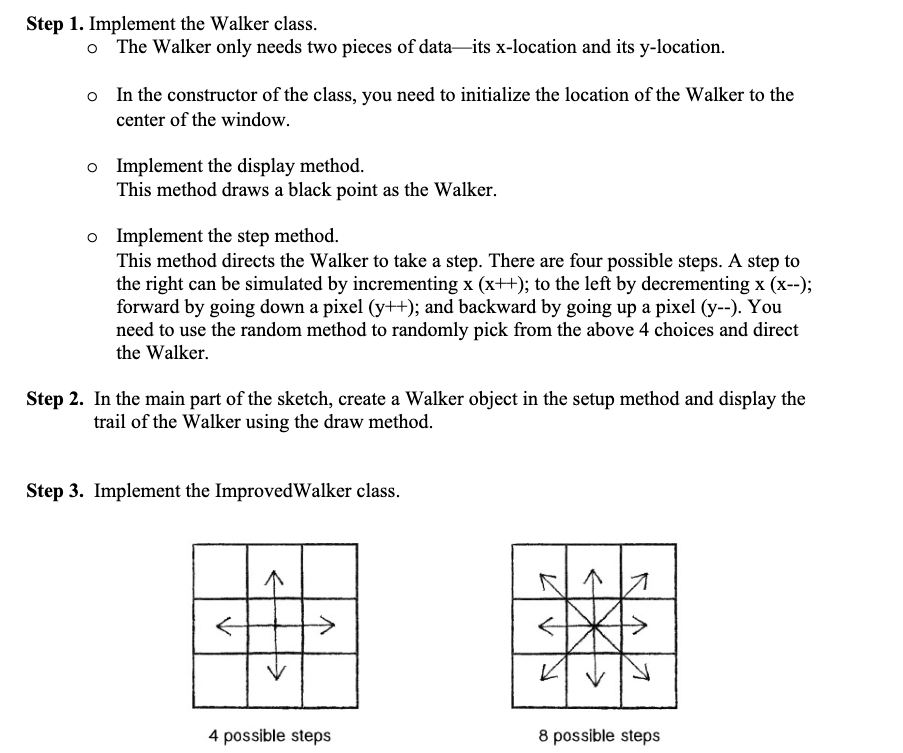
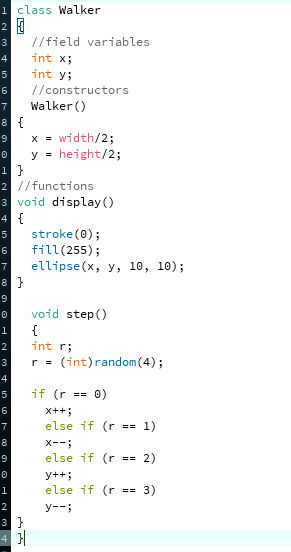
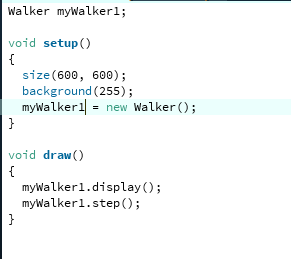
Step 1. Implement the Walker class. The Walker only needs two pieces of dataits x-location and its y-location. o In the constructor of the class, you need to initialize the location of the Walker to the center of the window. o Implement the display method. This method draws a black point as the Walker. o Implement the step method. This method directs the Walker to take a step. There are four possible steps. A step to the right can be simulated by incrementing x (x++); to the left by decrementing x (x--); forward by going down a pixel (y++); and backward by going up a pixel (y--). You need to use the random method to randomly pick from the above 4 choices and direct the Walker Step 2. In the main part of the sketch, create a Walker object in the setup method and display the trail of the Walker using the draw method. Step 3. Implement the Improved Walker class. NNA 4 possible steps 8 possible steps i class Walker 3 4 //field variables int x; int y; 5 6 //constructors 7 Walker() 8 { 9 width/2; height/2; 1} 2 // functions 3 void display() 4 { 5 stroke(0); 6 fill(255); 7 ellipse (x, y, 10, 10); int ri 9 0 void step) 1 { 2 3 r = (int) random(4); 4 5 if (r == 0) 6 X++; else if (r == 1) 8 X--; 9 else if (r == 2) y++; 1 else if (r == 3) 2 y--; 3 } Step 1. Implement the Walker class. The Walker only needs two pieces of dataits x-location and its y-location. o In the constructor of the class, you need to initialize the location of the Walker to the center of the window. o Implement the display method. This method draws a black point as the Walker. o Implement the step method. This method directs the Walker to take a step. There are four possible steps. A step to the right can be simulated by incrementing x (x++); to the left by decrementing x (x--); forward by going down a pixel (y++); and backward by going up a pixel (y--). You need to use the random method to randomly pick from the above 4 choices and direct the Walker Step 2. In the main part of the sketch, create a Walker object in the setup method and display the trail of the Walker using the draw method. Step 3. Implement the Improved Walker class. NNA 4 possible steps 8 possible steps i class Walker 3 4 //field variables int x; int y; 5 6 //constructors 7 Walker() 8 { 9 width/2; height/2; 1} 2 // functions 3 void display() 4 { 5 stroke(0); 6 fill(255); 7 ellipse (x, y, 10, 10); int ri 9 0 void step) 1 { 2 3 r = (int) random(4); 4 5 if (r == 0) 6 X++; else if (r == 1) 8 X--; 9 else if (r == 2) y++; 1 else if (r == 3) 2 y--; 3 }
Step by Step Solution
There are 3 Steps involved in it

Get step-by-step solutions from verified subject matter experts
 Study Help