







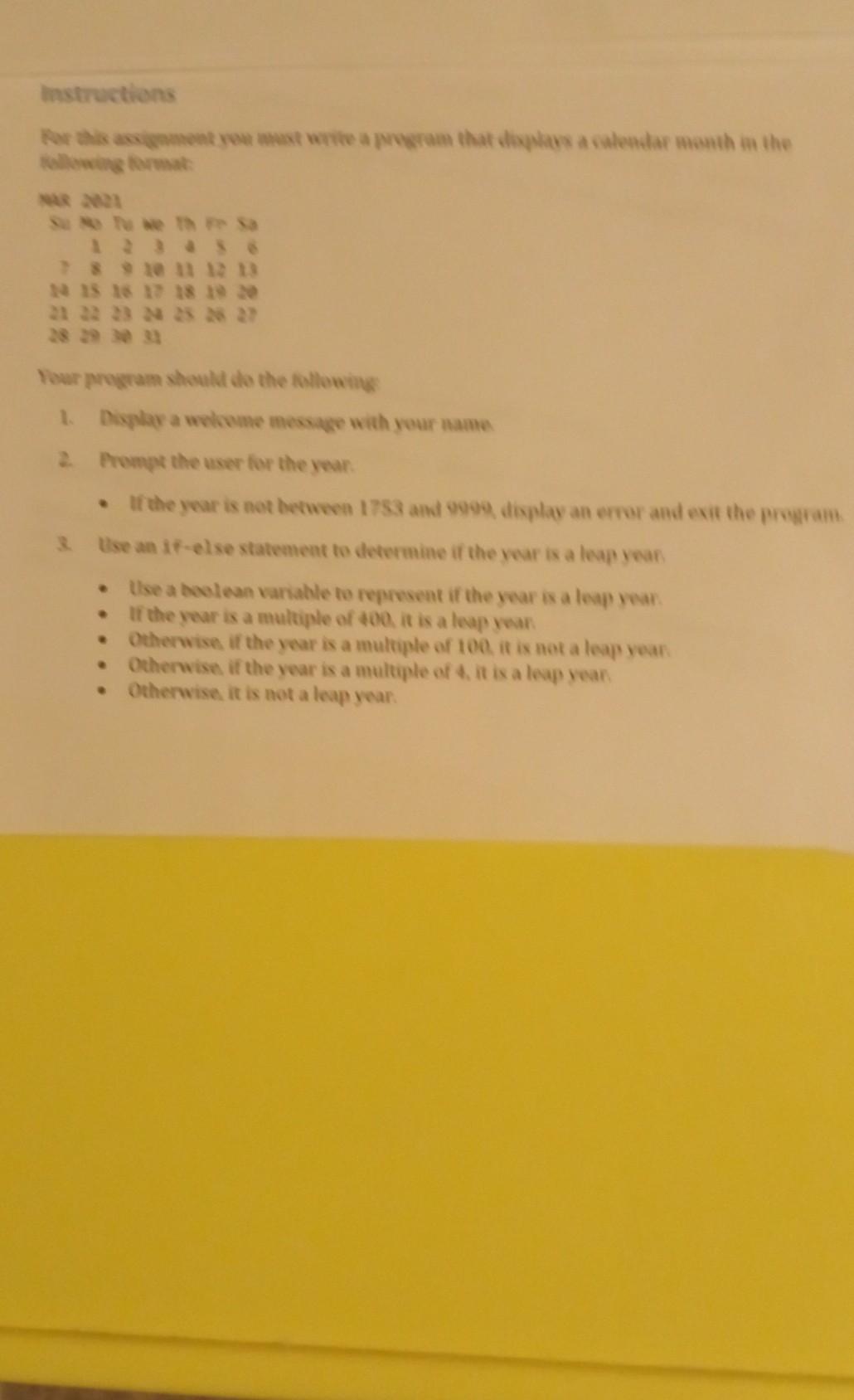
Question: Need help, I am stuck. thanks it's Java programming language. Instructions Por is assignment you write a program that displays a calendar month im the
Need help, I am stuck. thanks
it's Java programming language.
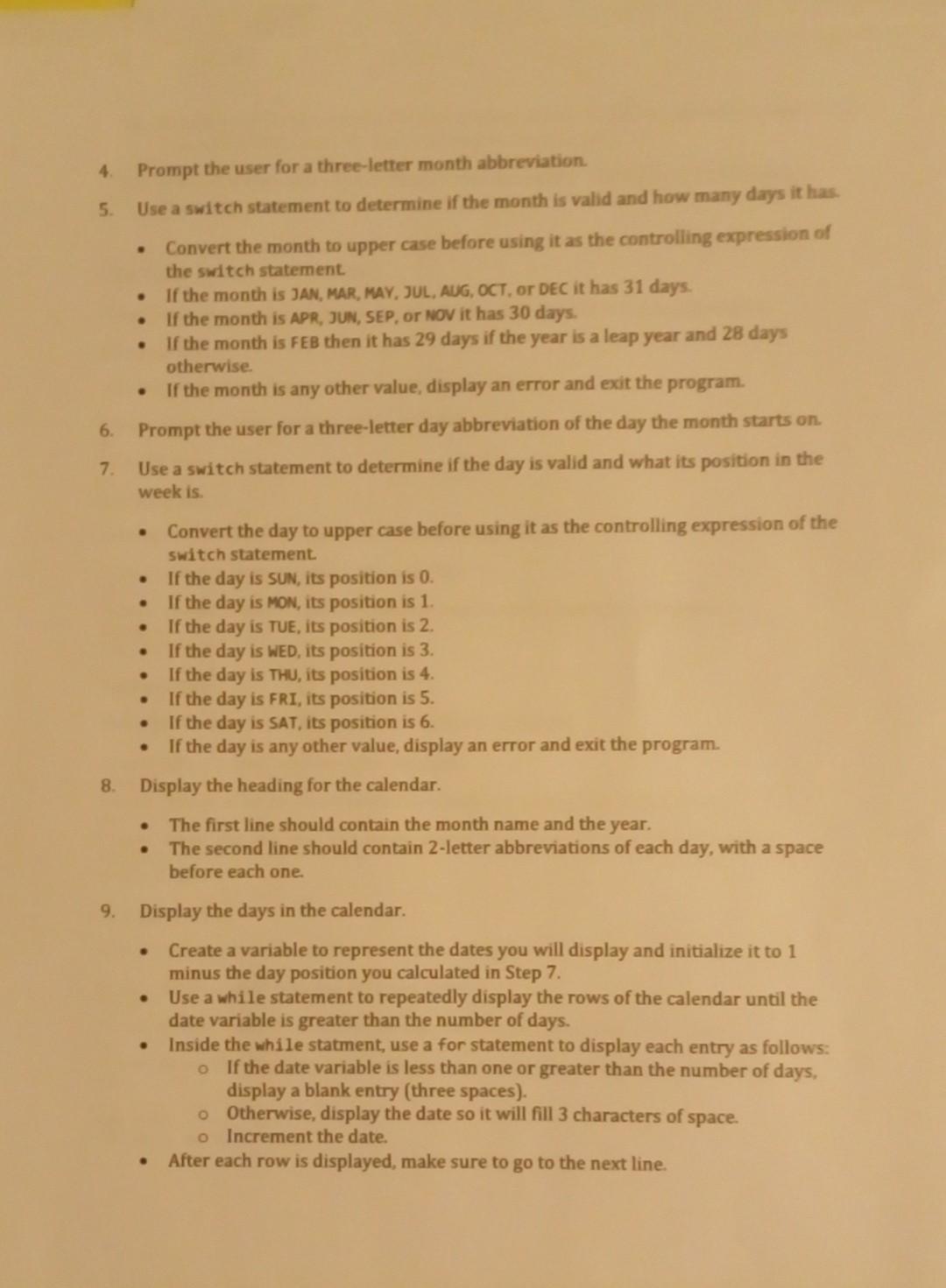
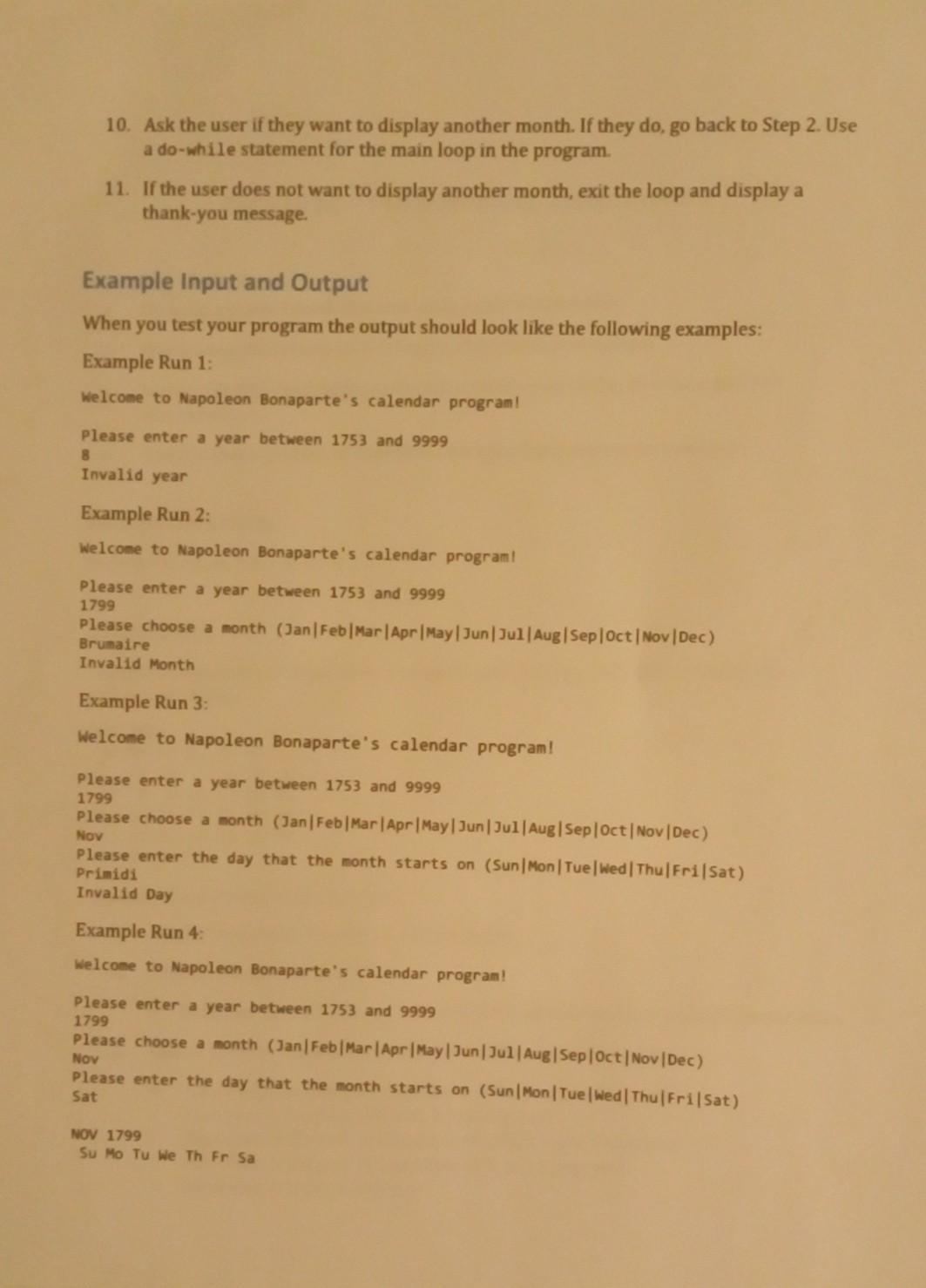
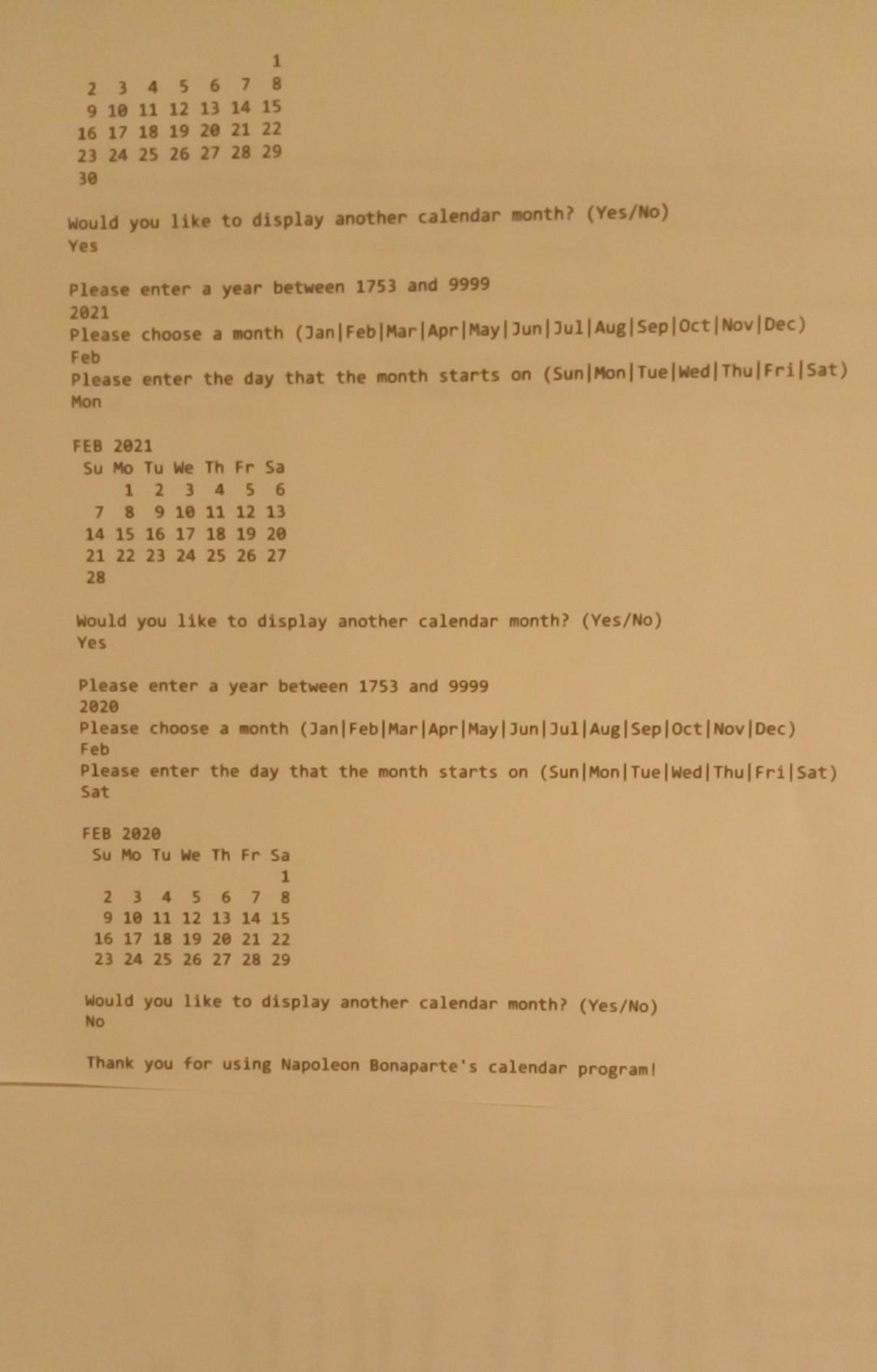
Instructions Por is assignment you write a program that displays a calendar month im the llowing format Ste 11 12 13 15 16 17 18 19 20 Your program should do the following 1. Display a welcome message with your name 2. Prompt the user for the year. If the year is not between 1753 and 9999 display an error and exit the program Use an if-else statement to determine if the year is a leap year Use a boolean variable to represent if the year is a leap year If the year is a multiple of 400it is a leap year Otherwise if the year is a multiple of 100 it is not a leap year Otherwise, if the year is a multiple of 4. it is a leap year Otherwise it is not a leap year . 4. Prompt the user for a three-letter month abbreviation 5. Use a switch statement to determine if the month is valid and how many days it has Convert the month to upper case before using it as the controlling expression of the switch statement. If the month is JAN, MAR, MAY, JUL, AUG, OCT. Or DEC it has 31 days. If the month is APR, JUN, SEP, or NOV it has 30 days. If the month is FEB then it has 29 days if the year is a leap year and 28 days otherwise If the month is any other value, display an error and exit the program. 6. Prompt the user for a three-letter day abbreviation of the day the month starts on. 7 Use a switch statement to determine if the day is valid and what its position in the week is. . . . . . Convert the day to upper case before using it as the controlling expression of the Switch statement If the day is SUN, its position is 0. If the day is MON, its position is 1. If the day is TUE, its position is 2. If the day is WED, its position is 3. If the day is THU, its position is 4. If the day is FRI, its position is 5. If the day is SAT, its position is 6. If the day is any other value, display an error and exit the program. 8. Display the heading for the calendar. The first line should contain the month name and the year. The second line should contain 2-letter abbreviations of each day, with a space before each one 9. Display the days in the calendar. Create a variable to represent the dates you will display and initialize it to 1 minus the day position you calculated in Step 7. Use a while statement to repeatedly display the rows of the calendar until the date variable is greater than the number of days. Inside the while statment, use a for statement to display each entry as follows: o If the date variable is less than one or greater than the number of days, display a blank entry (three spaces). o Otherwise, display the date so it will fill 3 characters of space. O Increment the date. After each row is displayed, make sure to go to the next line. . . 10. Ask the user if they want to display another month. If they do, go back to Step 2. Use a do-while statement for the main loop in the program 11. If the user does not want to display another month, exit the loop and display a thank-you message. Example Input and Output When you test your program the output should look like the following examples: Example Run 1: Welcome to Napoleon Bonaparte's calendar program! Please enter a year between 1753 and 9999 8 Invalid year Example Run 2: Welcome to Napoleon Bonaparte's calendar program! Please enter a year between 1753 and 9999 1799 Please choose a month (Jan Feb Mar Apr May Jun Jul Aug Sep Oct Nov Dec) Brumaire Invalid Month Example Run 3: Welcome to Napoleon Bonaparte's calendar program! Please enter a year between 1753 and 9999 1799 Please choose a month (Jan Feb Mar Apr May Jun Jul Aug Sep Oct Nov Dec) Please enter the day that the month starts on (Sun Mon Tue Wed Thu Fri Sat) Primidi Invalid Day Example Run 4: Welcome to Napoleon Bonaparte's calendar program! Please enter a year between 1753 and 9999 1799 Please choose a month (Jan Feb Mar Apr May Jun Jul Aug Sep Oct Nov Dec) Nov Please enter the day that the month starts on (Sun Mon Tue Wed Thu Fri Sat) Sat NOV 1799 Su Mo Tu We Th Fr Sa 1 2 3 4 5 6 7 8 9 10 11 12 13 14 15 16 17 18 19 20 21 22 23 24 25 26 27 28 29 30 Would you like to display another calendar month? (Yes/No) Yes Please enter a year between 1753 and 9999 2021 Please choose a month (Jan Feb Mar Apr May Jun Jul Aug Sep Oct Nov Dec) Feb Please enter the day that the month starts on (Sun Mon Tue Wed Thu Fri Sat) Mon FEB 2021 Su Mo Tu We Th Fr Sa 1 2 3 4 5 6 7 8 9 10 11 12 13 14 15 16 17 18 19 20 21 22 23 24 25 26 27 28 Would you like to display another calendar month? (Yes/No) Yes Please enter a year between 1753 and 9999 2020 Please choose a month (Jan Feb Mar Apr May Jun Jul Aug Sep Oct Nov Dec) Please enter the day that the month starts on (Sun Mon Tue Wed Thu Fri Sat) Feb Sat FEB 2020 Su Mo Tu We Th Fr Sa 1 2 3 4 5 6 7 8 9 10 11 12 13 14 15 16 17 18 19 20 21 22 23 24 25 26 27 28 29 Would you like to display another calendar month? (Yes/No) No Thank you for using Napoleon Bonaparte's calendar program
Step by Step Solution
There are 3 Steps involved in it

Get step-by-step solutions from verified subject matter experts
 Study Help