Question: Need help please, the programmjng language is C the assignment is stated on the second page, the first page just shows some examples thanks! Where
Need help please, the programmjng language is C
the assignment is stated on the second page, the first page just shows some examples
thanks!
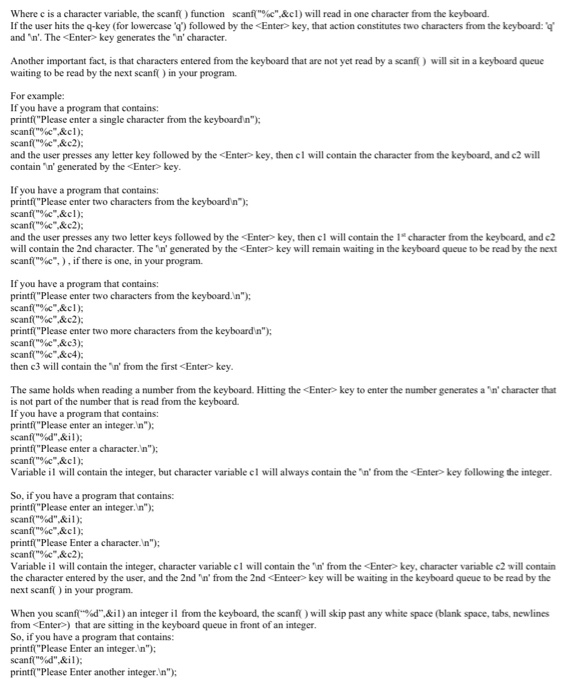
Where c is a character variable, the scanf() function scanf("%c".&cl) will read in one character from the keyboard. If the user hits the q-key (for lowercase ) followed by the key will remain waiting in the keyboard queue to be read by the next scanf("%c",), if there is one, in your program. If you have a program that contains: printf("Please enter two characters from the keyboard. In"); scanf("%c",&cl); scanf("%c" &c2): printf("Please enter two more characters from the keyboard n"); scanf("%c"&c3); scanf("%c".&c4): then c3 will contain the In' from the first key. The same holds when reading a number from the keyboard. Hitting the key will be waiting in the keyboard queue to be read by the next scanf() in your program. When you scanf("%d",&il) an integer il from the keyboard, the scanf() will skip past any white space (blank space, tabs, newlines from ) that are sitting in the keyboard queue in front of an integer. So, if you have a program that contains: printf("Please Enter an integer. In"); scanf("%d",&il): printf("Please Enter another integer. In"); scanf("%d",&i2); Variable il will contain the 1" integer and variable i2 will contain the 2nd integer, because scanf("%d",&i2); will skip past the 'in'in the keyboard queue from the of the 1" integer. Using what you have learned above, write a program to input a list of names and account balances from the keyboard and write them into a file called "out.txt". (1) Open an output file called "out.txt" for writing. The file "out.txt" will be located in the same directory from which the executable from your program will be run. (2) Write a loop wherein you ask the user if they want to enter another complete name (lastname, firstname) and account balance. Have the user respond with a single character 'y' or 'n' (note: the user will have to hit the key after the single character 'y' or 'n'). (3) Each time the user responds with 'y', instruct the user to enter the complete name and hit the key. Read this complete name and write it to the output file followed by a semi-colon and a blank space. To read-in the complete name from the keyboard, use another loop that reads a single character at a time from the keyboard and writes a single character to the file. When the character that you read rom the keyboard input is exactly the newline character 'n' (from the key), then you know the user has finished entering the complete name. Next instruct the user to enter the account balance as a floating point number followed by the key. Read this value and write it to the same line, but precede the value by the dollar sign 'S' and print the value with exactly 2 digits past the decimal point. Since the user might want to enter another name and account balance, don't leave the 'in' from the









 Study Help