







Question: need help to code this in python, another expert already answer the first 6 parts. require code for second half of the question . starting
need help to code this in python, another expert already answer the first 6 parts. require code for second half of the question . starting from making product part and onwards. thanks alot!
edit this code and submit below , thanks!
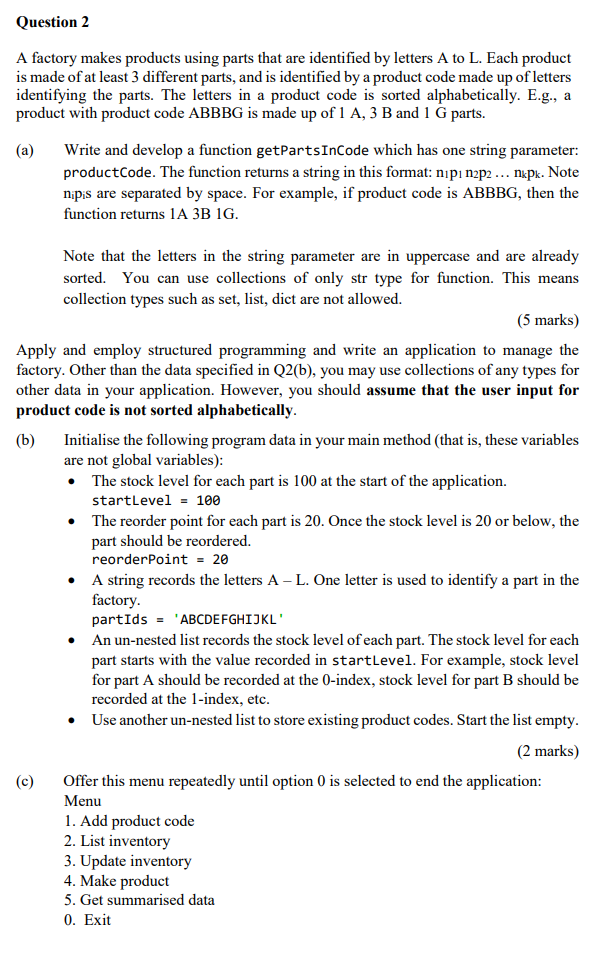
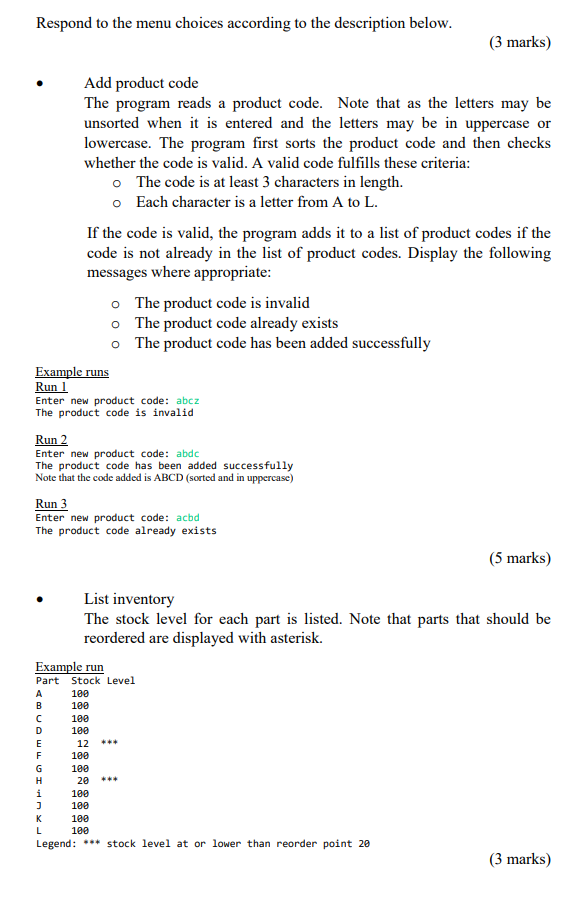
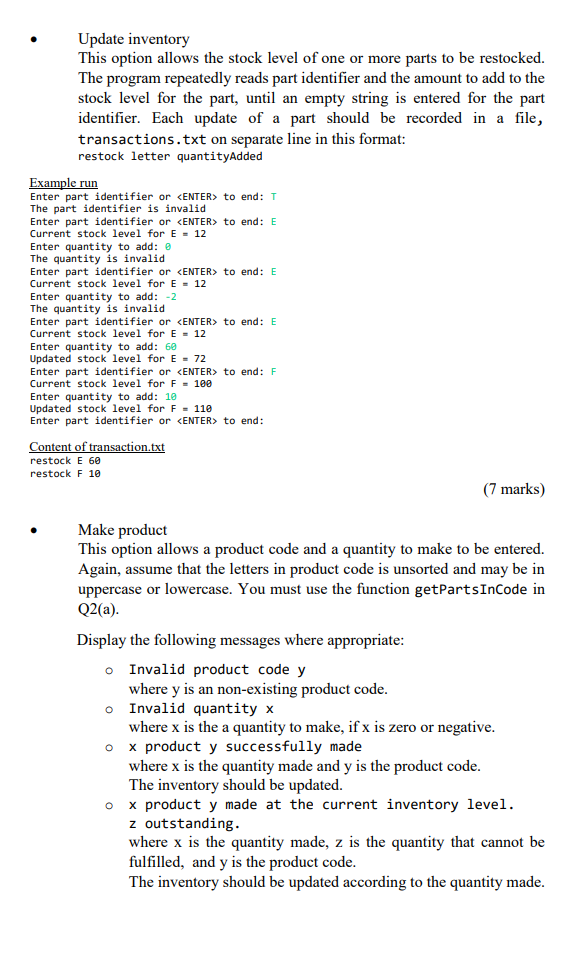
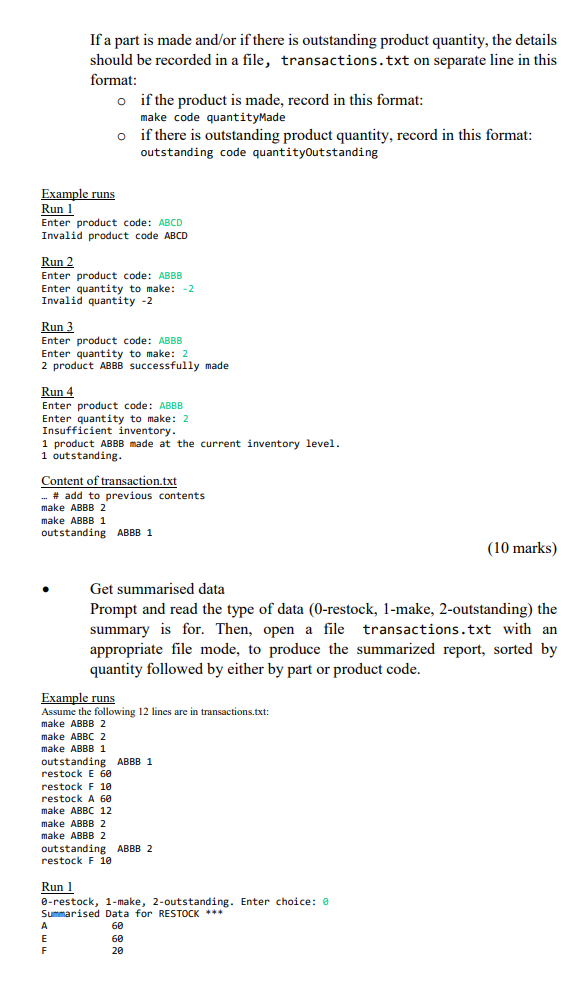
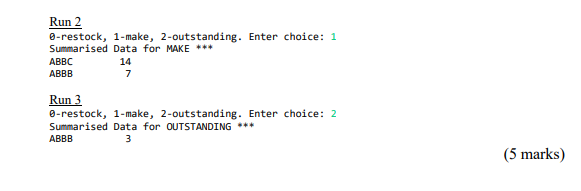
# function for Main Method def main(): # set startlevel and reorder point startLevel = 100 reorderPoint = 20 # record letters partIds = "ABCDEFGHIJKL" # list to store the stock level stockLevel = ['100']*12 # list to store the productCode product_Codes = [] #start a non-teminating loop until zero is pressed while True: print(" Menu : 1.Add product code 2.List inventory 3.Update inventory 4.Make product 5.Get Summarised data 0.Exit ") choice = input("Enter the choice : ") if choice == "0": break elif choice == "1": code = input("Enter the product code : ") #sort the code code = "".join(sorted(code)) flag = 10 #check for the validity of the code for ch in code: if ch.upper() not in "ABCDEFGHIJKL": #not a valid code print("The product code is invalid") flag = 0 break if flag == 1: code = code.upper() if code in product_Codes: print("The product code already exist") else: product_Codes.append(code) print("The product code has been added successfully") elif choice == "2": ans = [["Part" , "Stock Level"]] #zip the inventory first for a,b in zip(partIds,stockLevel): ans.append([a,b]) #printing the inventory for a,b in ans: print(a,b) elif choice == "3": file = open("transition.txt","a") while True: c = input("Enter the part identifier or to end: ") if c == " ": break elif c not in partIds: print('The part identifier is invalid') else: #when we want to update the inventory print(f"Current Stock level for {c} = {stockLevel[ord(c)-ord('A')]}") stock = input("Enter quantity to add : ") stockLevel[ord(c)-ord("A")] = stock + " ***" print(f"Updated stock level for {c} = {stock}") #entry in the transition file file.write(f"restock {c} {stock}") main() Question 2 A factory makes products using parts that are identified by letters A to L. Each product is made of at least 3 different parts, and is identified by a product code made up of letters identifying the parts. The letters in a product code is sorted alphabetically. E.g., a product with product code ABBBG is made up of 1 A, 3 B and 1 G parts. (a) Write and develop a function getPartsInCode which has one string parameter: product Code. The function returns a string in this format: nipi n2p2... nkpk. Note nipis are separated by space. For example, if product code is ABBBG, then the function returns 1A 3B 1G. (b) Note that the letters in the string parameter are in uppercase and are already sorted. You can use collections of only str type for function. This means collection types such as set, list, dict are not allowed. (5 marks) Apply and employ structured programming and write an application to manage the factory. Other than the data specified in Q2(b), you may use collections of any types for other data in your application. However, you should assume that the user input for product code is not sorted alphabetically. Initialise the following program data in your main method (that is, these variables are not global variables): The stock level for each part is 100 at the start of the application. startLevel = 100 The reorder point for each part is 20. Once the stock level is 20 or below, the part should be reordered. reorderPoint = 20 A string records the letters A - L. One letter is used to identify a part in the factory. partIds = 'ABCDEFGHIJKL' An un-nested list records the stock level of each part. The stock level for each part starts with the value recorded in startLevel. For example, stock level for part A should be recorded at the O-index, stock level for part B should be recorded at the 1-index, etc. Use another un-nested list to store existing product codes. Start the list empty. (2 marks) (c) Offer this menu repeatedly until option 0 is selected to end the application: Menu 1. Add product code 2. List inventory 3. Update inventory 4. Make product 5. Get summarised data 0. Exit Respond to the menu choices according to the description below. (3 marks) Add product code The program reads a product code. Note that as the letters may be unsorted when it is entered and the letters may be in uppercase or lowercase. The program first sorts the product code and then checks whether the code is valid. A valid code fulfills these criteria: The code is at least 3 characters in length. o Each character is a letter from A to L. If the code is valid, the program adds it to a list of product codes if the code is not already in the list of product codes. Display the following messages where appropriate: o The product code is invalid o The product code already exists o The product code has been added successfully Example runs Run 1 Enter new product code: abcz The product code is invalid Run 2 Enter new product code: abdc The product code has been added successfully Note that the code added is ABCD (sorted and in uppercase) Run 3 Enter new product code: acbd The product code already exists (5 marks) List inventory The stock level for each part is listed. Note that parts that should be reordered are displayed with asterisk. Example run Part Stock Level A B 100 100 100 100 D E F H i ) K L 12 189 100 20 100 100 100 100 Legend: *** stock level at or lower than reorder point 20 (3 marks) Update inventory This option allows the stock level of one or more parts to be restocked. The program repeatedly reads part identifier and the amount to add to the stock level for the part, until an empty string is entered for the part identifier. Each update of a part should be recorded in a file, transactions.txt on separate line in this format: restock letter quantityAdded Example run Enter part identifier or
Step by Step Solution
There are 3 Steps involved in it

Get step-by-step solutions from verified subject matter experts
 Study Help