







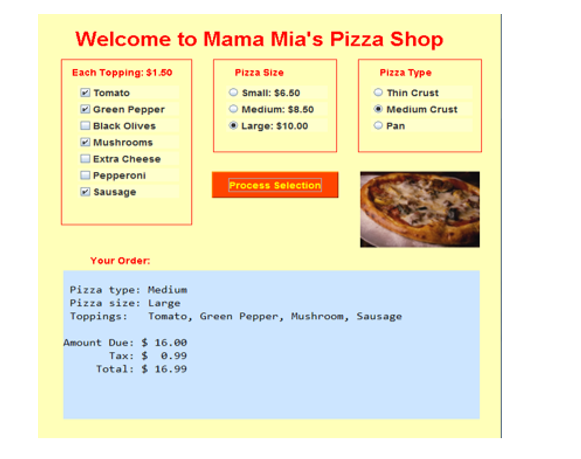
Question: Need help to fix this code please. Please don't change anything just help me to fix it. Here is the expected output. I am getting
Need help to fix this code please. Please don't change anything just help me to fix it. Here is the expected output. I am getting errors on bold lines.and i have added all import statements so do not worry about it.
public class FXMLDocumentController { @FXML private CheckBox chbox7;
@FXML private CheckBox chbox6;
@FXML private CheckBox chbox5;
@FXML private CheckBox chbox4;
@FXML private CheckBox chbox3;
@FXML private CheckBox chbox2;
@FXML private CheckBox chbox1;
@FXML private TextArea Tarea;
@FXML private ToggleGroup group; @FXML private ToggleGroup group2;
int pizzatype; int pizzasize; int toppings; double Total; double Tax; double AmountDue; private String getSizeName() { switch(pizzasize) { case 0: return "Small"; case 1: return "Medium"; case 2: return "Large"; } return " "; } private String getTypeName() { switch(pizzatype) { case 0: return "Thin Crust"; case 1: return "Medium Crust"; case 2: return "Pan"; } return " "; } private String getToppings() { String toppingnames = ""; for (int i = 0; i { toppingnames += toppings.get(i) + " "; } toppingnames += toppings.get(toppings.size() - 1); return toppingnames; } @FXML private void calculate(ActionEvent event) { AmountDue = toppings + pizzasize; Tax = 0.06 * AmountDue; Total = AmountDue + Tax; Tarea.setText( String.format("Pizza type: %s ", getTypeName())+ String.format("Pizza size: %s ", getSizeName())+ String.format("toppings: %s ", getToppings())+ String.format("Amount Due: $0.3f ", AmountDue)+ String.format("Tax: $0.3f ", Tax)+ String.format("Total: $0.3f ", Total) ); } private size ordersize; private type ordertype; ArrayList toppings = new ArrayList(); public void initialize(URL url, ResourceBundle rb) { // ArrayList topping = new ArrayList(); chbox1.selectedProperty().addListener((ObservableValue ov, Boolean old_val, Boolean new_val) -> { if (chbox1.isSelected()) { topping.add("Tomato"); } else{ topping.remove("Tomato"); } });
chbox2.selectedProperty().addListener((ObservableValue ov, Boolean old_val, Boolean new_val) -> { if (chbox2.isSelected()) { topping.add("Green Pepper"); } else{ topping.remove("Green Pepper"); } }); chbox3.selectedProperty().addListener((ObservableValue ov, Boolean old_val, Boolean new_val) -> { if (chbox3.isSelected()) { topping.add("Black Olives"); } else{ topping.remove("Black Olives"); } }); chbox4.selectedProperty().addListener((ObservableValue ov, Boolean old_val, Boolean new_val) -> { if (chbox4.isSelected()) { topping.add("Extra cheese"); } else{ topping.remove("Extra cheese"); } }); chbox5.selectedProperty().addListener((ObservableValue ov, Boolean old_val, Boolean new_val) -> { if (chbox5.isSelected()) { topping.add("Sausage"); } else{ topping.remove("Sausage"); } }); chbox6.selectedProperty().addListener((ObservableValue ov, Boolean old_val, Boolean new_val) -> { if (chbox6.isSelected()) { topping.add("Mushrooms"); } else{ topping.remove("Mushrooms"); } }); chbox7.selectedProperty().addListener((ObservableValue ov, Boolean old_val, Boolean new_val) -> { if (chbox7.isSelected()) { topping.add("Pepperoni"); } else{ topping.remove("Pepperoni"); } }); group.selectedToggleProperty().addListener((ObservableValue ov, Toggle old_toggle, Toggle new_toggle) -> { RadioButton rb = (RadioButton) new_toggle; if (rb == Small) { ordersize = size.Small; } else if (rb == Medium) { ordersize = size.Medium; } else if (rb == Large) { ordersize = size.Large; } });
group2.selectedToggleProperty().addListener((ObservableValue ov, Toggle old_toggle, Toggle new_toggle) -> { RadioButton rb = (RadioButton) new_toggle; if (rb == Thintype) { ordertype = type.thin; } else if (rb == mediumtype) { ordertype = type.medium; } else if (rb == pantype) { ordertype = type.pan; } }); } }
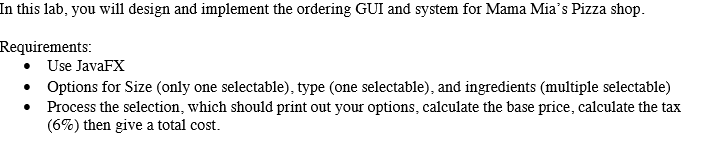
In this lab, you will design and implement the ordering GUI and system for Mama Mia's Pizza shop. Requirements Use JavaFX Options for Size (only one selectable), type (one selectable), and ingredients (multiple selectable) .Process the selection, which should print out your options, calculate the base price, calculate the tax (696) then give a total cost. In this lab, you will design and implement the ordering GUI and system for Mama Mia's Pizza shop. Requirements Use JavaFX Options for Size (only one selectable), type (one selectable), and ingredients (multiple selectable) .Process the selection, which should print out your options, calculate the base price, calculate the tax (696) then give a total cost
Step by Step Solution
There are 3 Steps involved in it

Get step-by-step solutions from verified subject matter experts
 Study Help