







Question: Need help to solve this question please. I need step by step solution with output. Here is the file /etc/hosts 60. Write a script named
Need help to solve this question please. I need step by step solution with output.
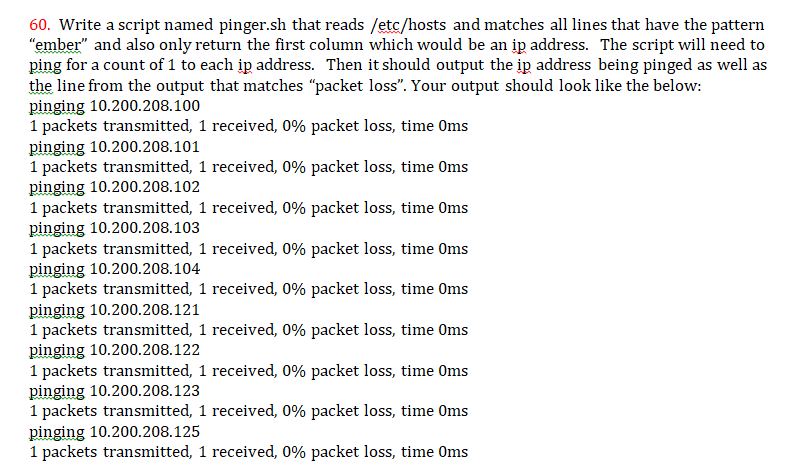
Here is the file /etc/hosts
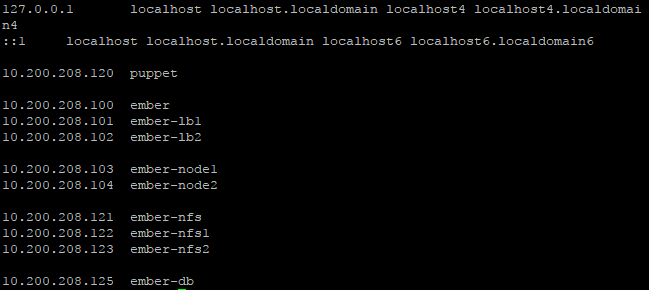
60. Write a script named pinger.sh that reads /etc/hosts and matches all lines that have the pattern ember" and also only return the first column which would be an ip address. The script will need to ping for a count of 1 to each ip address. Then it should output the ip address being pinged as well as the line from the output that matches "packet loss". Your output should look like the below: pinging 10.200.208.100 1 packets transmitted, 1 received, 0% packet loss, time 0ms pinging 10.200.208.101 1 packets transmitted, 1 received, 0% packet loss, time 0ms pinging 10.200.208.102 1 packets transmitted, 1 received, 0% packet loss, time 0ms pinging 10.200.208.103 1 packets transmitted, 1 received, 0% packet loss, time 0ms pinging 10.200.208.104 1 packets transmitted, 1 received, 0% packet loss, time 0ms pinging 10.200.208.121 1 packets transmitted, 1 received, 0% packet loss, time 0ms pinging 10.200.208.122 1 packets transmitted, 1 received, 0% packet loss, time 0ms pinging 10.200.208.123 1 packets transmitted, 1 received, 0% packet loss, time 0ms pinging 10.200.208.125 1 packets transmitted, 1 received, 0% packet loss, time 0ms
Step by Step Solution
There are 3 Steps involved in it

Get step-by-step solutions from verified subject matter experts
 Study Help