







Question: Need help with C++! Please answer this question! Instructions: Instructions: Download the files B ox .h , Box.cpp , client.cpp from Canvas. The Box class
Need help with C++! Please answer this question!
Instructions: Instructions:
Download the files Box.h, Box.cpp, client.cpp from Canvas. The Box class contain length, breadth, and height as member variables. The class supports several operations on these member variables as: adding the variables of two boxes, increasing/decreasing the member variables, outputting the variables and assign the variables to another box object. Read the given code. Then implement these member and non-member functions in Box.cpp file. You do not need to edit the Box.h and client.cpp files.
Below are the given codes:
Box.h
#include
class Box { public:
Box(); // default constructor Box(double, double, double); // parameter constructor double getVolume(); void setLength(double length); void setBreadth(double breadth); void setHeight(double height);
Box operator+(Box const&); // addition operator overload, member function Box& operator++(); // pre-increment operator overload, member function
private: double length; // Length of a box double breadth; // Breadth of a box double height; // Height of a box
friend ostream& operator
}; Box.cpp
#include
class Box { public:
Box(); // default constructor Box(double, double, double); // parameter constructor double getVolume(); void setLength(double length); void setBreadth(double breadth); void setHeight(double height);
Box operator+(Box const&); // addition operator overload, member function Box& operator++(); // pre-increment operator overload, member function
private: double length; // Length of a box double breadth; // Breadth of a box double height; // Height of a box
friend ostream& operator
}; Client.cpp
#include "Box.h"
int main() { Box Box1; // Instantiate Box1 of type Box Box Box2; // Instantiate Box2 of type Box Box Box3; // Instantiate Box3 of type Box double volume = 0.0; // Store the volume of a box here
// Box1 specification Box1.setLength(6.0); Box1.setBreadth(7.0); Box1.setHeight(5.0); cout
// Get the volume of Box1 volume = Box1.getVolume(); cout
Box1 = ++Box1; cout
// Get the new volume of Box1 volume = Box1.getVolume(); cout
// Box2 specification Box2.setLength(12.0); Box2.setBreadth(13.0); Box2.setHeight(10.0);
cout
// Get the volume of Box2 volume = Box2.getVolume(); cout
Box2 = --Box2; cout
// Get the new volume of Box2 volume = Box2.getVolume(); cout
// Add two Boxes as follows: Box3 = Box1 + Box2;
cout
// Get the volume of Box3 volume = Box3.getVolume(); cout
return 0; }
Output:
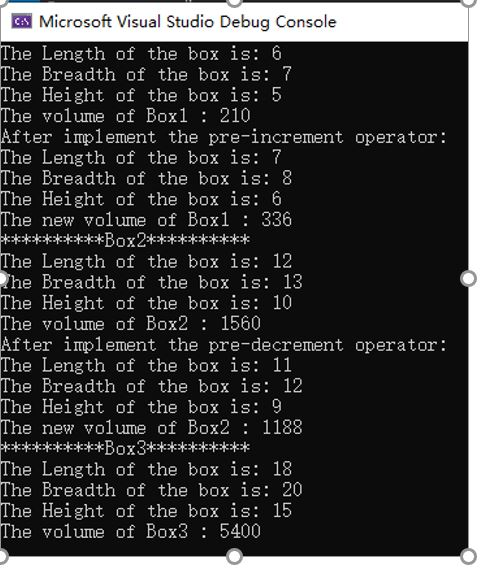
Microsoft Visual Studio Debug Console The Length of the box is: 6 The Breadth of the box is: 7 The Height of the box is: 5 The volume of Boxl : 210 After implement the pre-increment operator: The Length of the box is: 7 The Breadth of the box is: 8 The Height of the box is: 6 The new volume of Boxl : 336 **************Box2*************** The Length of the box is: 12 The Breadth of the box is: 13 The Height of the box is: 10 The volume of Box2 : 1560 After implement the pre-decrement operator: The Length of the box is: 11 The Breadth of the box is: 12 The Height of the box is: 9 The new volume of Box2 : 1188 *************Box3********** The Length of the box is: 18 The Breadth of the box is: 20 The Height of the box is: 15 The volume of Box3 : 5400
Step by Step Solution
There are 3 Steps involved in it

Get step-by-step solutions from verified subject matter experts
 Study Help