







Question: Need help with coding assignment in uVision using ARM assembly. The code should do the following: Have a null - terminated read only integer array
Need help with coding assignment in uVision using ARM assembly. The code should do the following:
Have a nullterminated read only integer array called Inputs and a readwrite array called Outputs with space reserved for up to ten integers.
Have a subroutine called Cubes that takes the value in r and cubes it so returned r passed r
Have a subroutine called MathFun that performs xx and returns the result in r The value for x will be passed in r and the muldiv instructions should not be used. Treat r as signed. This subroutine should call the Cubes subroutine as needed.
o Note: as there was some confusion regarding the equation, its okay if you did this part as xx without the multiplying by
Have a subroutine called ShiftFun that shifts the value in r three times to the left if its positive when treated as signed or rotates it five times to the right if its negative. The new value will also be returned in r
Within the Main part of the code, youll loop through the Inputs array until you reach the null termination. For each value in Inputs, youll call MathFun if its odd and ShiftFun if its even, then store the returned result in the corresponding Outputs array slot.
Example Inputs and Outputs arrays:
Inputs dcd xFFFFFFFxxxx
;xFFFFFFF is odd, so youd call MathFun and get xFFFFFAC
;x is even and positive MSB so youd call ShiftFun and shift
left to get xC
;x is even and positive, so youd call ShiftFun and shift left to
get x
;x is odd, so youd call MathFun and get xC
;x is even and negative, so youd call ShiftFun and rotate right
to get x
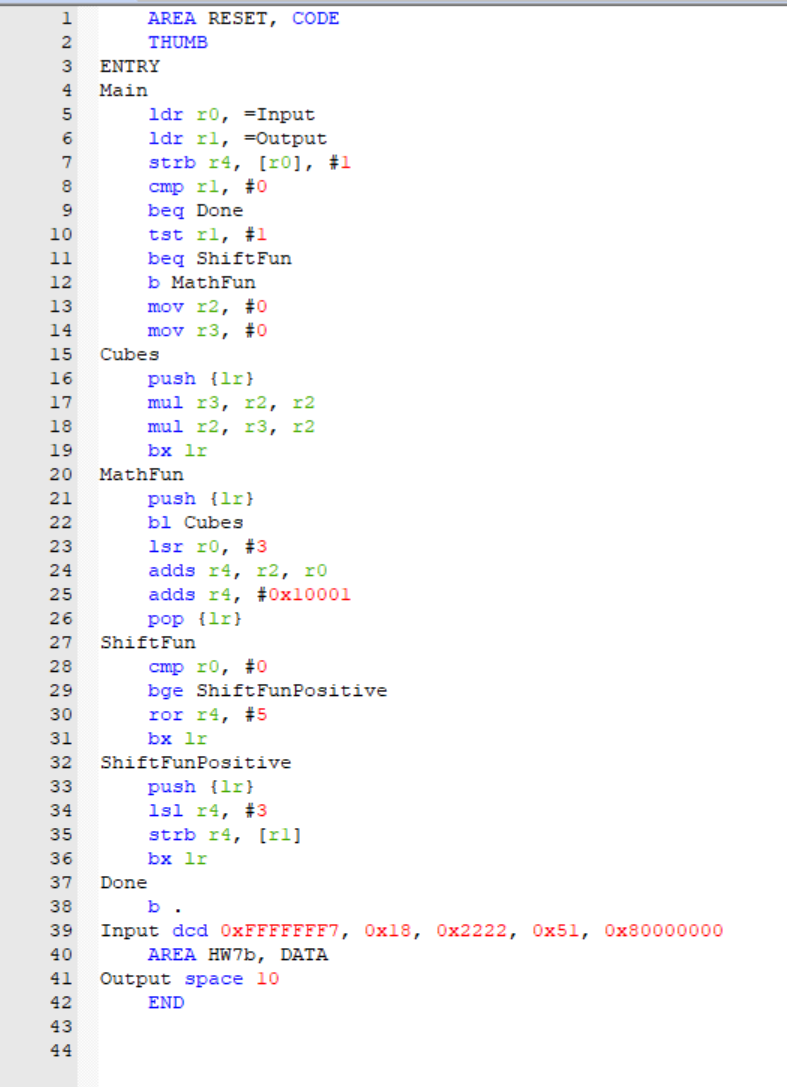
Here is the code I have so far along with the specific debug file:
AREA RESET, CODE
THUMB
ENTRY
Main
ldr Input
output
strb r#
cmp rl #
beq Done
tst rl #
beq ShiftFun
b MathFun
mov #
mov #
Cubes
push
mul
mul
lr
MathFun
push lis
bl Cubes
lsr #
adds
adds r #x
pop
ShiftFun
cmp ro #
bge ShiftFunPositive
ror #
bx lr
ShiftFunPositive
push
sl #
strb rr
lr
Done
b
Input ded xFFFFFFFxxxx
AREA HWb DATA
Output space
END
Debug:
xPSR xthumb mode
PC xstart with the code at this address
SP xstack Pointer
Step by Step Solution
There are 3 Steps involved in it
1 Expert Approved Answer
Step: 1 Unlock

Question Has Been Solved by an Expert!
Get step-by-step solutions from verified subject matter experts
Step: 2 Unlock
Step: 3 Unlock
 Study Help