Question: need help with coding,wirte comments to explian set up: input buffer local buffer output buffer read a single value using get_value() NO is it NOT-1
need help with coding,wirte comments to explian
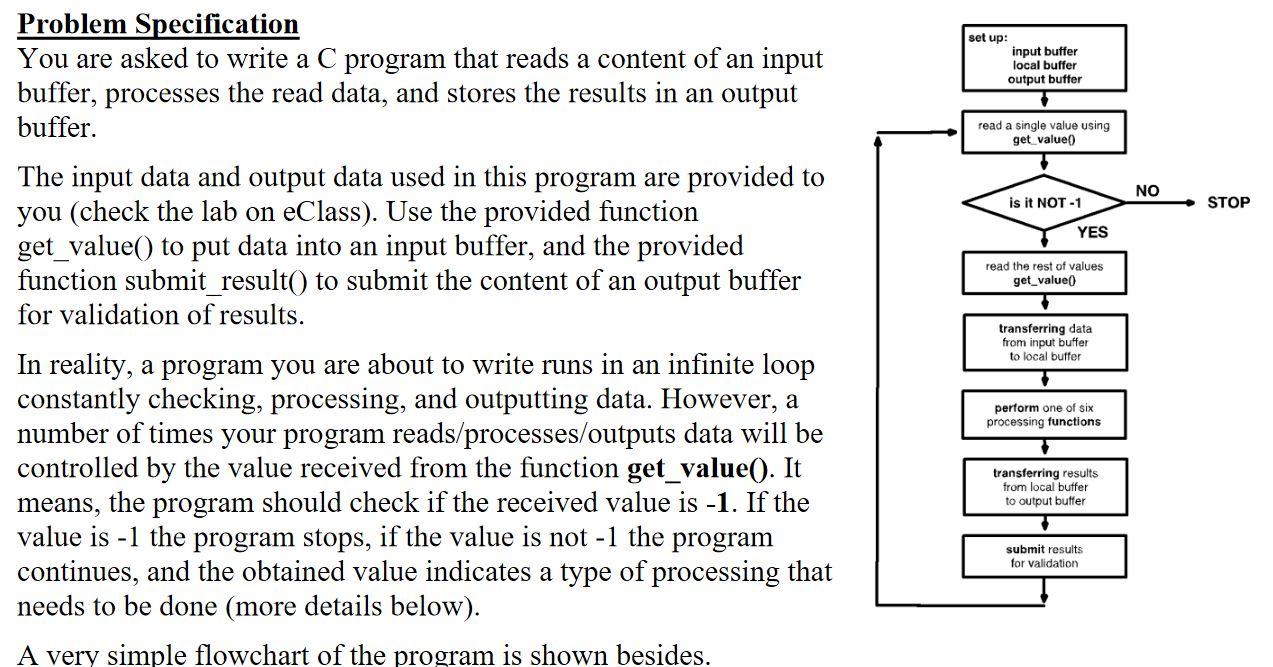
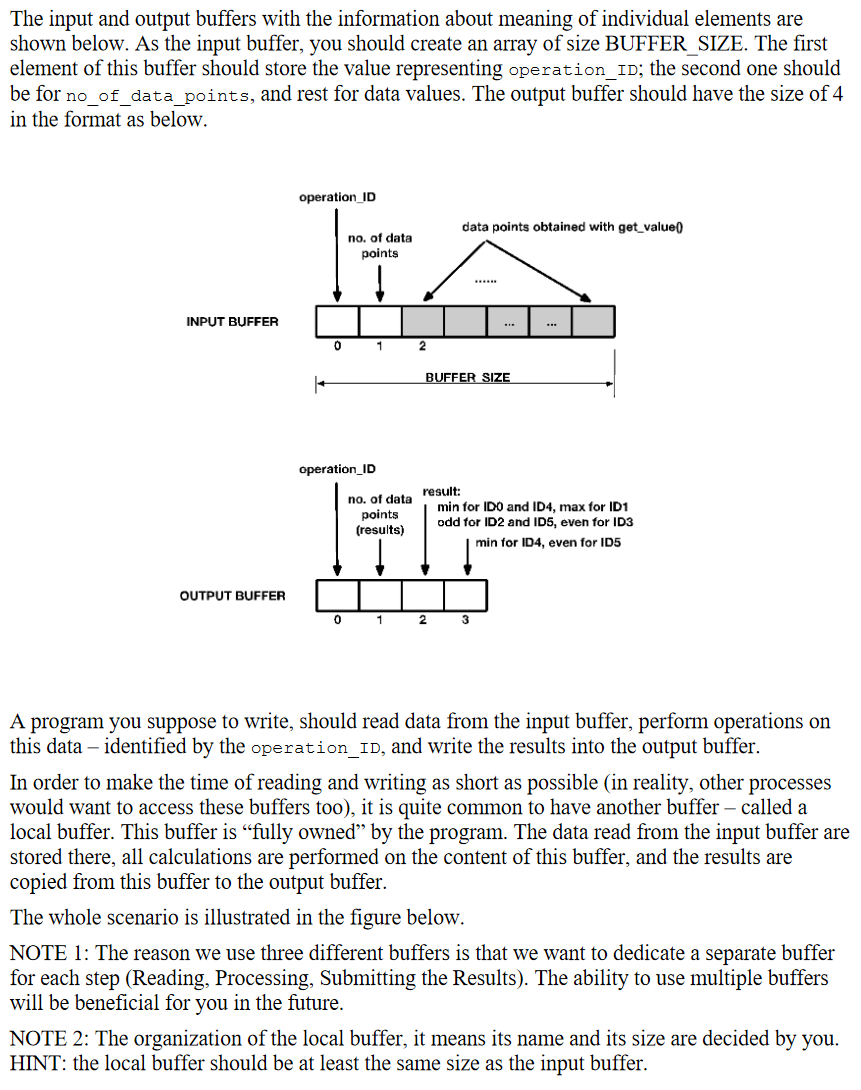
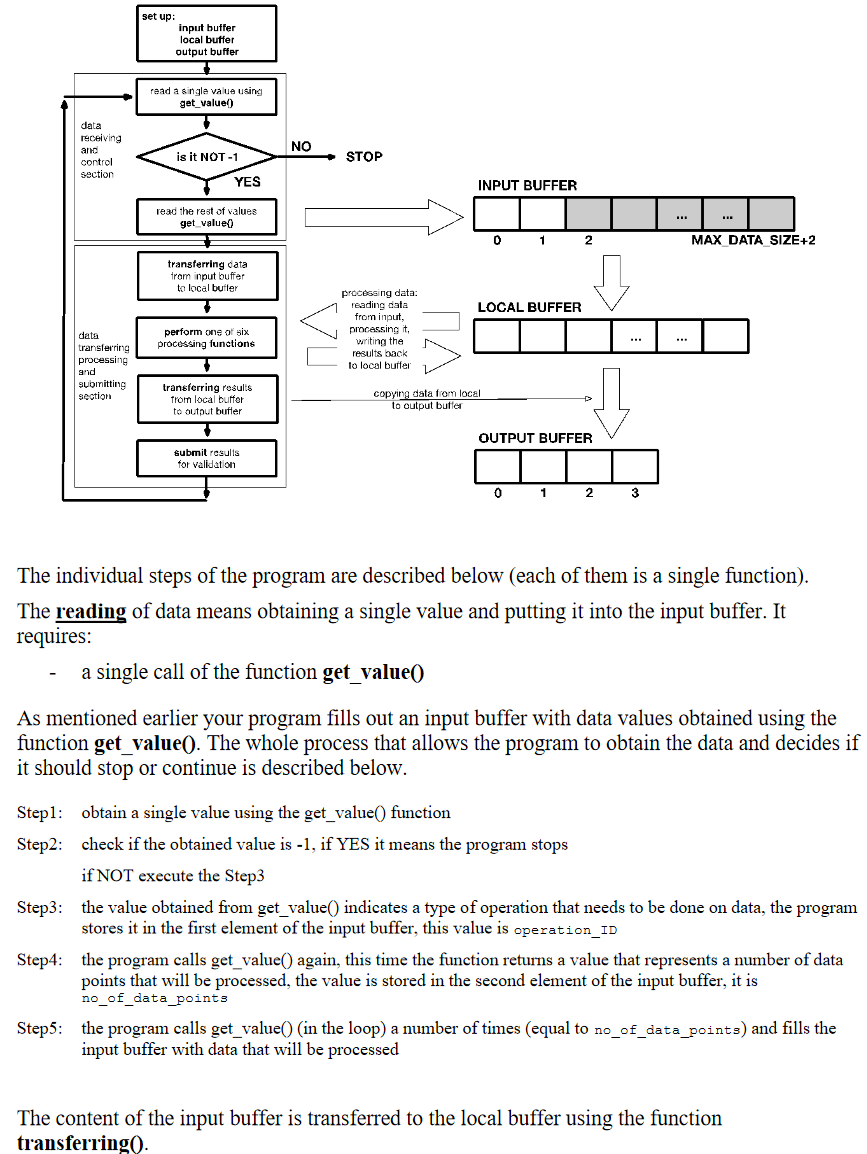
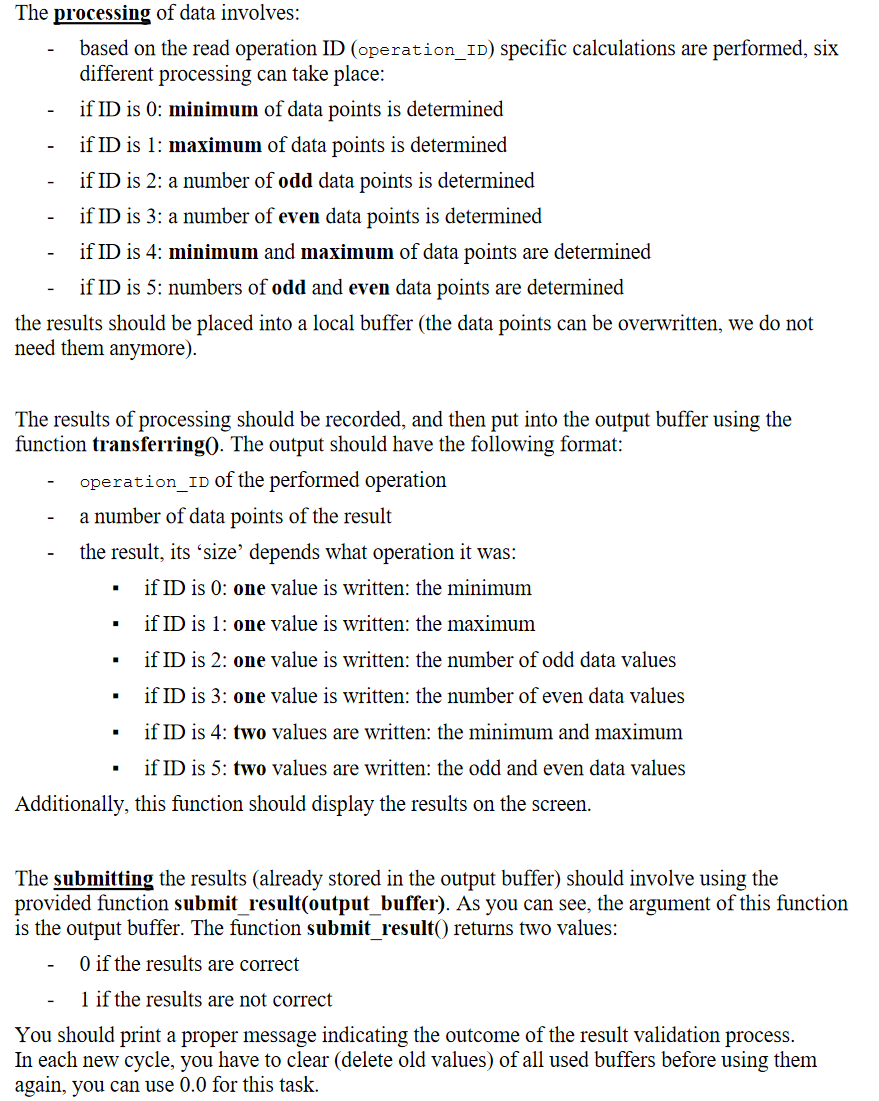
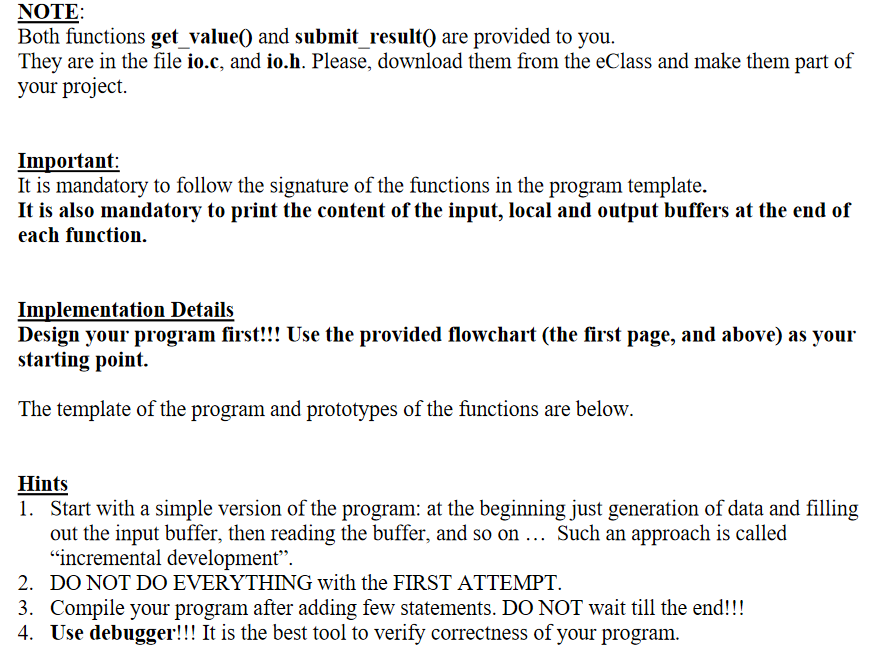
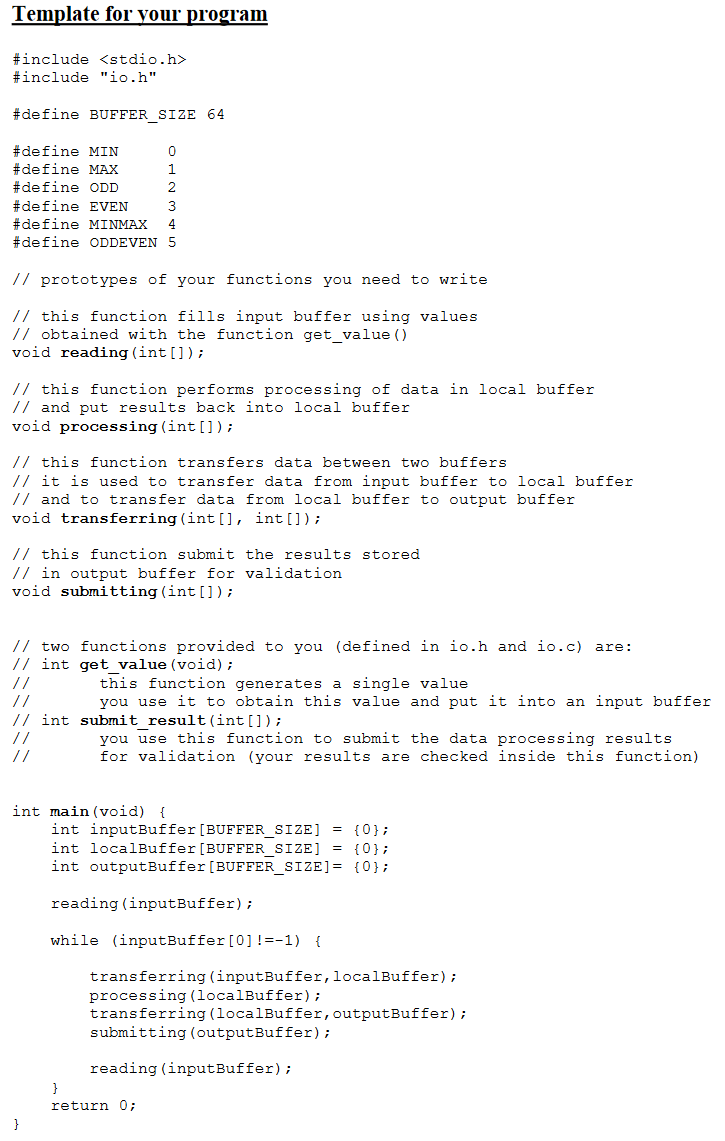
set up: input buffer local buffer output buffer read a single value using get_value() NO is it NOT-1 STOP YES read the rest of values get_value Problem Specification You are asked to write a C program that reads a content of an input buffer, processes the read data, and stores the results in an output buffer. The input data and output data used in this program are provided to you (check the lab on eClass). Use the provided function get_value() to put data into an input buffer, and the provided function submit_result() to submit the content of an output buffer for validation of results. In reality, a program you are about to write runs in an infinite loop constantly checking, processing, and outputting data. However, a number of times your program reads/processes/outputs data will be controlled by the value received from the function get_value(). It means, the program should check if the received value is -1. If the value is -1 the program stops, if the value is not -1 the program continues, and the obtained value indicates a type of processing that needs to be done (more details below). A very simple flowchart of the program is shown besides. transferring data from input buffer to local buffer perform one of six processing functions transferring results from local buffer to output buffer submit results for validation The input and output buffers with the information about meaning of individual elements are shown below. As the input buffer, you should create an array of size BUFFER_SIZE. The first element of this buffer should store the value representing operation_ID; the second one should be for no_of_data_points, and rest for data values. The output buffer should have the size of 4 in the format as below. operation ID data points obtained with get_value) F no. of data points INPUT BUFFER 0 1 2 BUFFER SIZE operation_ID no. of data result: points (results) min for IDO and ID4, max for ID1 odd for ID2 and ID5, even for ID3 min for ID4, even for ID5 OUTPUT BUFFER 0 1 2 3 A program you suppose to write, should read data from the input buffer, perform operations on this data - identified by the operation_ID, and write the results into the output buffer. In order to make the time of reading and writing as short as possible (in reality, other processes would want to access these buffers too), it is quite common to have another buffer - called a local buffer. This buffer is fully owned by the program. The data read from the input buffer are stored there, all calculations are performed on the content of this buffer, and the results are copied from this buffer to the output buffer. The whole scenario is illustrated in the figure below. NOTE 1: The reason we use three different buffers is that we want to dedicate a separate buffer for each step (Reading, Processing, Submitting the Results). The ability to use multiple buffers will be beneficial for you in the future. NOTE 2: The organization of the local buffer, it means its name and its size are decided by you. HINT: the local buffer should be at least the same size as the input buffer. set up: input buffer local buffer output buffer read a single value using get_value] data receiving anc control section NO is it NOT-1 STOP YES INPUT BUFFER read the rest of values get_value 0 1 2 MAX DATA SIZE+2 transferring data trom input buffer to local butler LOCAL BUFFER perform one of six processing functions processing data: reading data from inout. processing it, writing the results back to local buffer data transferring processing and submitting section transferring results from local buffer to output butter copying data from local to output butter > OUTPUT BUFFER submit results for validation 0 1 2 3 The individual steps of the program are described below (each of them is a single function). The reading of data means obtaining a single value and putting it into the input buffer. It requires: a single call of the function get_value() As mentioned earlier your program fills out an input buffer with data values obtained using the function get_value(). The whole process that allows the program to obtain the data and decides if it should stop or continue is described below. Stepl: obtain a single value using the get_value() function Step2: check if the obtained value is -1, if YES it means the program stops if NOT execute the Step3 Step3: the value obtained from get_value() indicates a type of operation that needs to be done on data, the program stores it in the first element of the input buffer, this value is operation_ID Step4: the program calls get_value() again, this time the function returns a value that represents a number of data points that will be processed, the value is stored in the second element of the input buffer, it is no_of_data_points Step5: the program calls get_value() (in the loop) a number of times (equal to no_of_data_points) and fills the input buffer with data that will be processed The content of the input buffer is transferred to the local buffer using the function transferring The processing of data involves: based on the read operation ID (operation_ID) specific calculations are performed, six different processing can take place: if ID is 0: minimum of data points is determined if ID is 1: maximum of data points is determined if ID is 2: a number of odd data points is determined if ID is 3: a number of even data points is determined if ID is 4: minimum and maximum of data points are determined if ID is 5: numbers of odd and even data points are determined the results should be placed into a local buffer (the data points can be overwritten, we do not need them anymore). The results of processing should be recorded, and then put into the output buffer using the function transferring0. The output should have the following format: operation ID of the performed operation a number of data points of the result the result, its size' depends what operation it was: if ID is 0: one value is written: the minimum if ID is 1: one value is written: the maximum if ID is 2: one value is written: the number of odd data values if ID is 3: one value is written: the number of even data values if ID is 4: two values are written: the minimum and maximum if ID is 5: two values are written: the odd and even data values Additionally, this function should display the results on the screen. The submitting the results (already stored in the output buffer) should involve using the provided function submit_result(output_buffer). As you can see, the argument of this function is the output buffer. The function submit_result() returns two values: O if the results are correct 1 if the results are not correct You should print a proper message indicating the outcome of the result validation process. In each new cycle, you have to clear (delete old values) of all used buffers before using them again, you can use 0.0 for this task. NOTE: Both functions get_value() and submit_result() are provided to you. They are in the file io.c, and io.h. Please, download them from the eClass and make them part of your project. Important: It is mandatory to follow the signature of the functions in the program template. It is also mandatory to print the content of the input, local and output buffers at the end of each function. Implementation Details Design your program first!!! Use the provided flowchart (the first page, and above) as your starting point. The template of the program and prototypes of the functions are below. Hints 1. Start with a simple version of the program: at the beginning just generation of data and filling out the input buffer, then reading the buffer, and so on... Such an approach is called incremental development. 2. DO NOT DO EVERYTHING with the FIRST ATTEMPT. 3. Compile your program after adding few statements. DO NOT wait till the end!!! 4. Use debugger!!! It is the best tool to verify correctness of your program. Template for your program #include #include "io.h" #define BUFFER_SIZE 64 #define MIN 0 #define MAX 1 #define ODD 2 #define EVEN 3 #define MINMAX 4 #define ODDEVEN 5 // prototypes of your functions you need to write // this function fills input buffer using values Il obtained with the function get_value() void reading (int[]); // this function performs processing of data in local buffer // and put results back into local buffer void processing (int[]); // this function transfers data between wo buffers // it is used to transfer data from input buffer to local buffer // and to transfer data from local buffer to output buffer void transferring (int[], int[]); // this function submit the results stored // in output buffer for validation void submitting (int[]); // two functions provided to you (defined in io.h and io.c) are: // int get value (void); this function generates a single value // you use it to obtain this value and put it into an input buffer // int submit result (int[]); // you use this function to submit the data processing results for validation (your results are checked inside this function) int main(void) { int inputBuffer[BUFFER_SIZE] = {0}; int localBuffer[BUFFER_SIZE] = {0}; int outputBuffer (BUFFER_SIZE] = {0}; reading (inputBuffer); while (inputBuffer[0] !=-1) { transferring (inputBuffer, localBuffer); processing (localBuffer); transferring (localBuffer, outputBuffer); submitting (outputBuffer); reading (inputBuffer); } return 0; } set up: input buffer local buffer output buffer read a single value using get_value() NO is it NOT-1 STOP YES read the rest of values get_value Problem Specification You are asked to write a C program that reads a content of an input buffer, processes the read data, and stores the results in an output buffer. The input data and output data used in this program are provided to you (check the lab on eClass). Use the provided function get_value() to put data into an input buffer, and the provided function submit_result() to submit the content of an output buffer for validation of results. In reality, a program you are about to write runs in an infinite loop constantly checking, processing, and outputting data. However, a number of times your program reads/processes/outputs data will be controlled by the value received from the function get_value(). It means, the program should check if the received value is -1. If the value is -1 the program stops, if the value is not -1 the program continues, and the obtained value indicates a type of processing that needs to be done (more details below). A very simple flowchart of the program is shown besides. transferring data from input buffer to local buffer perform one of six processing functions transferring results from local buffer to output buffer submit results for validation The input and output buffers with the information about meaning of individual elements are shown below. As the input buffer, you should create an array of size BUFFER_SIZE. The first element of this buffer should store the value representing operation_ID; the second one should be for no_of_data_points, and rest for data values. The output buffer should have the size of 4 in the format as below. operation ID data points obtained with get_value) F no. of data points INPUT BUFFER 0 1 2 BUFFER SIZE operation_ID no. of data result: points (results) min for IDO and ID4, max for ID1 odd for ID2 and ID5, even for ID3 min for ID4, even for ID5 OUTPUT BUFFER 0 1 2 3 A program you suppose to write, should read data from the input buffer, perform operations on this data - identified by the operation_ID, and write the results into the output buffer. In order to make the time of reading and writing as short as possible (in reality, other processes would want to access these buffers too), it is quite common to have another buffer - called a local buffer. This buffer is fully owned by the program. The data read from the input buffer are stored there, all calculations are performed on the content of this buffer, and the results are copied from this buffer to the output buffer. The whole scenario is illustrated in the figure below. NOTE 1: The reason we use three different buffers is that we want to dedicate a separate buffer for each step (Reading, Processing, Submitting the Results). The ability to use multiple buffers will be beneficial for you in the future. NOTE 2: The organization of the local buffer, it means its name and its size are decided by you. HINT: the local buffer should be at least the same size as the input buffer. set up: input buffer local buffer output buffer read a single value using get_value] data receiving anc control section NO is it NOT-1 STOP YES INPUT BUFFER read the rest of values get_value 0 1 2 MAX DATA SIZE+2 transferring data trom input buffer to local butler LOCAL BUFFER perform one of six processing functions processing data: reading data from inout. processing it, writing the results back to local buffer data transferring processing and submitting section transferring results from local buffer to output butter copying data from local to output butter > OUTPUT BUFFER submit results for validation 0 1 2 3 The individual steps of the program are described below (each of them is a single function). The reading of data means obtaining a single value and putting it into the input buffer. It requires: a single call of the function get_value() As mentioned earlier your program fills out an input buffer with data values obtained using the function get_value(). The whole process that allows the program to obtain the data and decides if it should stop or continue is described below. Stepl: obtain a single value using the get_value() function Step2: check if the obtained value is -1, if YES it means the program stops if NOT execute the Step3 Step3: the value obtained from get_value() indicates a type of operation that needs to be done on data, the program stores it in the first element of the input buffer, this value is operation_ID Step4: the program calls get_value() again, this time the function returns a value that represents a number of data points that will be processed, the value is stored in the second element of the input buffer, it is no_of_data_points Step5: the program calls get_value() (in the loop) a number of times (equal to no_of_data_points) and fills the input buffer with data that will be processed The content of the input buffer is transferred to the local buffer using the function transferring The processing of data involves: based on the read operation ID (operation_ID) specific calculations are performed, six different processing can take place: if ID is 0: minimum of data points is determined if ID is 1: maximum of data points is determined if ID is 2: a number of odd data points is determined if ID is 3: a number of even data points is determined if ID is 4: minimum and maximum of data points are determined if ID is 5: numbers of odd and even data points are determined the results should be placed into a local buffer (the data points can be overwritten, we do not need them anymore). The results of processing should be recorded, and then put into the output buffer using the function transferring0. The output should have the following format: operation ID of the performed operation a number of data points of the result the result, its size' depends what operation it was: if ID is 0: one value is written: the minimum if ID is 1: one value is written: the maximum if ID is 2: one value is written: the number of odd data values if ID is 3: one value is written: the number of even data values if ID is 4: two values are written: the minimum and maximum if ID is 5: two values are written: the odd and even data values Additionally, this function should display the results on the screen. The submitting the results (already stored in the output buffer) should involve using the provided function submit_result(output_buffer). As you can see, the argument of this function is the output buffer. The function submit_result() returns two values: O if the results are correct 1 if the results are not correct You should print a proper message indicating the outcome of the result validation process. In each new cycle, you have to clear (delete old values) of all used buffers before using them again, you can use 0.0 for this task. NOTE: Both functions get_value() and submit_result() are provided to you. They are in the file io.c, and io.h. Please, download them from the eClass and make them part of your project. Important: It is mandatory to follow the signature of the functions in the program template. It is also mandatory to print the content of the input, local and output buffers at the end of each function. Implementation Details Design your program first!!! Use the provided flowchart (the first page, and above) as your starting point. The template of the program and prototypes of the functions are below. Hints 1. Start with a simple version of the program: at the beginning just generation of data and filling out the input buffer, then reading the buffer, and so on... Such an approach is called incremental development. 2. DO NOT DO EVERYTHING with the FIRST ATTEMPT. 3. Compile your program after adding few statements. DO NOT wait till the end!!! 4. Use debugger!!! It is the best tool to verify correctness of your program. Template for your program #include #include "io.h" #define BUFFER_SIZE 64 #define MIN 0 #define MAX 1 #define ODD 2 #define EVEN 3 #define MINMAX 4 #define ODDEVEN 5 // prototypes of your functions you need to write // this function fills input buffer using values Il obtained with the function get_value() void reading (int[]); // this function performs processing of data in local buffer // and put results back into local buffer void processing (int[]); // this function transfers data between wo buffers // it is used to transfer data from input buffer to local buffer // and to transfer data from local buffer to output buffer void transferring (int[], int[]); // this function submit the results stored // in output buffer for validation void submitting (int[]); // two functions provided to you (defined in io.h and io.c) are: // int get value (void); this function generates a single value // you use it to obtain this value and put it into an input buffer // int submit result (int[]); // you use this function to submit the data processing results for validation (your results are checked inside this function) int main(void) { int inputBuffer[BUFFER_SIZE] = {0}; int localBuffer[BUFFER_SIZE] = {0}; int outputBuffer (BUFFER_SIZE] = {0}; reading (inputBuffer); while (inputBuffer[0] !=-1) { transferring (inputBuffer, localBuffer); processing (localBuffer); transferring (localBuffer, outputBuffer); submitting (outputBuffer); reading (inputBuffer); } return 0; }









 Study Help