







Question: Need help with exercise. will gives thumbs up! The code that was done provided below will help with the exercise! store.html : Our Store! KU
Need help with exercise. will gives thumbs up!
The code that was done provided below will help with the exercise!
store.html :
KU Generic Groceries | |||
|---|---|---|---|
| Home | Browse |
|
|
| This is an example website for an on-line grocery store that sells only generic products - no brand names here! Please note that this is not an actual on-line store! It is just an example - designed for web programming course. | |||
Same Quality at Lower Prices!Contact: John Doe | |||
*************************
store.css :
/*external stylesheet file */
/*style rule for table */
table{
width:100%;
height: 100%;
text-align: center;
border: 3px outset gray;
border-collapse: collapse;
}
/*style rule for tr,td,th */
tr,th,td{
border: 2px outset gray;
}
/*style rule for class link */
.links{
background-color: lightgreen;
}
/*style rule for equal width */
.links td{
width:25%;
}
/*style rule for class footer */
.footer{
background-color: mediumseagreen;
font-family: Arial, Helvetica, sans-serif;
}
/*style rule for class normal */
.normal{
text-align: left;
background-color: whitesmoke;
height: 350px;
}
/*style rule for paragraphs */
p{
padding-left: 25px;
padding-right: 20px;
}
/*style rule for h1 */
h1{
font-family: Arial, Helvetica, sans-serif;
font-style: italic;
}
/*style rule for th in thead */
thead th{
background-color:mediumseagreen;
border: 3px outset gray;
}
/*style rule for hyperlink */
li{
list-style: none;
}
/*style rule for hyperlink hover */
a:hover{
font-size: 20px;
color: green;
}
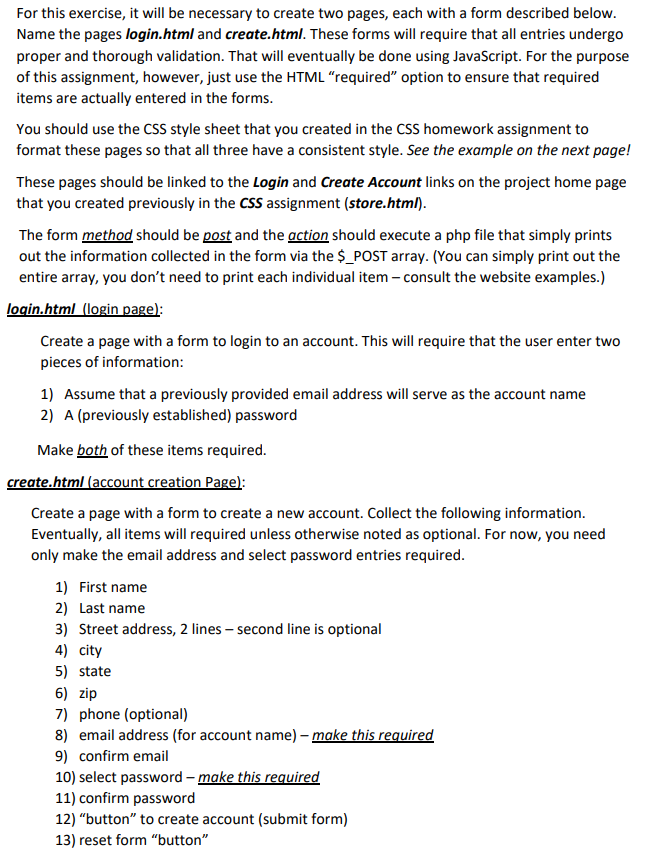
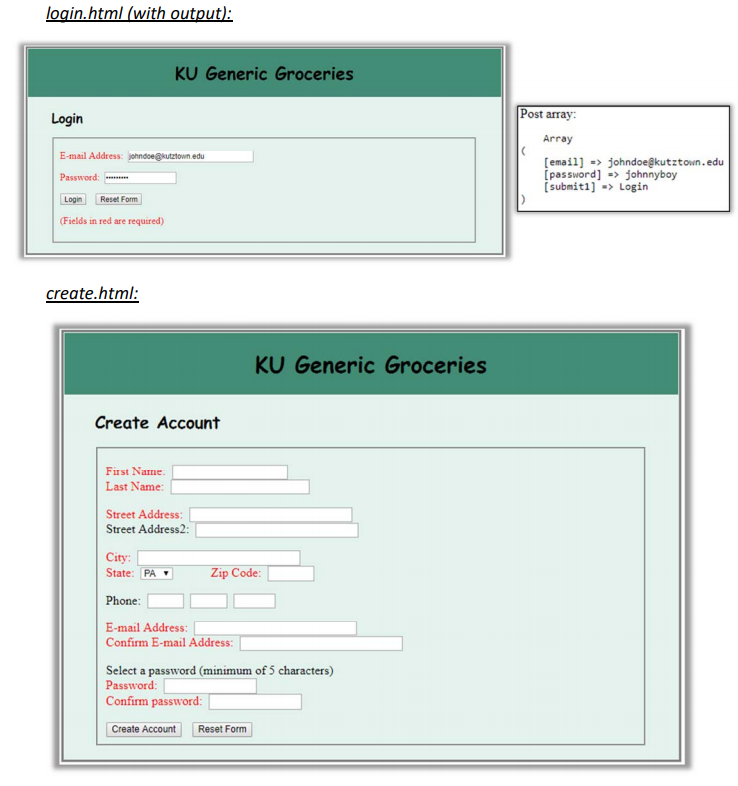
For this exercise, it will be necessary to create two pages, each with a form described below Name the pages login.html and create.html. These forms will require that all entries undergo proper and thorough validation. That will eventually be done using JavaScript. For the purpose of this assignment, however, just use the HTML "required" option to ensure that required items are actually entered in the forms You should use the CSS style sheet that you created in the CSS homework assignment to format these pages so that all three have a consistent style. See the example on the next page! These pages should be linked to the Login and Create Account links on the project home page that you created previously in the CSS assignment (store.html) The form method should be post and the gction should execute a php file that simply prints out the information collected in the form via the $_POST array. (You can simply print out the entire array, you don't need to print each individual item consult the website examples.) Create a page with a form to login to an account. This will require that the user enter two pieces of information 1) Assume that a previously provided email address will serve as the account name 2) A (previously established) password Make both of these items required ate.html Create a page with a form to create a new account. Collect the following information Eventually, all items will required unless otherwise noted as optional. For now, you need only make the email address and select password entries required 1) First name 2) Last name 3) Street address, 2 lines-second line is optional 4) city 5) state ZI 7) phone (optional) 8) email address (for account name) make this required 9) confirm email 10) select password - make this required 11) confirm password 12) "button" to create account (submit form) 13) reset form "button" login.html (with KU Generic Groceries Post array in Array E-mail Address: johndoe@kutztown.edu Password: Login Reset Form (Fields in red are required) [email] => johndoe@kut ztown.edu [password johnnyboy submit1]Login create.html KU Generic Groceries Create Account First Name Last Name: Street Address Street Address2: City: State: PA Zip Code Phone E-mail Address: Confirm E-mail Addres Select a password (minimum of 5 characters) Password Confirm password Create Account Reset Form
Step by Step Solution
There are 3 Steps involved in it

Get step-by-step solutions from verified subject matter experts
 Study Help