







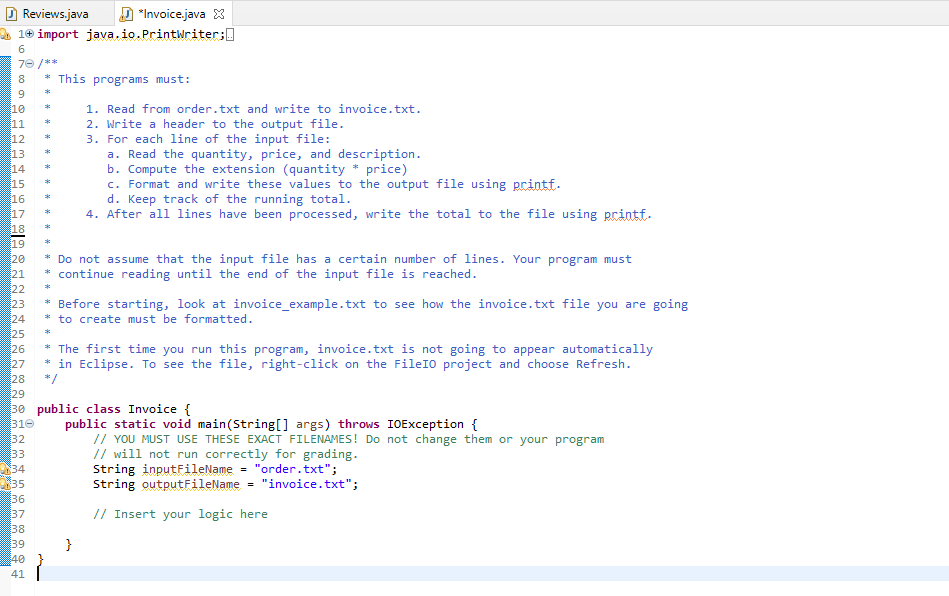
Question: Need help with Java assignment Order.txt Reviews.java Invoice.java X 21+ import java.io.PrintWriter:0 6 76/** 8 * This programs must: 9 10 1. Read from order.txt
Need help with Java assignment
Order.txt
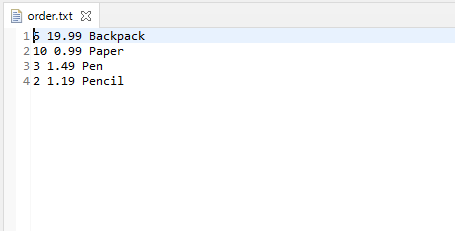
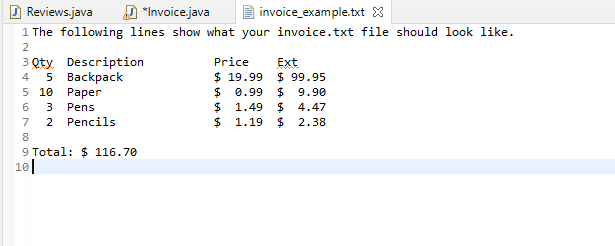
Reviews.java Invoice.java X 21+ import java.io.PrintWriter:0 6 76/** 8 * This programs must: 9 10 1. Read from order.txt and write to invoice.txt. 11 2. Write a header to the output file. 3. For each line of the input file: a. Read the quantity, price, and description. b. Compute the extension (quantity * price) 15 C. Format and write these values to the output file using printf. 16 d. Keep track of the running total. 4. After all lines have been processed, write the total to the file using printf. 12 13 14 17 18 19 20 21 22 23 24 25 26 27 28 * Do not assume that the input file has a certain number of lines. Your program must continue reading until the end of the input file is reached. Before starting, look at invoice_example.txt to see how the invoice.txt file you are going * to create must be formatted. * The first time you run this program, invoice.txt is not going to appear automatically in Eclipse. To see the file, right-click on the Fileto project and choose Refresh. */ 29 32 30 public class Invoice { 310 public static void main(String[] args) throws IOException { // YOU MUST USE THESE EXACT FILENAMES! Do not change them or your program 33 // will not run correctly for grading. 134 String inputFileName = "order.txt"; String outputFileName = "invoice.txt"; // Insert your logic here 35 36 37 38 } 39 40 41 Reviews.java *Invoice.java invoice_example.txt X 1 The following lines show what your invoice.txt file should look like. 2 3 Qty Description Price Ext 4 5 Backpack $ 19.99 $ 99.95 5 10 Paper $0.99 $ 9.90 6 3 Pens $ 1.49 $ 4.47 7 2 Pencils $ 1.19 $ 2.38 9 Total: $ 116.70 10 order.txt X 1$ 19.99 Backpack 2 10 0.99 Paper 33 1.49 Pen 42 1.19 Pencil
Step by Step Solution
There are 3 Steps involved in it

Get step-by-step solutions from verified subject matter experts
 Study Help