







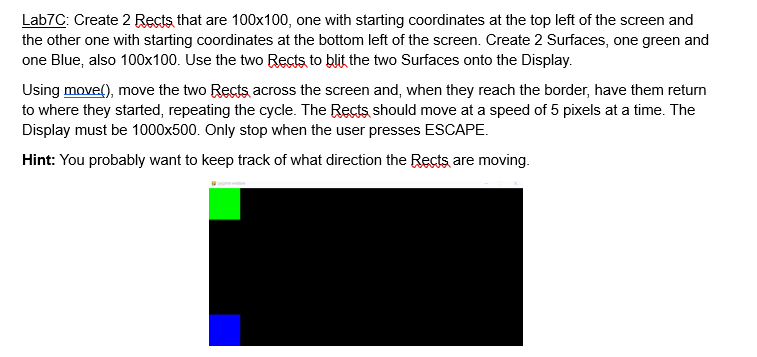
Question: Need help with keeping the squares from leaving the screen. Its supposed to switch direction once it hits a side. import pygame import sys pygame.init
Need help with keeping the squares from leaving the screen. Its supposed to switch direction once it hits a side.
import pygame
import sys
pygame.init
screenwidth
screenheight
rectsize
green
blue
movespeed
screen pygame.display.setmodescreenwidth, screenheight
pygame.display.setcaptionLabC: Moving Rects with Surfaces'
clock pygame.time.Clock
surfacegreen pygame.Surfacerectsize, rectsize
surfacegreen.fillgreen
surfaceblue pygame.Surfacerectsize, rectsize
surfaceblue.fillblue
rect pygame.Rect rectsize, rectsize
rect pygame.Rect screenheight rectsize, rectsize, rectsize
moveright True
moveright True
running True
while running:
for event in pygame.event.get:
if event.type pygame.QUIT:
running False
elif event.type pygame.KEYDOWN:
if event.key pygame.KESCAPE:
running False
if moveright:
rectx movespeed
if rectx screenwidth:
rectx rectsize
else:
rectx movespeed
if rectx rectsize:
rectx screenwidth
if moveright:
rectx movespeed
if rectx screenwidth:
rectx rectsize
else:
rectx movespeed
if rectx rectsize:
rectx screenwidth
screen.fill
screen.blitsurfacegreen, rect
screen.blitsurfaceblue, rect
pygame.display.flip
clock.tick
pygame.quit
sysexit
Step by Step Solution
There are 3 Steps involved in it
1 Expert Approved Answer
Step: 1 Unlock

Question Has Been Solved by an Expert!
Get step-by-step solutions from verified subject matter experts
Step: 2 Unlock
Step: 3 Unlock
 Study Help