







Question: need help with lab what was noticed during the tasks or steps. couple hours left Project 6-4: Using an Internet Content Filter Internet content filters
need help with lab what was noticed during the tasks or steps. couple hours left
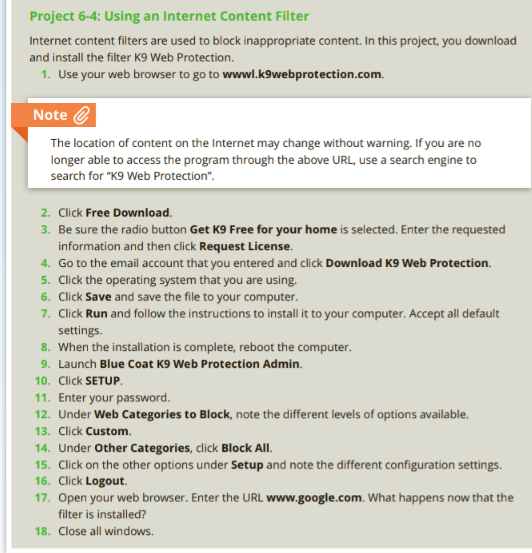
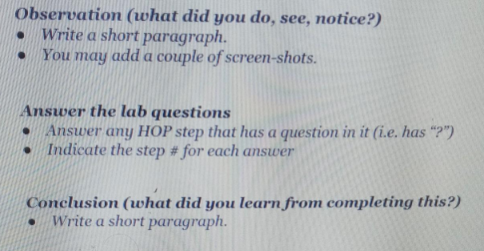
Project 6-4: Using an Internet Content Filter Internet content filters are used to block inappropriate content. In this project, you download and install the filter K9 Web Protection. 1. Use your web browser to go to wwwl.k9webprotection.com. Note The location of content on the Internet may change without warning. If you are no longer able to access the program through the above URL, use a search engine to search for "K9 Web Protection". 2. Click Free Download 3. Be sure the radio button Get K9 Free for your home is selected. Enter the requested information and then click Request License. 4. Go to the email account that you entered and click Download K9 Web Protection. 5. Click the operating system that you are using. 6. Click Save and save the file to your computer. 7. Click Run and follow the instructions to install it to your computer. Accept all default settings. 8. When the installation is complete, reboot the computer. 9. Launch Blue Coat K9 Web Protection Admin. 10. Click SETUP 11. Enter your password. 12. Under Web Categories to Block, note the different levels of options available. 13. Click Custom 14. Under Other Categories, click Block All. 15. Click on the other options under Setup and note the different configuration settings. 16. Click Logout 17. Open your web browser. Enter the URL www.google.com. What happens now that the filter is installed? 18. Close all windows Observation (what did you do, see, notice?) Write a short paragraph. You may add a couple of screen-shots. . Answer the lab questions Answer any HOP step that has a question in it (i.e. has "?") Indicate the step # for each answer Conclusion (what did you learn from completing this?) Write a short paragraph
Step by Step Solution
There are 3 Steps involved in it

Get step-by-step solutions from verified subject matter experts
 Study Help