







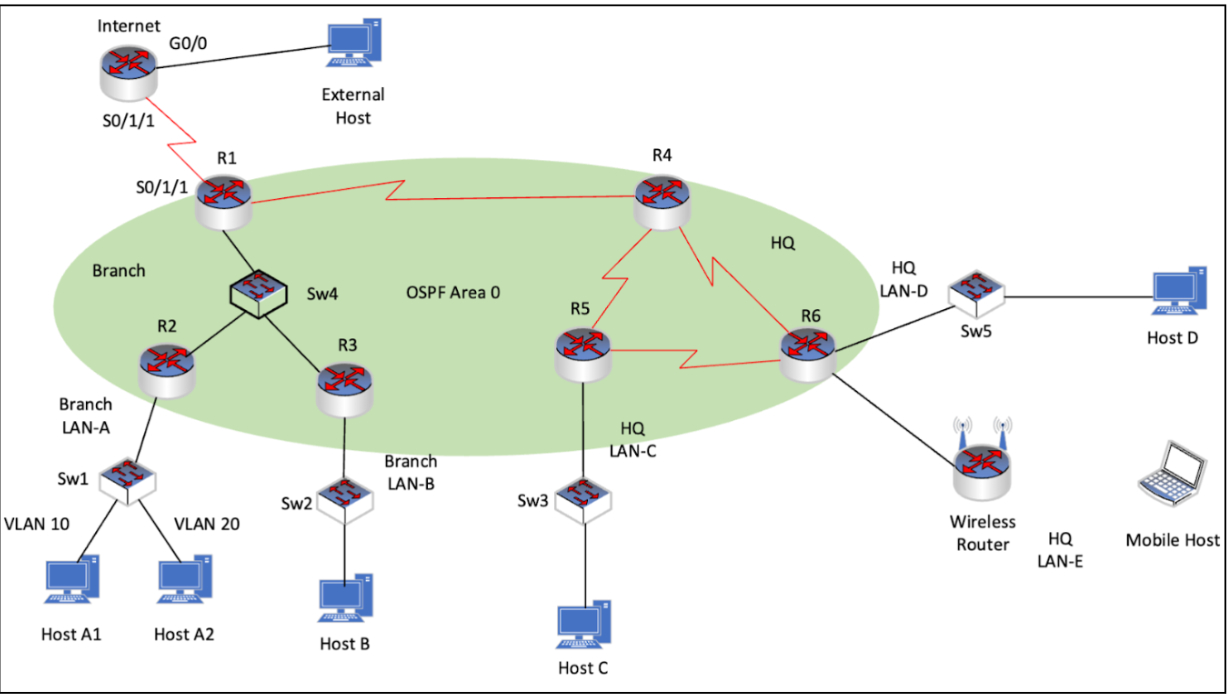
Question: Need Help with making OSPF work as required below, Step 1 : Activate OSPF. Use process ID 1 0 for OSPF activation on all routers.
Need Help with making OSPF work as required below,
Step : Activate OSPF.
Use process ID for OSPF activation on all routers.
Activate OSPF by configuring the interfaces of the network devices in the Branch and HQ networks, where required.
Activate OSPF using network statements and inverse masks on the routers.
Step : Configure router IDs.
Configure router IDs on the multiaccess network routers as follows:
R:
R:
R:
You will need to restart the OSPF process after changing the router IDs.
Step : Customise OSPF operation.
Configure router R with the highest OSPF interface priority so that it will always be the designated router of the multiaccess network.
On router R configure a default route to the Internet with the next hop IP address.
Automatically distribute the default route to all routers in the network.
Configure OSPF so that routing updates are not sent into networks where OSPF updates are not required.
Here is the addressing table:
Device Name InterfaceDefault Gateway IP addressprefix
Internet G
S
R G
S
S
R G
G
G
G
R G
G
R S
S
S
R G
S
S
R G
G
S
S
Sw VLAN
Default Gateway
Host A NIC VLAN DHCP
Host A NIC VLAN
Default Gateway
Host B NIC
Default Gateway
Host C NIC DHCP
Host D NIC
Default Gateway
Mobile Host Wireless NIC DHCP
External Host NIC
Step by Step Solution
There are 3 Steps involved in it
1 Expert Approved Answer
Step: 1 Unlock

Question Has Been Solved by an Expert!
Get step-by-step solutions from verified subject matter experts
Step: 2 Unlock
Step: 3 Unlock
 Study Help