







Question: need help with MATLAB Error % Temperature Data temp =[75,77,76,73,69,68,63,59,57,55,54,52, 50,50,49,49,49,50,54,56,59,63,67,72]; % Time t=1:24; % Query the polynomial fit X= linspace (1,24,100); % Time Vector
need help with MATLAB Error
![need help with MATLAB Error \% Temperature Data temp =[75,77,76,73,69,68,63,59,57,55,54,52, 50,50,49,49,49,50,54,56,59,63,67,72]; \%](https://s3.amazonaws.com/si.experts.images/answers/2024/09/66debc0c55e85_16366debc0bf06ce.jpg)
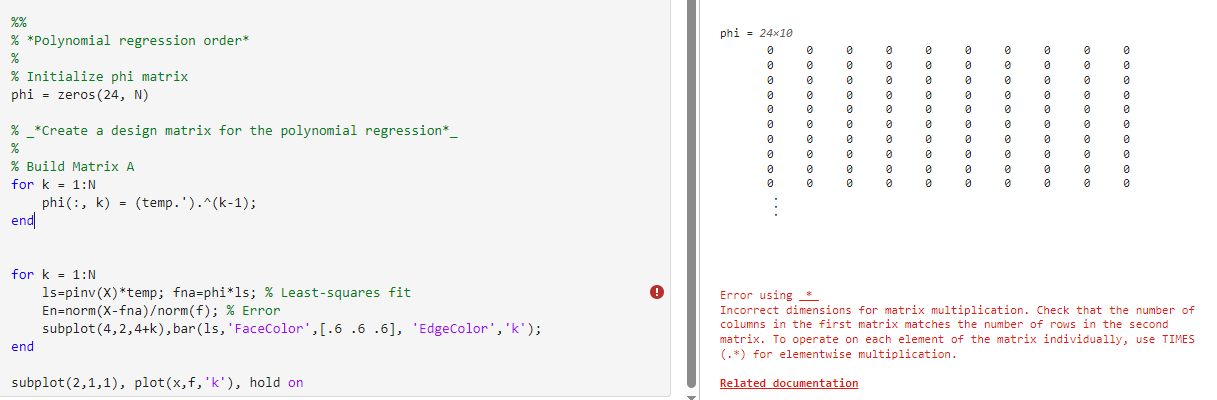
\% Temperature Data temp =[75,77,76,73,69,68,63,59,57,55,54,52, 50,50,49,49,49,50,54,56,59,63,67,72]; \% Time t=1:24; \% Query the polynomial fit X= linspace (1,24,100); \% Time Vector N=10;% Polynomial Degree % \% *Polynomial regression order* % \% Initialize phi matrix phi =zeros(24,N) \% _*Create a design matrix for the polynomial regression*_ % \% Build Matrix A for k=1:N phi (:,k)=( temp. ' )(k1); end| for k=1:N ls=pinv (X) temp; fna=phi*ls; \% Least-squares fit En=norm (Xfna)orm(f);% Error subplot (4,2,4+k), bar(1s, 'FaceColor', [.6.6.6], 'EdgeColor ', 'k'); end subplot (2,1,1),plot(x,f,k), hold on Error using * Incorrect dimensions for matrix multiplication. Check that the number of columns in the first matrix matches the number of rows in the second matrix. To operate on each element of the matrix individually, use TIMES (.*) for elementwise multiplication. Related documentation
Step by Step Solution
There are 3 Steps involved in it

Get step-by-step solutions from verified subject matter experts
 Study Help