







Question: Need help with MIS question! (Python +). I attach a script as it contains more information. Thank you so much. ------- Create an application to
Need help with MIS question! (Python +). I attach a script as it contains more information. Thank you so much.
-------
Create an application to compute retirement account balances.
User will enter the annual savings. Annual savings must be a positive number. Use a loop to prompt the user to enter annual savings until they get it right.
User will enter the year that the user will start saving. Start year must be a year between 2020 and 2100 (inclusive). Use a loop to prompt the user to enter the start year until they get it right.
User will enter the year that savings ends. End year must be between 2020 and 2100 (inclusive) and must be greater than or equal to the start year. Use a loop to prompt the user to enter the end year until they get it right.
User will enter a retirement year. Retirement year must be between 2020 and 2100 (inclusive) and must be greater than or equal to the end year. Use a loop to prompt the user to enter the retirement year until they get it right.
User enter the interest rate between 1 and 15% (inclusive). Use a loop to prompt the user to enter the interest rate until they get it right.
ALWAYS display an error message if the user did something wrong let them know why they are being prompted to re-enter an input.
Use a FOR loop statement to calculate the amount saved, interest earned and total savings for each year using the following formulas:
If current year
If current year > end of savings year, additional savings = 0. (You can choose to stop saving money before you retire.)
Interest Earned = (Total Savings + Additional Savings) * Interest Rate
Total Savings = Total Savings from previous year + additional savings + interest earned
Display a table with a row for each year between the start year and the retirement year.
There should be a header row with labels for each of the columns.
Each row should display the year, additional savings, interest and total savings amount for that year.
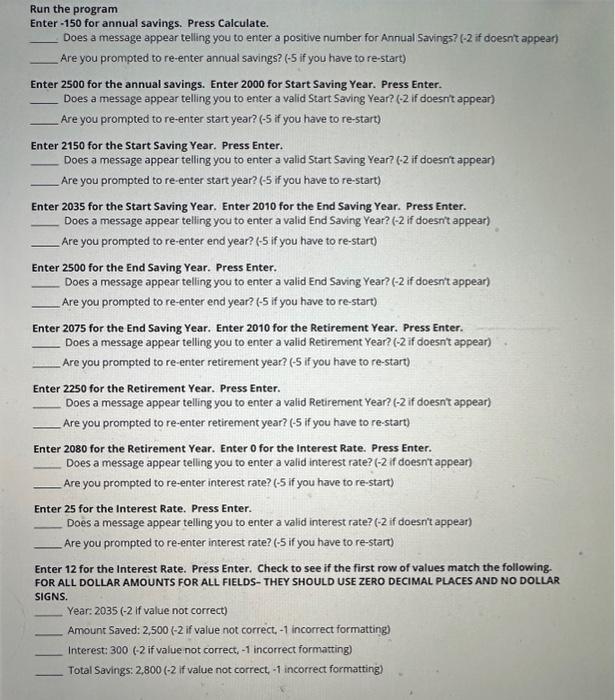
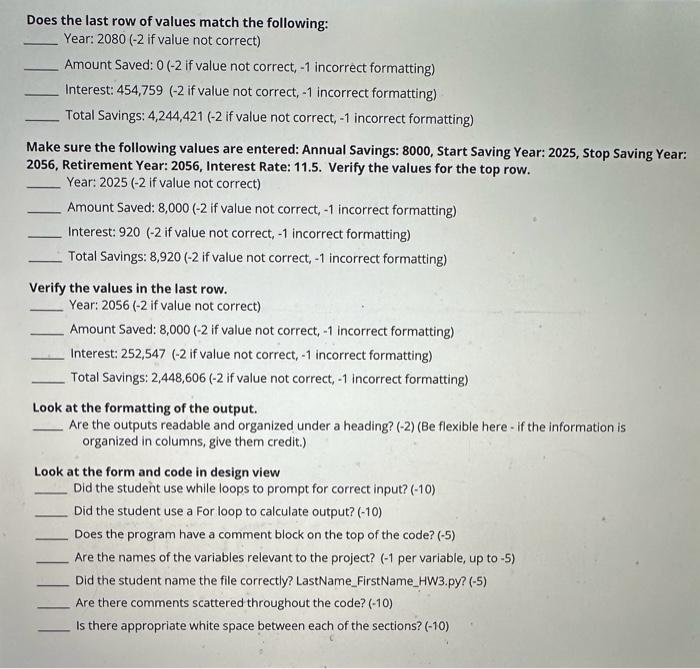
Run the program Enter - 150 for annual savings. Press Calculate. Does a message appear telling you to enter a positive number for Annual Savings? (- 2 if doesnt appear) Are you prompted to re-enter annual savings? ( 5 if you have to re-start) Enter 2500 for the annual savings. Enter 2000 for Start Saving Year. Press Enter. Does a message appear telling you to enter a valid Start Saving Year? ( 2 if doesnit appear) Are you prompted to re-enter start year? (5 if you have to re-start) Enter 2150 for the Start Saving Year. Press Enter. Does a message appear telling you to enter a valid Start Saving Year? (- 2 if doesn't appear) Are you prompted to re enter start year? ( 5 if you have to re-start) Enter 2035 for the Start Saving Year. Enter 2010 for the End Saving Year. Press Enter. Does a message appear telling you to enter a valid End Saving Year? (-2 if doesn't appear) Are you prompted to re-enter end year? (5 if you have to re-start) Enter 2500 for the End Saving Year. Press Enter. Does a message appear telling you to enter a valid End Saving Year? (-2 if doesn't appear) Are you prompted to re-enter end year? ( 5 if you have to re-start) Enter 2075 for the End Saving Year. Enter 2010 for the Retirement Year. Press Enter. Does a message appear telling you to enter a valid Retirement Year? ( 2 if doesn't appear) Are you prompted to re-enter retirement year? (5 if you have to re-start) Enter 2250 for the Retirement Year. Press Enter. Does a message appear telling you to enter a valid Retirement Year? (-2 if doesnt appear) Are you prompted to re-enter retirement year? ( 5 if you have to re-start) Enter 2080 for the Retirement Year. Enter ofor the Interest Rate. Press Enter. Does a message appear telling you to enter a valid interest rate? ( 2 if doesn' appear) Are you prompted to re-enter interest rate? (-5 if you have to re-start) Enter 25 for the interest Rate. Press Enter. Does a message appear telling you to enter a valid interest rate? ( 2 if doesn't appear) Are you prompted to re-enter interest rate? ( 5 if you have to re-start) Enter 12 for the Interest Rate. Press Enter. Check to see if the first row of values match the following. FOR ALL DOLLAR AMOUNTS FOR ALL FIELDS- THEY SHOULD USE ZERO DECIMAL PLACES AND NO DOLLAR SIGNS. Year: 2035 (-2 if value not correct) Amount Saved: 2,500(2 if value not correct, 1 incorrect formatting) Interest: 300(2 if value not correct, 1 incorrect formatting) Total Savings: 2,800(2 if value not correct, 1 incorrect formatting) Does the last row of values match the following: Year: 2080(2 if value not correct) Amount Saved: 0 (- 2 if value not correct, 1 incorrect formatting) Interest: 454,759 ( 2 if value not correct, 1 incorrect formatting) Total Savings: 4,244,421 (-2 if value not correct, 1 incorrect formatting) Make sure the following values are entered: Annual Savings: 8000, Start Saving Year: 2025, Stop Saving Yeal 2056, Retirement Year: 2056, Interest Rate: 11.5. Verify the values for the top row. Year: 2025 (-2 if value not correct) Amount Saved: 8,000 (-2 if value not correct, 1 incorrect formatting) Interest: 920 (-2 if value not correct, 1 incorrect formatting) Total Savings: 8,920 (-2 if value not correct, 1 incorrect formatting) Verify the values in the last row. Year: 2056(2 if value not correct) Amount Saved: 8,000 ( 2 if value not correct, 1 incorrect formatting) Interest: 252,547 (-2 if value not correct, 1 incorrect formatting) Total Savings: 2,448,606 (-2 if value not correct, 1 incorrect formatting) Look at the formatting of the output. Are the outputs readable and organized under a heading? (2) (Be flexible here - If the information is organized in columns, give them credit.) Look at the form and code in design view Did the student use while loops to prompt for correct input? (10) Did the student use a For loop to calculate output? (-10) Does the program have a comment block on the top of the code? (5) Are the names of the variables relevant to the project? (-1 per variable, up to 5) Did the student name the file correctly? LastName_FirstName_HW3.py? (-5) Are there comments scattered throughout the code? (10) Is there appropriate white space between each of the sections? (10)
Step by Step Solution
There are 3 Steps involved in it

Get step-by-step solutions from verified subject matter experts
 Study Help