







Question: Need help with my Lab, please help I do not get it! here is the shifter.cpp file but it won't show the whole code on
Need help with my Lab, please help I do not get it!
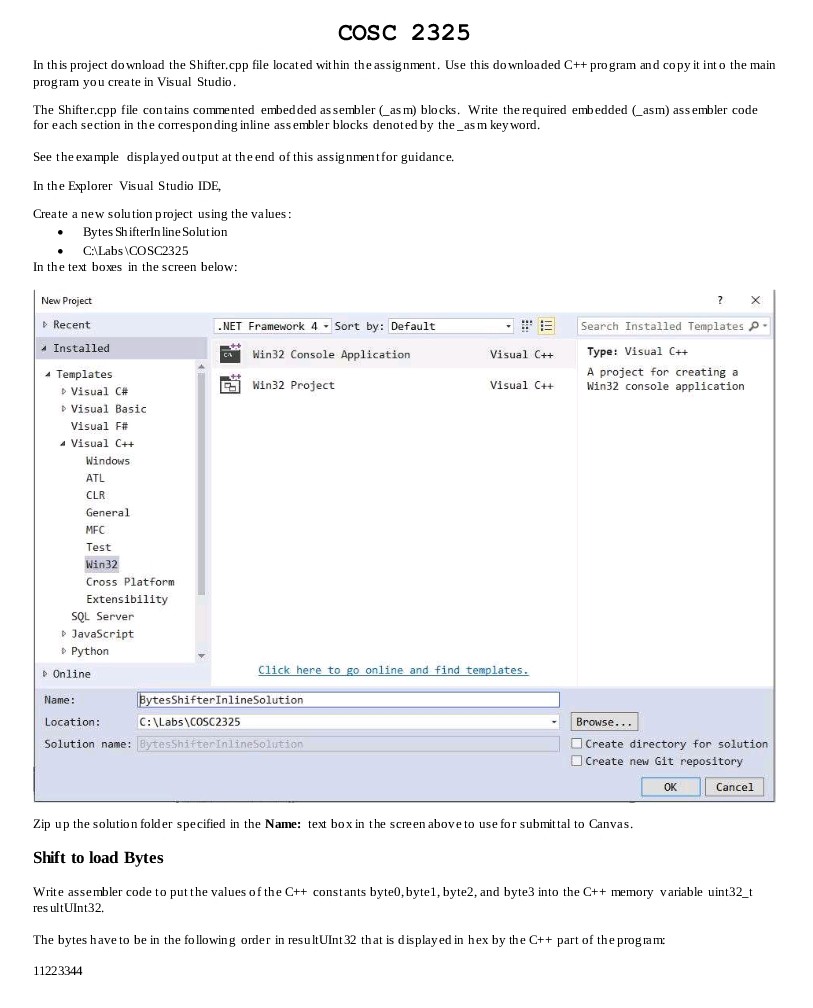
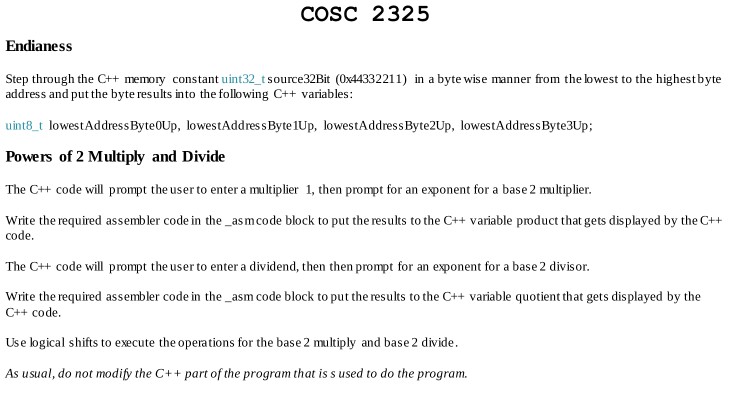
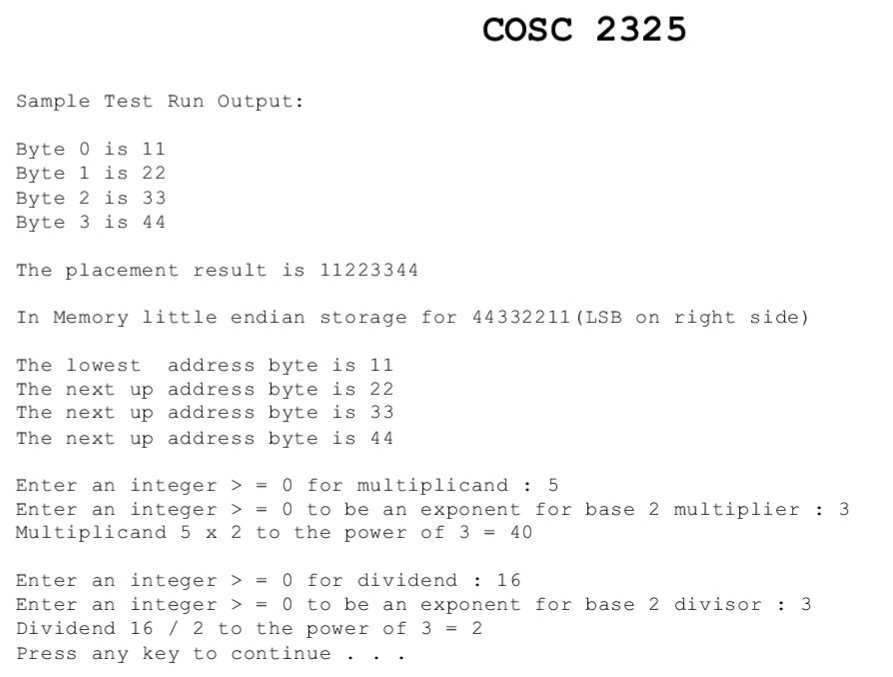
here is the shifter.cpp file but it won't show the whole code on screen I so I took two screen shots of the of the other half of code that was not showing up on the right side
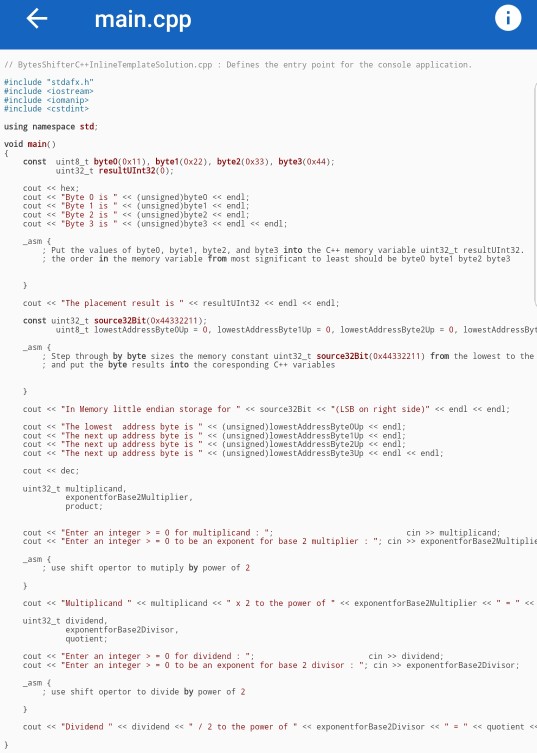
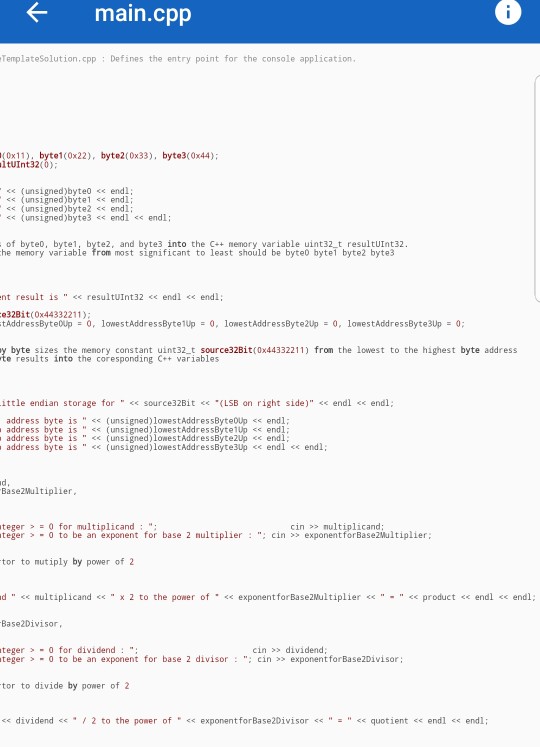
if you can do this for me it would be really helpful!
COSC 2325 In th is project download the Shifter.cpp file located within the assignment. Use this do wnloaded C++ pro gram and copy it int o the main prog ram you create in Visual Studio The Shifter.cpp file contains commented embedded as sembler (as m) blocks. Write the required embedded (asm) ass embler code for each section in the corresponding inline ass embler blocks denoted by the_as m keyword See the example displayed output at the end of this assignment for guidance. In the Explorer Visual Studio IDE, Create a new solution p roject using the values: Bytes Shifterln line Solution CALabs COSC2325 In the text boxes in the screen below: New Project Recent Installed 4 Templates NET Framework 4 Sort by: Default Search Installed Templates o Type: Visual C++ A project for creatinga Win32 console application Win32 Console Application Visual C++ E Win32 Project Visual C++ Visual C# p Visual Basic Visual F# a Visual C++ Windows CLR General MFC Test Win32 Cross Platform Extensibility SQL Server p JavaScript Python ick here to ine and find p Online Name: Location: Solution name: esShifterInlineSolution C:\Labs\COSC2325 -Browse Create directory for solution Create new Git repository esShifterInlinesoli OK Cancel Zip up the solution folder specified in the Name: text box in the scre aboveto use for submittal to Canvas Shift to load Bytes Write assembler code to put the values of the C++ constants byte0, byte1, byte2, and byte3 into the Ct+ memory variable uint32 t res ultUInt32. The bytes have to be in the fo llowing order in resu ltUInt 32 that is display ed in hex by the C++ part of the prog ram 11223344 COSC 2325 In th is project download the Shifter.cpp file located within the assignment. Use this do wnloaded C++ pro gram and copy it int o the main prog ram you create in Visual Studio The Shifter.cpp file contains commented embedded as sembler (as m) blocks. Write the required embedded (asm) ass embler code for each section in the corresponding inline ass embler blocks denoted by the_as m keyword See the example displayed output at the end of this assignment for guidance. In the Explorer Visual Studio IDE, Create a new solution p roject using the values: Bytes Shifterln line Solution CALabs COSC2325 In the text boxes in the screen below: New Project Recent Installed 4 Templates NET Framework 4 Sort by: Default Search Installed Templates o Type: Visual C++ A project for creatinga Win32 console application Win32 Console Application Visual C++ E Win32 Project Visual C++ Visual C# p Visual Basic Visual F# a Visual C++ Windows CLR General MFC Test Win32 Cross Platform Extensibility SQL Server p JavaScript Python ick here to ine and find p Online Name: Location: Solution name: esShifterInlineSolution C:\Labs\COSC2325 -Browse Create directory for solution Create new Git repository esShifterInlinesoli OK Cancel Zip up the solution folder specified in the Name: text box in the scre aboveto use for submittal to Canvas Shift to load Bytes Write assembler code to put the values of the C++ constants byte0, byte1, byte2, and byte3 into the Ct+ memory variable uint32 t res ultUInt32. The bytes have to be in the fo llowing order in resu ltUInt 32 that is display ed in hex by the C++ part of the prog ram 11223344
Step by Step Solution
There are 3 Steps involved in it

Get step-by-step solutions from verified subject matter experts
 Study Help