







Question: need help with number 14 need help with 13 Paste Font Paragraph Styles Dictate Sensitivity er - Instructions Excel 2019 Pr Step Instructions Points Possible
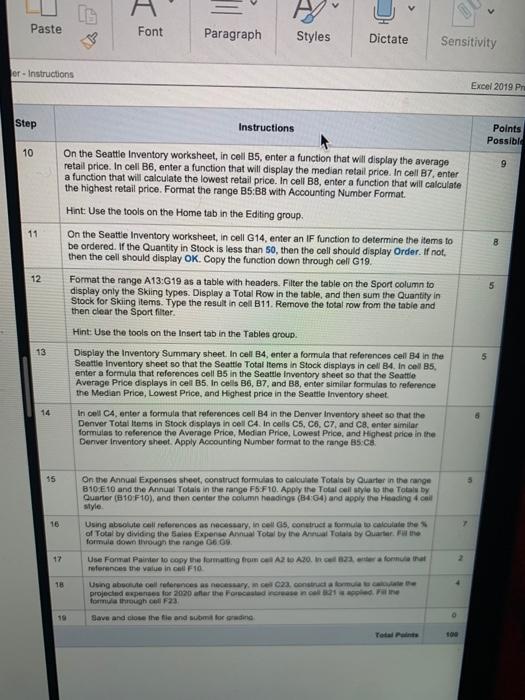
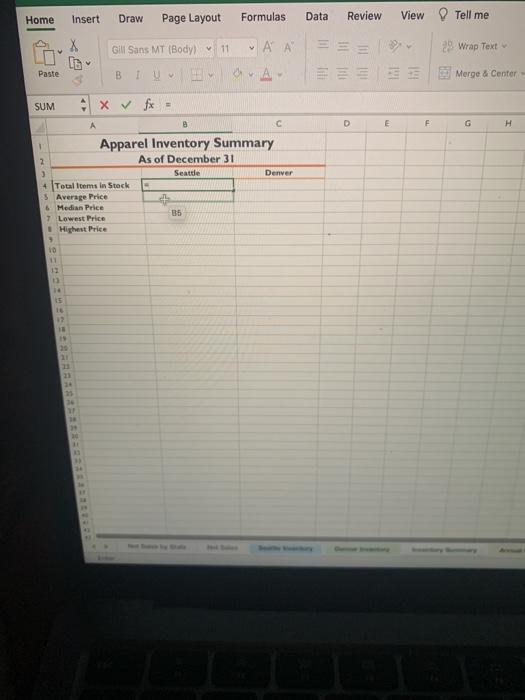
Paste Font Paragraph Styles Dictate Sensitivity er - Instructions Excel 2019 Pr Step Instructions Points Possible 10 9 11 On the Seattle Inventory worksheet, in cell B5, enter a function that will display the average retail price. In cell B6, enter a function that will display the median retail price. In cell B7, enter a function that will calculate the lowest retail price. In cell B8, enter a function that will calculate the highest retail price. Format the range B5:38 with Accounting Number Format. Hint: Use the tools on the Home tab in the Editing group. On the Seattle Inventory worksheet, in cell G14, enter an IF function to determine the items to be ordered. If the Quantity in Stock is less than 50, then the cell should display Order. If not. then the cell should display OK. Copy the function down through cell G19. Format the range A13:G19 as a table with headers. Filter the table on the Sport column to display only the Skiing types. Display a Total Row in the table, and then sum the Quantity in Stock for Skiing items. Type the result in cell B11. Remove the total row from the table and then clear the Sport filter 12 5 Hint: Use the tools on the Insert tab in the Tables group 13 Display the Inventory Summary sheet. In cell B4, enter a formula that references cell 84 in the Seattle Inventory sheet so that the Seattle Total Items in Stock displays in cell B4. In cel B5, enter a formula that references cell B5 in the Seattle inventory sheet so that the Seattle Average Price displays in cell B5. In cells B6, B7, and 38, enter similar formulas to reference the Median Price, Lowest Price, and Highest price in the Seattle Inventory sheet In cell CA, enter a formula that references cell B4 in the Denver Inventory sheet so that the Denver Total Items in Stock displays in cell C4. In cells C5, C6 C7, and Center similar formulas to reference the average Price, Median Price, Lowest Price, and Highest price in the Denver Inventory sheet. Apply Accounting Number format to the range B5.ca 14 8 55 16 On the Annual Expenses sheet, construct formulas to calculate Totals by Quarter in the range 810E10 and the Annual Totals in the range F5 F10. Apply the Total call style to the Total by Quarter (810-F10), and then center the column Headings (464) and apply the Heading 4 coil style Using absolute cell references as necessary, incelas, construct a formula o calitate the of Total by dividing the sales Expense Annual Total by the Anna Tatais by Quarter. Fw the formula down through the range 06.09 Use Format Painter to copy the formatting from cel A2 A20. 22. era formula that references the value in cel F10 Using able cell references as necessary.me 23. construct a forma projected expenses for 2020 afar the Forecastinence de formula through coll F23 Save and close the fie and for den 12 18 SON Home Insert Draw Page Layout Formulas Data Review View Tell me Gill Sans MT (Body) 11 29 Wrap Text ' A ili tu Paste B 1991 Merge & Center SUM x x D E F G H B c Apparel Inventory Summary 2 As of December 31 3 Seatde Denver 4 Totalems in Stock 5 Average Price 6 Median Price 7 Lowest Price Highest Price 9 10 11 + 16 21 1
Step by Step Solution
There are 3 Steps involved in it

Get step-by-step solutions from verified subject matter experts
 Study Help