







Question: Need help with Processing. Just need help with any bolded parts 1, 2, or 3! Will give thumbs up! *Only edit this code! Menu globalMenu
Need help with Processing. Just need help with any bolded parts 1, 2, or 3! Will give thumbs up! *Only edit this code!
Menu globalMenu = null ;
class ResponsiveText { String mytext ; PFont font ; int pointSize ; int x ; int y ; Menu menu ; ResponsiveText(String mytext, PFont font, int pointSize, int x, int y,Menu menu) { this.mytext = mytext ; this.font = font ; this.pointSize = pointSize ; this.x = x ; this.y = y ; this.menu = menu ; } void setMyFont() { if (font != null) { textFont(font, pointSize) ; } else { textSize(pointSize); } textAlign(LEFT, TOP); } void display(boolean highlight) { setMyFont(); // set for display if (highlight) { fill(255,255,0); // STUDENT 6: Underline the highlighted text using // Processing's line library function in the same color. // You have the x,y location of the left,top of the // text; call getWidth() and getHeight() to determine // the right and bottom coordinates of the text; put // the underline a little below the bottom. } else { fill(0,255,255); } text(mytext, x, y); } boolean isInBoundingBox(int eventX, int eventY) { setMyFont(); // set for determining extents int right = x + round(textWidth(mytext)); int bottom = y + round(textAscent()+textDescent()); return (eventX >= x && eventX = y && eventY 0 multi-character commands. String [] rowsOfLetters ; ResponsiveText submitButton = null ; ResponsiveText cancelButton = null ; ResponsiveText [][] buttons ; int [] activeRowPerColumn ; int maxcolumns = 0 ; String mytext ; PFont font ; int pointSize ; int leftx = 0 ; Menu(String title, boolean isSubmit, boolean isCancel, String [][] columnsOfMulticharFields, // May be null!!! String [] rowsOfLetters, PFont font, int pointSize, float rowSpacing, float colSpacing) { this.title = title ; this.isSubmit = isSubmit ; this.isCancel = isCancel ; this.columnsOfMulticharFields = columnsOfMulticharFields ; this.rowsOfLetters = rowsOfLetters ; this.font = font ; this.pointSize = pointSize ; setMyFont(); ResponsiveText fatText = new ResponsiveText("X",font, pointSize, -1, -1, null); int fatWidth = fatText.getWidth(); int verticalHeight = fatText.getHeight(); leftx = round(textWidth("i")) ; // start over at left int tmpx = leftx, tmpy = round(textAscent()+textDescent()) * 2 ; // Leave room for title if (isSubmit) { submitButton = new ResponsiveText(" Submit ", font, pointSize, tmpx, tmpy, this); tmpx += round(colSpacing * submitButton.getWidth()); } if (isCancel) { cancelButton = new ResponsiveText(" Cancel ", font, pointSize, tmpx, tmpy, this); } if (isSubmit || isCancel) { tmpy += round((textAscent()+textDescent())*rowSpacing) ; } tmpx = leftx ; // start over at left if (columnsOfMulticharFields == null) { buttons = new ResponsiveText [ rowsOfLetters.length ][]; for (int row = 0 ; row // Part1: Create an array of String objects CommandMenuStrings [], // patterned after SetServerAddressPortStrings above, with each command // string padded out with trailing spaces to the length of the longest // command string + 1; the longest commands with have 1 trailing space, // and all command strings will have the same String length to simplify // alignment on the screen. // See top of PaintDomeAndroid2018.pde for command datagram protocol. // These are the commands: // addbrush // rembrush // shuffle // setX // setY // speedX // speedY // scaleX // scaleXS // scaleXLB // scaleXUB // scaleY // scaleYS // scaleYLB // scaleYUB // rotate // speedRot // rotateB // shearX // shearXS // shearXB // shearY // shearYS // shearYB // reset String [] CommandMenuStrings = { //work goes here. }; // Part2: Create an array of String objects FloatStrings [], // patterned after SetServerAddressPortStrings above, where there // are exactly 6 characters in each string. The first column // consists of alternating '+' and '-' characters for plus and minus. // The second, third, fifth, and sixth columns consist of digits, // with 0 at the top, increasing by 1 to 9 at the bottom; there // are thus 10 rows. The fourth column consists entirely of '.' // decimal points. With this arrangement, the even digit strings have // '+ at the front, and the odd digit strings have '-' at the front. String [] FloatStrings = { //work goes here. }; // Part 3: Rewrite function combineStringArrays to return // an array that has String array brushes as its first element // and String array commands as its second element. See its application // in the CommandMenu constructor below. String [][] combineStringArrays( //work goes here. return null ; // REPLACE THIS LINE with the real thing. } class CommandMenu extends Menu { CommandMenu() { super("Send Command to Server (Cancel Exits)", true, true, combineStringArrays(getAllBrushnames(),CommandMenuStrings),FloatStrings, globalFont, round(globalPointSize * .8), 1.5, 1.5); } 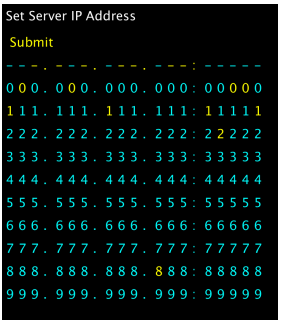
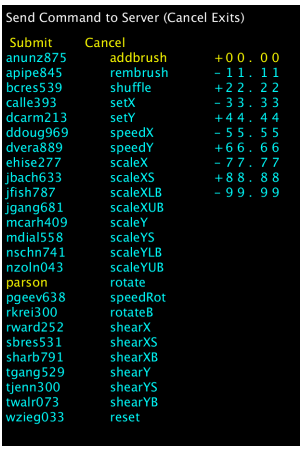
Set Server IP Address Submit 000.000. 000. 000:000 0 0 2 22. 222.222.2 2 2:22222 333.333.3 33.333:33333 444.444.444.444: 4444 4 55 5. 555. 555. 555: 5555 5 666.666. 666.666: 66666 888.888. 888. 888:888 8 8 999. 999. 999.999: 99999
Step by Step Solution
There are 3 Steps involved in it
1 Expert Approved Answer
Step: 1 Unlock

Question Has Been Solved by an Expert!
Get step-by-step solutions from verified subject matter experts
Step: 2 Unlock
Step: 3 Unlock
 Study Help