







Question: Need help with SQL Log into your online Oracle SQL account (livesql.oracle.com) Open SQL Worksheet and write and run (execute) SQL statements to accomplish the
Need help with SQL
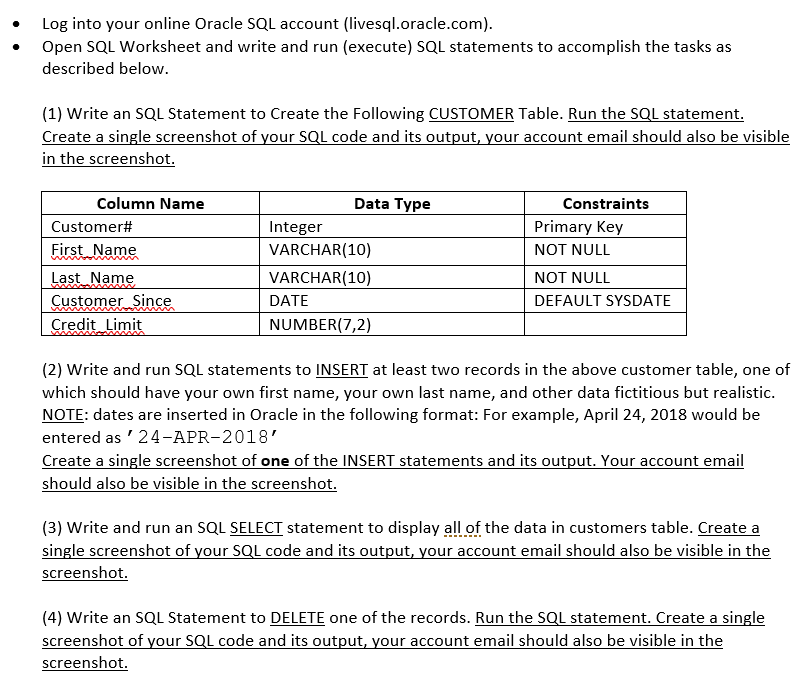
Log into your online Oracle SQL account (livesql.oracle.com) Open SQL Worksheet and write and run (execute) SQL statements to accomplish the tasks as described below (1) Write an SQL Statement to Create the Following CUSTOMER Table. Run the SQL statement. Create a single screenshot of your SQL code and its output, your account email should also be visible in the screenshot Column Name Data Type Constraints Customer# First Name Last Name Customer Since Credit Limit Integer VARCHAR(10) VARCHAR(10) DATE NUMBER(7,2) Primary Key NOT NULL NOT NULL DEFAULT SYSDATE (2) Write and run SQL statements to INSERT at least two records in the above customer table, one of which should have your own first name, your own last name, and other data fictitious but realistic. NOTE: dates are inserted in Oracle in the following format: For example, April 24, 2018 would be entered as 24-APR-2018 Create a single screenshot of one of the INSERT statements and its output. Your account email should also be visible in the screenshot (3) Write and run an SQL SELECT statement to display all of the data in customers table. Create a single screenshot of vour SQL code and its output, your account email should also be visible in the screenshot (4) Write an SQL Statement to DELETE one of the records. Run the SQL statement. Create a single screenshot of your SQL code and its output, your account email should also be visible in the screenshot
Step by Step Solution
There are 3 Steps involved in it

Get step-by-step solutions from verified subject matter experts
 Study Help