Question: Need help with task #4 with the question to use. Thanks in advance. Excel File Edit View 50%O Sat 4:29 PM Q >> AutoSave OFF
Need help with task #4 with the question to use. Thanks in advance.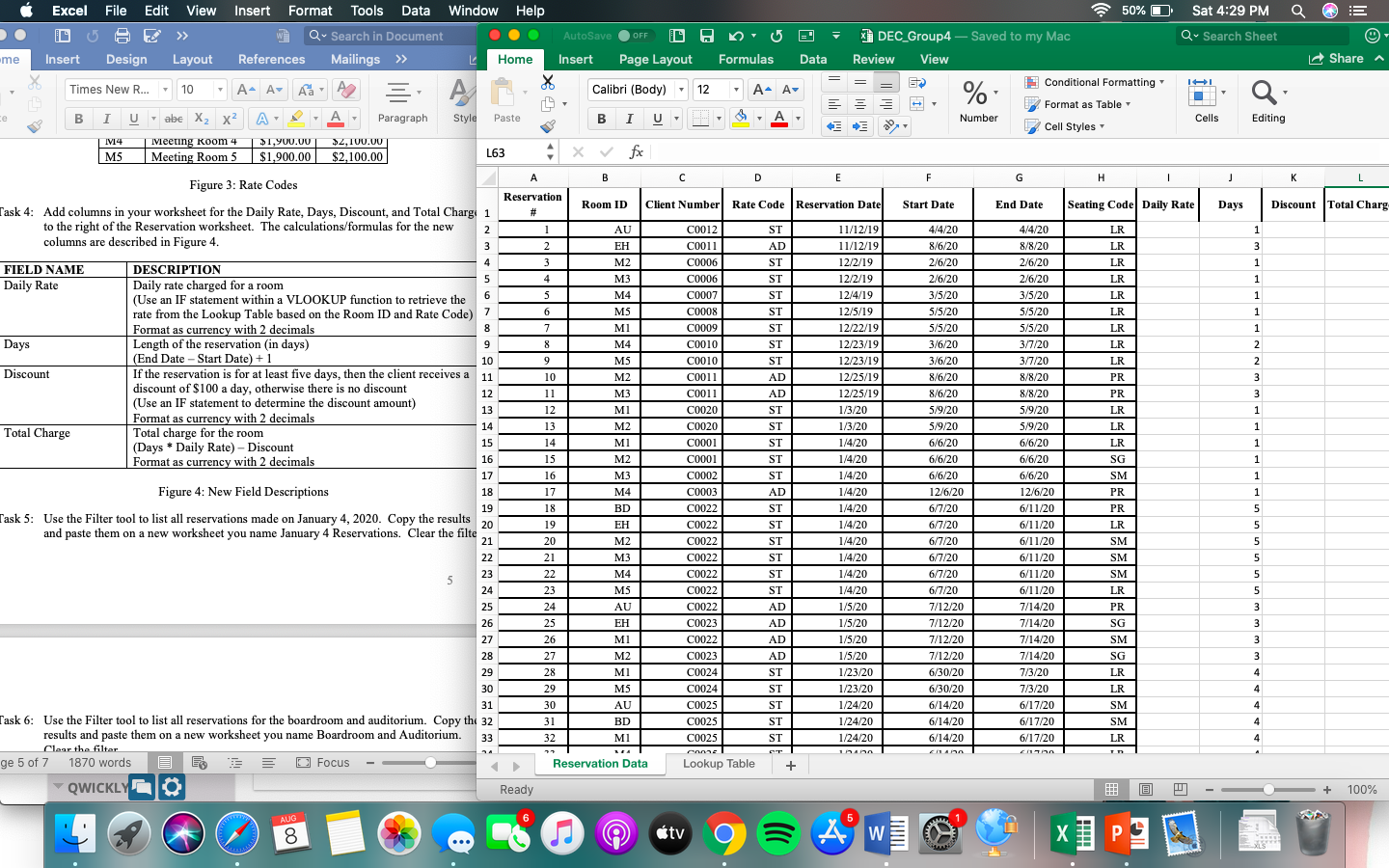
Excel File Edit View 50%O Sat 4:29 PM Q >> AutoSave OFF 0 Q Search Sheet Insert Format Tools Data Window Help Q Search in Document References Mailings >> L Home A- A Aa X .me Insert Design Layout Insert Page Layout Formulas Data Share a DEC_Group4 - Saved to my Mac Review View Conditional Formatting Format as Table Number 17 Cell Styles Times New R... - 10 . Calibri (Body) - 12 A A % BIU abe X2 X2 - A - Paragraph Style Paste A 7 Cells Editing 14 MS Meeting Room 4 Meeting Room 5 $1,900.00 $1,900.00 $2,100.00 $2,100.00 L63 fx A B C D E F H J - K L Figure 3: Rate Codes Dhe me Room ID Client Number Rate Code Reservation Date Start Date End Date Seating Code Daily Rate Days Discount Total Charg Reservation # 1 2 AU EH ST AD ST 1 3 1 M2 3 4 5 LR LR LR LR LR LR ST 1 ST 1 6 ST 1 ST 1 7 8 9 10 9 2 2 3 Task 4: Add columns in your worksheet for the Daily Rate, Days, Discount, and Total Charge 1 to the right of the Reservation worksheet. The calculations/formulas for the new 2 columns are described in Figure 4. 3 4 FIELD NAME DESCRIPTION 5 Daily Rate Daily rate charged for a room 6 (Use an IF statement within a VLOOKUP function to retrieve the rate from the Lookup Table based on the Room ID and Rate Code) 7 Format as currency with 2 decimals 8 Days Length of the reservation (in days) (End Date - Start Date) +1 Discount If the reservation is for at least five days, then the client receives a 11 discount of $100 a day, otherwise there is no discount 12 (Use an IF statement to determine the discount amount) 13 Format as currency with 2 decimals 14 Total Charge Total charge for the room 15 (Days * Daily Rate) - Discount Format as currency with 2 decimals 16 17 Figure 4: New Field Descriptions 18 19 Task 5: Use the Filter tool to list all reservations made on January 4, 2020. Copy the results 30 and paste them on a new worksheet you name January 4 Reservations. Clear filte 21 22 10 11 12 13 ST ST AD AD ST ST ST ST ST 1 1 1 1 16 1 M3 M4 MS MI M4 M5 M2 M3 MI M2 MI M2 M3 M4 BD EH M2 M3 M4 MS AU EH MI M2 MI MS AU BD MI LR LR LR PR PR LR LR LR SG SM PR PR LR C0012 C0011 C0006 C0006 C0007 C0008 C0009 C0010 C0010 C0011 C0011 C0020 C0020 C0001 C0001 C0002 C0003 C0022 C0022 C0022 C0022 C0022 C0022 C0022 C0023 C0022 C0023 C0024 C0024 C0025 C0025 C0025 anne Lookup Table 11/12/19 11/12/19 12/2/19 12/2/19 12/4/19 12/5/19 12/22/19 12/23/19 12/23/19 12/25/19 12/25/19 1/3/20 1/3/20 1/4/20 1/4/20 1/4/20 1/4/20 1/4/20 1/4/20 1/4/20 1/4/20 1/4/20 1/4/20 1/5/20 1/5/20 1/5/20 1/5/20 1/23/20 1/23/20 1/24/20 1/24/20 1/24/20 4/4/20 8/6/20 2/6/20 2/6/20 3/5/20 5/5/20 5/5/20 3/6/20 3/6/20 8/6/20 8/6/20 5/9/20 5/9/20 6/6/20 6/6/20 6/6/20 12/6/20 6/7/20 6/7/20 6/7/20 6/7/20 6/7/20 6/7/20 7/12/20 7/12/20 7/12/20 7/12/20 6/30/20 6/30/20 6/14/20 6/14/20 6/14/20 4/4/20 8/8/20 2/6/20 2/6/20 3/5/20 5/5/20 5/5/20 3/7/20 3/7/20 8/8/20 8/8/20 5/9/20 5/9/20 6/6/20 6/6/20 6/6/20 12/6/20 6/11/20 6/11/20 6/11/20 6/11/20 6/11/20 6/11/20 7/14/20 7/14/20 7/14/20 7/14/20 7/3/20 7/3/20 6/17/20 6/17/20 6/17/20 14 15 16 17 18 19 20 21 22 23 24 25 26 27 28 29 30 31 32 1 5 5 5 5 23 AD ST ST ST ST ST ST AD AD AD AD ST ST ST ST ST SM SM SM LR PR SG 5 5 3 3 3 SM 3 5 24 25 26 27 28 29 30 31 Task 6: Use the Filter tool to list all reservations for the boardroom and auditorium. Copy the 32 results and paste them on a new worksheet you name Boardroom and Auditorium. 33 Clear the filter 1870 words E Focus QWICKLY Ready 3 4 4 SG LR LR SM SM LR 4 4 4 11n * ge 5 of 7 Reservation Data + + 100% AUG 6 5 8 tv AWT X PE Excel File Edit View 50%O Sat 4:29 PM Q >> AutoSave OFF 0 Q Search Sheet Insert Format Tools Data Window Help Q Search in Document References Mailings >> L Home A- A Aa X .me Insert Design Layout Insert Page Layout Formulas Data Share a DEC_Group4 - Saved to my Mac Review View Conditional Formatting Format as Table Number 17 Cell Styles Times New R... - 10 . Calibri (Body) - 12 A A % BIU abe X2 X2 - A - Paragraph Style Paste A 7 Cells Editing 14 MS Meeting Room 4 Meeting Room 5 $1,900.00 $1,900.00 $2,100.00 $2,100.00 L63 fx A B C D E F H J - K L Figure 3: Rate Codes Dhe me Room ID Client Number Rate Code Reservation Date Start Date End Date Seating Code Daily Rate Days Discount Total Charg Reservation # 1 2 AU EH ST AD ST 1 3 1 M2 3 4 5 LR LR LR LR LR LR ST 1 ST 1 6 ST 1 ST 1 7 8 9 10 9 2 2 3 Task 4: Add columns in your worksheet for the Daily Rate, Days, Discount, and Total Charge 1 to the right of the Reservation worksheet. The calculations/formulas for the new 2 columns are described in Figure 4. 3 4 FIELD NAME DESCRIPTION 5 Daily Rate Daily rate charged for a room 6 (Use an IF statement within a VLOOKUP function to retrieve the rate from the Lookup Table based on the Room ID and Rate Code) 7 Format as currency with 2 decimals 8 Days Length of the reservation (in days) (End Date - Start Date) +1 Discount If the reservation is for at least five days, then the client receives a 11 discount of $100 a day, otherwise there is no discount 12 (Use an IF statement to determine the discount amount) 13 Format as currency with 2 decimals 14 Total Charge Total charge for the room 15 (Days * Daily Rate) - Discount Format as currency with 2 decimals 16 17 Figure 4: New Field Descriptions 18 19 Task 5: Use the Filter tool to list all reservations made on January 4, 2020. Copy the results 30 and paste them on a new worksheet you name January 4 Reservations. Clear filte 21 22 10 11 12 13 ST ST AD AD ST ST ST ST ST 1 1 1 1 16 1 M3 M4 MS MI M4 M5 M2 M3 MI M2 MI M2 M3 M4 BD EH M2 M3 M4 MS AU EH MI M2 MI MS AU BD MI LR LR LR PR PR LR LR LR SG SM PR PR LR C0012 C0011 C0006 C0006 C0007 C0008 C0009 C0010 C0010 C0011 C0011 C0020 C0020 C0001 C0001 C0002 C0003 C0022 C0022 C0022 C0022 C0022 C0022 C0022 C0023 C0022 C0023 C0024 C0024 C0025 C0025 C0025 anne Lookup Table 11/12/19 11/12/19 12/2/19 12/2/19 12/4/19 12/5/19 12/22/19 12/23/19 12/23/19 12/25/19 12/25/19 1/3/20 1/3/20 1/4/20 1/4/20 1/4/20 1/4/20 1/4/20 1/4/20 1/4/20 1/4/20 1/4/20 1/4/20 1/5/20 1/5/20 1/5/20 1/5/20 1/23/20 1/23/20 1/24/20 1/24/20 1/24/20 4/4/20 8/6/20 2/6/20 2/6/20 3/5/20 5/5/20 5/5/20 3/6/20 3/6/20 8/6/20 8/6/20 5/9/20 5/9/20 6/6/20 6/6/20 6/6/20 12/6/20 6/7/20 6/7/20 6/7/20 6/7/20 6/7/20 6/7/20 7/12/20 7/12/20 7/12/20 7/12/20 6/30/20 6/30/20 6/14/20 6/14/20 6/14/20 4/4/20 8/8/20 2/6/20 2/6/20 3/5/20 5/5/20 5/5/20 3/7/20 3/7/20 8/8/20 8/8/20 5/9/20 5/9/20 6/6/20 6/6/20 6/6/20 12/6/20 6/11/20 6/11/20 6/11/20 6/11/20 6/11/20 6/11/20 7/14/20 7/14/20 7/14/20 7/14/20 7/3/20 7/3/20 6/17/20 6/17/20 6/17/20 14 15 16 17 18 19 20 21 22 23 24 25 26 27 28 29 30 31 32 1 5 5 5 5 23 AD ST ST ST ST ST ST AD AD AD AD ST ST ST ST ST SM SM SM LR PR SG 5 5 3 3 3 SM 3 5 24 25 26 27 28 29 30 31 Task 6: Use the Filter tool to list all reservations for the boardroom and auditorium. Copy the 32 results and paste them on a new worksheet you name Boardroom and Auditorium. 33 Clear the filter 1870 words E Focus QWICKLY Ready 3 4 4 SG LR LR SM SM LR 4 4 4 11n * ge 5 of 7 Reservation Data + + 100% AUG 6 5 8 tv AWT X PE









 Study Help