



Question: Need help with the attached. Acct 104 ASSGN2 - CHART Your Name Here (cell A4) Expense Salary Benefits Supplies Services Other $ 3,509,899 $ $
Need help with the attached.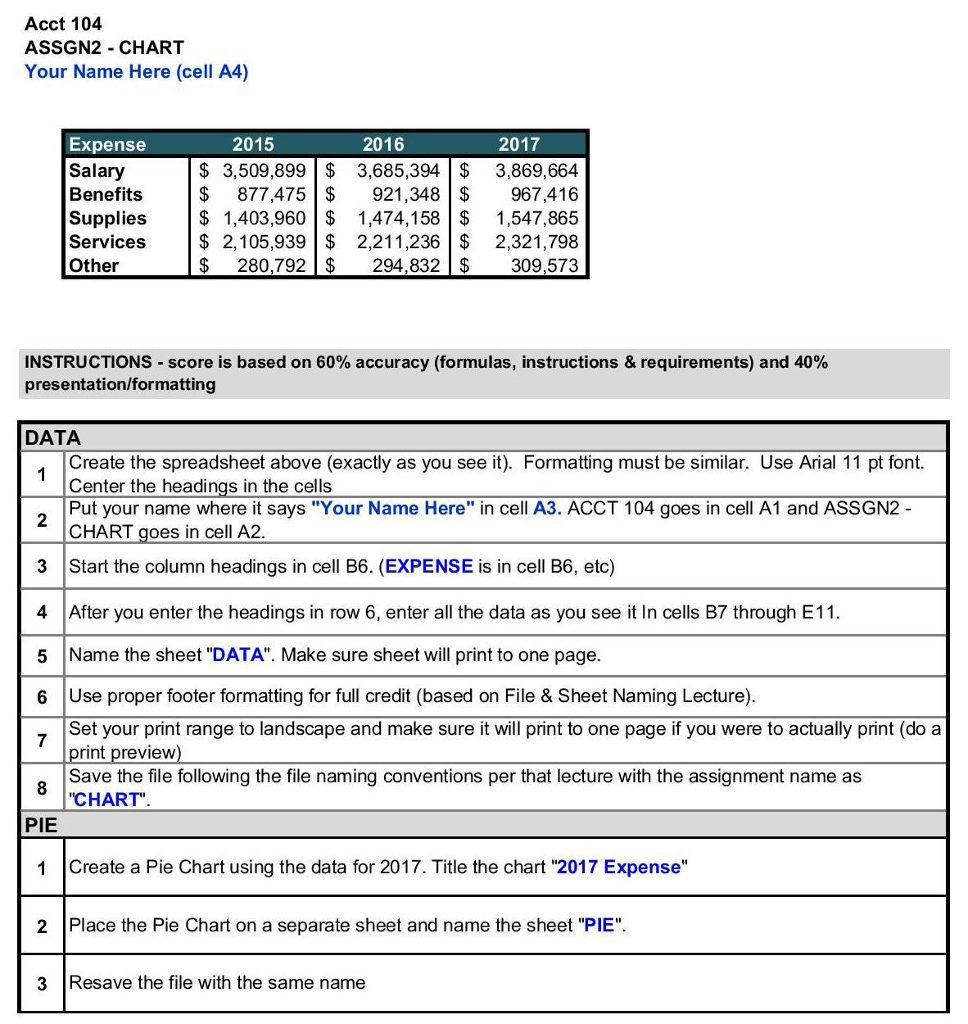
Acct 104 ASSGN2 - CHART Your Name Here (cell A4) Expense Salary Benefits Supplies Services Other $ 3,509,899 $ $ 877,475 $ $ 1,403,960 $ $ 2,105,939 | $ $ 280,792 $ 2016 3,685,394 | $ 921,348 $ 1,474,158 $ 2,211,236 $ 294,832 $ 2017 3,869,664 967,416 1,547,865 2,321,798 309.573 INSTRUCTIONS -score is based on 60% accuracy (formulas, instructions & requirements) and 40% presentation/formatting DATA Create the spreadsheet above (exactly as you see it). Formatting must be similar. Use Arial 11 pt font. Center the headings in the cells Put your name where it says "Your Name Here" in cell A3. ACCT 104 goes in cell A1 and ASSGN2 - CHART goes in cell A2. 3 Start the column headings in cell B6. (EXPENSE is in cell B6, etc) 4 After you enter the headings in row 6, enter all the data as you see it In cells B7 through E11. 5 Name the sheet "DATA". Make sure sheet will print to one page. 6 Use proper footer formatting for full credit (based on File & Sheet Naming Lecture). Set your print range to landscape and make sure it will print to one page if you were to actually print (do a print preview) Save the file following the file naming conventions per that lecture with the assignment name as "CHART". PIE 1 Create a Pie Chart using the data for 2017. Title the chart 2017 Expense" 2 Place the Pie Chart on a separate sheet and name the sheet "PIE". 3 Resave the file with the same name
Step by Step Solution
There are 3 Steps involved in it

Get step-by-step solutions from verified subject matter experts